You could save up to 25% on transaction costs².
Speak with us now to see if you qualify.
Talk to sales 1-800-515-8366
Monday - Friday, 6 AM to 4 PM PT

Table of contents
Table of contents
QuickBooks Free is a $0/mo option designed for simple finance management, while the QuickBooks Online free trial gives you 30 days of full access to a chosen paid plan. Paid QuickBooks Online plans are built for fuller accounting needs, offering advanced tools to help you grow. Understanding the difference between the QuickBooks free plan and paid options helps you choose the right fit for your business from the start.
When you start a new venture, managing your cash flow effectively is one of the most important things you can do. You want a tool that simplifies your day-to-day tasks, saves you time, and keeps your finances organized without stretching your budget. Whether you want to use the QuickBooks Free plan to get your bearings or you’re ready for more advanced accounting tools, having the right information helps you make a confident decision.
When you explore QuickBooks accounting software options, you need to know exactly what you’re signing up for. Let’s separate the ongoing QuickBooks Free tier from trial offers and QuickBooks subscription plans so you can choose what’s best for you.
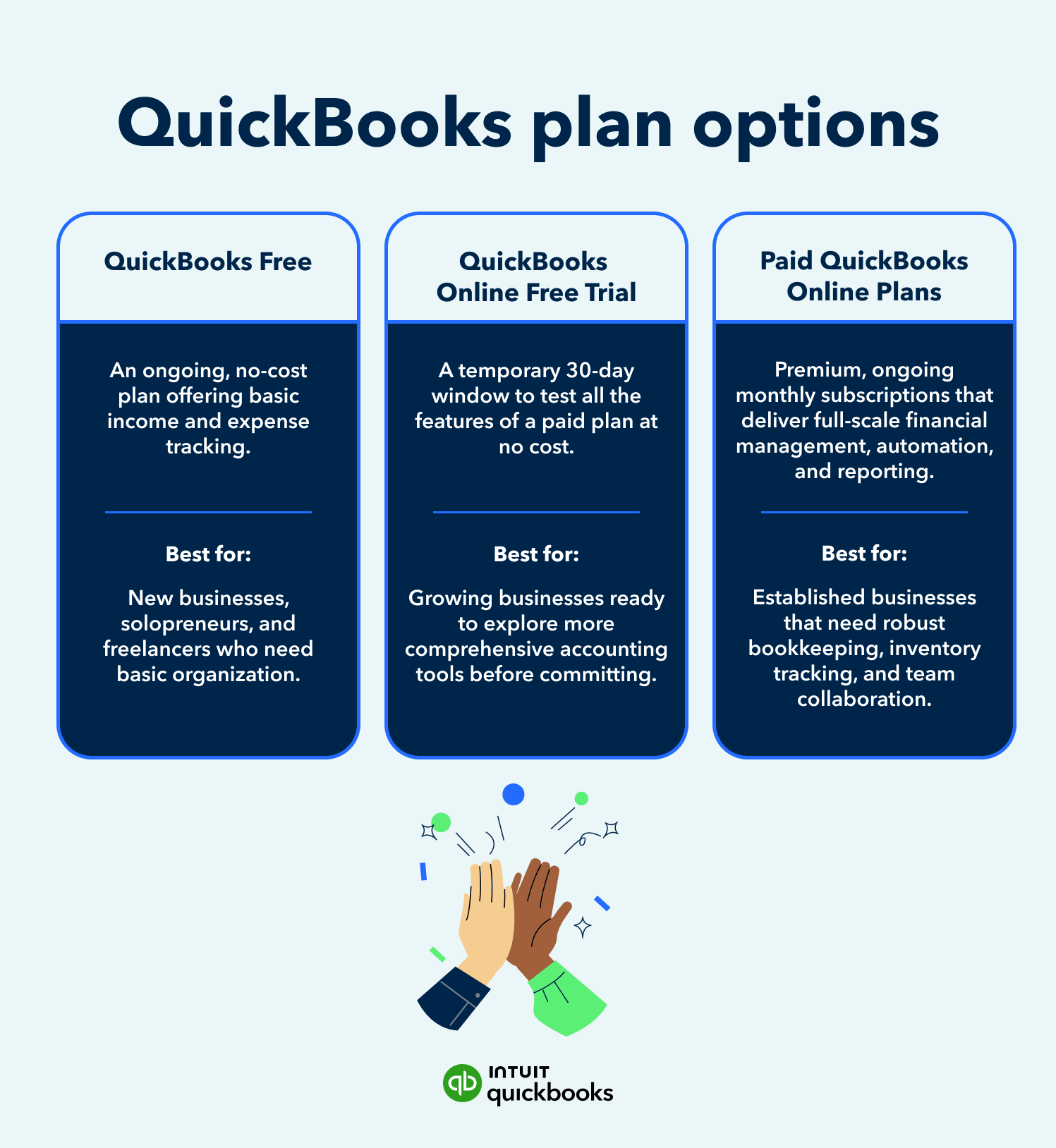
Here’s a simple breakdown of the three main options:
QuickBooks Free is a simple way to track money coming in and going out, with built-in limits. Paid plans unlock more complete accounting workflows like automation, bill management, accountant access, and deeper reporting. QuickBooks Free helps you stay organized, while paid helps you run and grow your business.
QuickBooks Free is a good fit when your needs are straightforward, like tracking income and expenses. Paid QuickBooks Online subscription plans work best when you need more control, visibility, and efficiency across your finances.
The key difference comes down to how much support your business needs. The free plan helps you move your bookkeeping beyond spreadsheets and manual tracking, giving you a clear place to manage your money and learn accounting basics. Paid plans go further by automating tasks, helping categorize transactions, reconciling accounts, and making it easy to collaborate with your accountant, all in one place.
QuickBooks Free suits businesses with basic finance needs like light invoicing and tracking a few receipts, but it’s not built for more advanced accounting needs like payroll or working with an accountant.
If you run a simple, one-person operation with a handful of clients, the free version can be a strong starting point. It helps you quickly assess fit: if you only need one user, send a couple of invoices each month, capture a few receipts, run basic reports, and manage a small number of contractors, this free plan may meet your needs.
If you’re unsure whether your business fits this one-person model, learning what a solopreneur is can help you decide if this tier matches your current setup.
The free plan doesn’t include all features and is limited to one user, two invoices per month, two receipt uploads per month, and one contractor—plus no accountant access or Intuit Assist features.
It’s important to understand these limits alongside the benefits. While QuickBooks Free gives small businesses a simple way to get started, it’s designed for lower-volume use. For example, if you work with multiple contractors and need to file a 1099-NEC for more than one person, or if you want AI to categorize your expenses automatically, you may outgrow the free plan quickly.
Upgrading your accounting software is about supporting how your business runs as it grows. When you move to paid plans like QuickBooks Simple Start, you keep everything in QuickBooks Free and gain more advanced accounting tools. You unlock unlimited invoices and receipt capture, access more visibility into your cash flow over time, and, in some cases, get support for multiple users.
To make the upgrade decision easier, think about where your business is today:
1. Staying simple: You have low transaction volume and minimal expenses. QuickBooks Free helps you stay organized and track the basics, so you can focus on landing your first clients.
2. Steady solo business: You have consistent client work and recurring expenses. Upgrading to Simple Start removes the caps on generating invoices and receipts, giving you more flexibility as your self-employment income becomes more predictable.
3. Growing complexity: You’re hiring employees, managing inventory, or dealing with complex financial needs. Moving to a paid QuickBooks Online plan like Essentials or Plus can help you stay on top of everything with more automation, reporting, and collaboration tools.
No, the free trial is not the same as QuickBooks Free. The trial is a 30-day period that offers full access to a paid QuickBooks Online plan, while QuickBooks Free is an ongoing no-cost option with built-in limits.
It’s easy to confuse the two, but they serve different purposes. If you sign up for a free trial of QuickBooks Online Plus, you can explore advanced features for a month before deciding to subscribe. With QuickBooks Free, you can keep using the product at no cost for as long as your needs stay within its limits.
Consider upgrading when your needs move beyond basic money tracking or when your current workflow starts to slow you down. According to the Intuit QuickBooks Small Business Index, small businesses in the U.S. generate an average of $53,580 in monthly revenue, highlighting how quickly financial activity can grow.
As that activity increases and as your team or business grows, having tools that help you stay organized and save time becomes even more important. Manual tasks and feature limits can start to take up more time than they should. Moving to a paid plan can help you save time, reduce errors, and manage your finances more efficiently.

If you find yourself needing access to more features—like needing to upload more receipts or send more invoices each month—or using multiple tools to fill gaps, your business may be ready to upgrade.
Choosing between free and paid doesn’t have to be complicated. Use this simple framework to decide your next step:

The goal is to choose what supports you today, while giving you room to grow tomorrow. You can start with QuickBooks Free to track your money, stay organized, and build good habits from day one, with no monthly cost required.
As your business grows, you can explore a paid plan with a free trial to see how automation and advanced tools can save you time.
If you need help mapping out your business goals before choosing a software plan, download our business plan template to map out your goals. You can also use our small business budget template to better understand your costs and priorities. These tools can help you understand your finances and decide when it makes sense to move from a free QuickBooks plan to a paid solution.
**Products and features
***QuickBooks Free: Free is currently available at no charge and may be offered for a limited time. Features and availability are subject to change or discontinuation at any time, with or without notice. If the Free plan is discontinued, we will notify you in advance and provide you with comparable options to transition to another QuickBooks plan that meets your business needs. Certain add-on products may be eligible for use with the Free plan. To utilize any add-on products, you must agree to additional terms and conditions, and limitations and fees for and any selected add-ons will apply.*
*Terms, conditions, pricing, special features, service and support options are subject to change without notice.*

Call Sales: 1-800-285-4854