
SUMMER SAVINGS 90% OFF QuickBooks for 3 months* Ends 8/27

Buy now
Switch to QuickBooks and 70% off for 3 Months
March 19, 2019
Solved

Deleted payroll check accidentally

  • March 19, 2019
  • 13 replies
  • 114 views

I deleted payroll checks that I thought were duplicates on my reconciliations page from 2018 went to look up payroll information and those checks are gone from the employee payroll, how can I remake checks?

Best answer by BettyJaneB

Hi there, @Rattleonco.


Glad to have you here in the Community. I'd be happy to help share some information on how you can recreate paychecks in QuickBooks Desktop.


If you've created a backup copy of your company file prior to the deletion of paychecks, then you still have the option to restore it. If not, you'll need to recreate an unscheduled payroll and enter the same information of the paychecks that you've deleted. 


To do that:
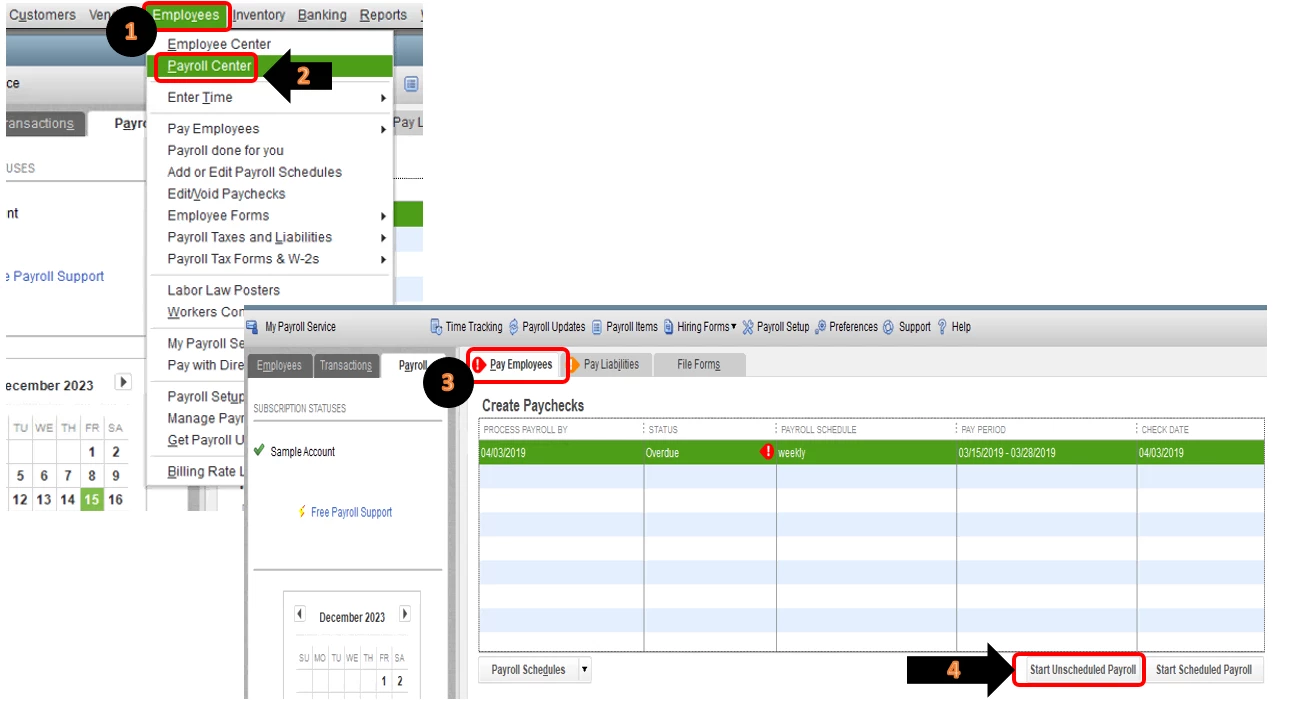
  1. Click on Employees at the top menu bar.
  2. Select on Payroll Center.
  3. In the Pay Employees section, select on Start Unscheduled Payroll.
  4. Select the employee or employees you're paying.

To get more information about creating paychecks in QuickBooks Desktop, please refer to this article: Create paychecks.


That should do it!


Keep me posted if there's anything else you need about recreating paychecks in QuickBooks. I'm always up for further assistance. Wishing you and your business continued success.

13 replies

BettyJaneB
Level 9
March 20, 2019

Hi there, @Rattleonco.


Glad to have you here in the Community. I'd be happy to help share some information on how you can recreate paychecks in QuickBooks Desktop.


If you've created a backup copy of your company file prior to the deletion of paychecks, then you still have the option to restore it. If not, you'll need to recreate an unscheduled payroll and enter the same information of the paychecks that you've deleted. 


To do that:

  1. Click on Employees at the top menu bar.
  2. Select on Payroll Center.
  3. In the Pay Employees section, select on Start Unscheduled Payroll.
  4. Select the employee or employees you're paying.

To get more information about creating paychecks in QuickBooks Desktop, please refer to this article: Create paychecks.


That should do it!


Keep me posted if there's anything else you need about recreating paychecks in QuickBooks. I'm always up for further assistance. Wishing you and your business continued success.

March 20, 2019

I have pulled up the copy how do I restore the paycheck?  Thank you for helping me  :)

March 19, 2020

Hi @Adiux,


It's good to know that the steps provided by my colleague assisted you in restoring your deleted paychecks. 


As for the Send to Intuit request, there isn't an option to dismiss this. As you mentioned, one of the reasons why this shows up is due to the paychecks being marked as a direct deposit. Another reason is for us to determine the payroll usage fee. 


In case you're using QuickBooks Workforce, check out this article for steps on how to upload your recreated paychecks: QuickBooks Workforce: Uploading historical paychecks.


I'll be around in case you need further help. Drop a comment below, and I'll be sure to get back to you.


I accidentally deleted a paycheck instead of a liability after the fact.  The paycheck has been cashed (dated 1-25-2020), it was deleted on 2-10-2020.  Can I recreate the paycheck without producing a paper check?  How does this affect the taxes that were paid?