Get 50% OFF QuickBooks for 3 months*

Buy now
Switch to QuickBooks and 70% off for 3 Months
August 1, 2017
Solved

Resolving Difference when Matching Transactions in Quickbooks

  • August 1, 2017
  • 1 reply
  • 3 views

Hi, does anyone know how to go about resolving the difference when matching transactions from banking when you need to resolve it by adding more than one transaction. When you click on the resolve difference button it only allows you to do so by adding one transaction but I need to be able to add more as the amount left needs to be allocated to more than one revenue category.


When a deposit is made up of a couple donations, and some of them we want to match up with invoices and the others we just want to categorize into a revenue category and not match to invoices, I cannot split the remaining amount when resolving the difference I can only add one transaction to resolve when i'd like to add more.
    Best answer by

    HI Cbillings,

    Welcome to the community. I am the moderator here, and I think I have an answer for your question.


    You are correct, you can only add one line when “resolving the difference” of a matched transaction.


    The best workflow that I have found is to create transactions such as invoices for each portion of the deposit that you want to match. You can then use them to complete the process without using the Resolve Difference button.


    In the case that you do not want to create transactions, you can find the transaction you created by resolving the difference and split it from there, here is my example:


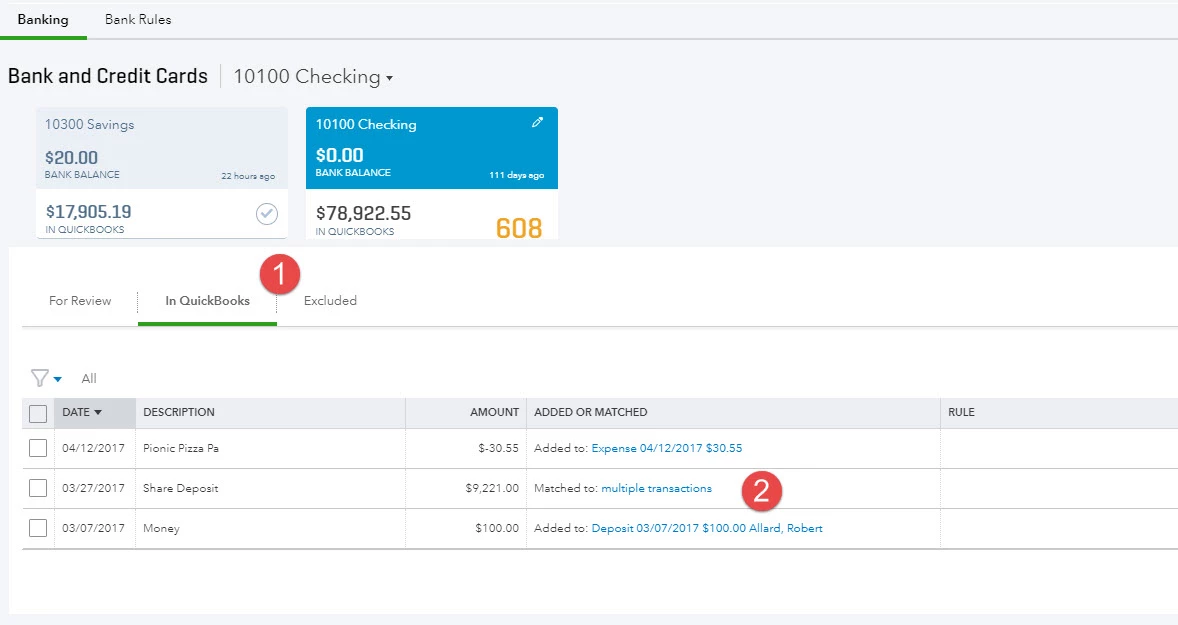
    • Select the In QuickBooks tab
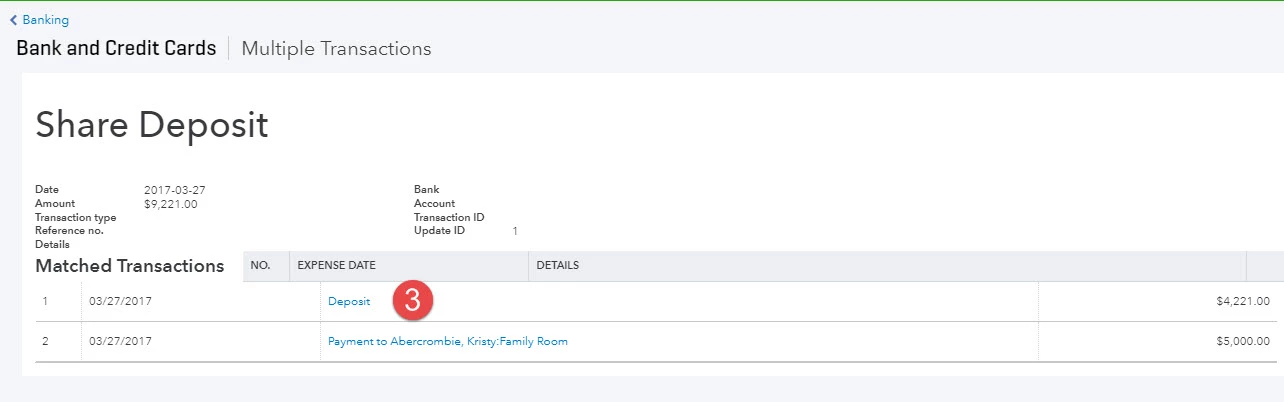
    • Click on the blue link labeled Multiple Transactions to see the detail of the transaction you matched
      • The portion created by resolving the difference will show up as a Deposit
    • Select the Deposit
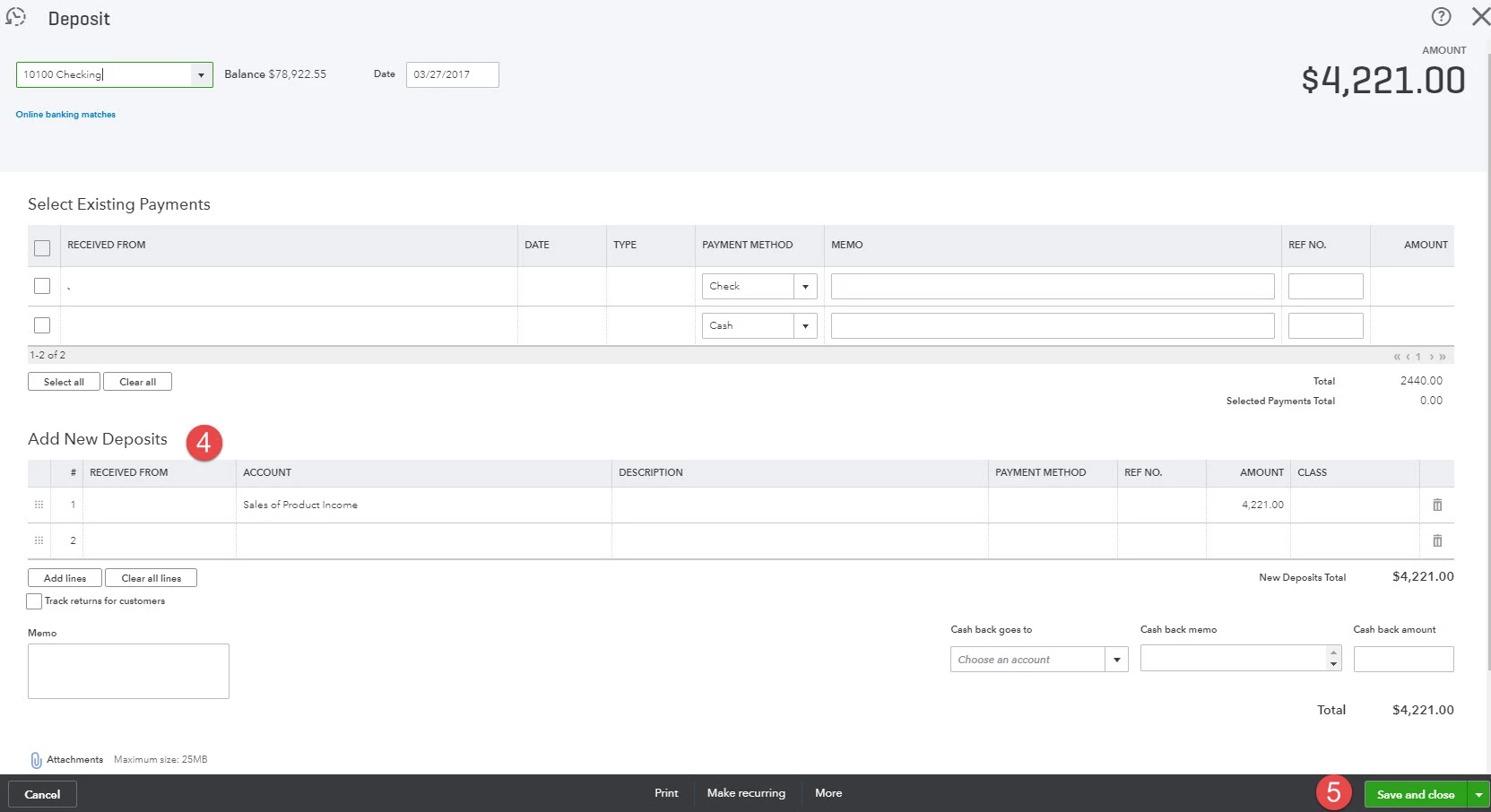
    • Add new lines for each portion you need in the Add New Deposits section with the amount you want in each.
    • Delete the original line by clicking the trashcan next to it
    • Select Save and close to save the deposit


    Here are some screenshots of the process:


    I hope that helps, feel free to respond if you need more information. 

    1 reply

    Answer
    August 1, 2017

    HI Cbillings,

    Welcome to the community. I am the moderator here, and I think I have an answer for your question.


    You are correct, you can only add one line when “resolving the difference” of a matched transaction.


    The best workflow that I have found is to create transactions such as invoices for each portion of the deposit that you want to match. You can then use them to complete the process without using the Resolve Difference button.


    In the case that you do not want to create transactions, you can find the transaction you created by resolving the difference and split it from there, here is my example:


    • Select the In QuickBooks tab
    • Click on the blue link labeled Multiple Transactions to see the detail of the transaction you matched
      • The portion created by resolving the difference will show up as a Deposit
    • Select the Deposit
    • Add new lines for each portion you need in the Add New Deposits section with the amount you want in each.
    • Delete the original line by clicking the trashcan next to it
    • Select Save and close to save the deposit


    Here are some screenshots of the process:


    I hope that helps, feel free to respond if you need more information. 

    john-pero
    Level 12
    August 2, 2017

    Best practices in using the tools you are given is to Receive Payment against open Invoices and use Sales Receipts when you are paid concurrent with sale. Post these payments into Undeposited Funds. Then create your deposit from teh Undeposited Funds. All you then need do is accept a green match from the feed.

    August 31, 2020

    i receive a message in QBO:


    Your action is required: Please undo the highlighted transactions

    Due to an issue with your bank data some income transactions were categorized as expense transactions. To correct this please go to the Categorized tab and undo the highlighted transactions.
     
    i went to categorized tab and see blue and purple for some lettering but no actual transactions hilighted within the time frame I'm working?!
     
    Please help!