
Get 50% OFF QuickBooks for 3 months*

Buy now
Switch to QuickBooks and 70% off for 3 Months
December 8, 2020
Solved

Payroll Service Connection Error

  • December 8, 2020
  • 4 replies
  • 7 views

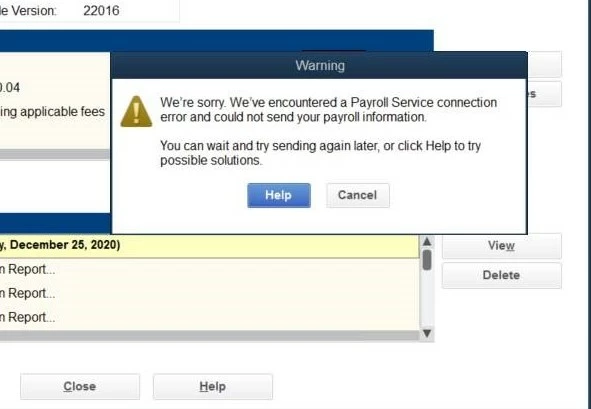
We have QB Enterprise and do our own payroll with Intuit making the direct deposit for all employees. Once payroll is completed in house we send data to Intuit. It was working great for 3 years until last 3 payrolls. Intuit gets the details we send but the system states. "We're sorry. We've encountered a Payroll Service connection error and could not send your payroll information" QB stated we need to delete all checks and manually add the data back in a process that has taken 2 days each pay period. When we open up QB it states you have checks to send? 
Best answer by JasroV

Thanks for providing the details with me, @Eric123456789.


Rest assured I’m here to help and ensure you’ll be able to send your payroll information to us.


The error message you receive is caused by one of these reasons:


  • A network time-out prevents QuickBooks Desktop (QBDT) from accessing the server.
  • Incorrect system date and time properties.
  • General Internet connection issues.

To isolate this issue, I suggest rebooting your computer and send your payroll information again to double-check. If the issue persists, check your time and date settings, and change them if they are not set correctly. For more information and additional steps in fixing this issue, check out this article: Troubleshoot Payroll Service Server Error or Payroll Connection Error


Once everything looks good, you can now send your payroll data to us seamlessly.


Have other questions or concerns regarding payroll in QBDT? Leave them in your reply and I’ll be sure to answer them for you. Have a good one!

4 replies

JasroV
JasroVAnswer
Level 8
December 8, 2020

Thanks for providing the details with me, @Eric123456789.


Rest assured I’m here to help and ensure you’ll be able to send your payroll information to us.


The error message you receive is caused by one of these reasons:


  • A network time-out prevents QuickBooks Desktop (QBDT) from accessing the server.
  • Incorrect system date and time properties.
  • General Internet connection issues.

To isolate this issue, I suggest rebooting your computer and send your payroll information again to double-check. If the issue persists, check your time and date settings, and change them if they are not set correctly. For more information and additional steps in fixing this issue, check out this article: Troubleshoot Payroll Service Server Error or Payroll Connection Error


Once everything looks good, you can now send your payroll data to us seamlessly.


Have other questions or concerns regarding payroll in QBDT? Leave them in your reply and I’ll be sure to answer them for you. Have a good one!

December 10, 2020

seems there was corrupt data that created the problem. Needed to run data validation report before sending data to intuit. Hopefully that fixes it. Will find out in 2 weeks.

February 9, 2021

Three of the companies I process payroll for are experiencing this error today.  Three different computers.  Is there an Intuit outage, perhaps?  Thanks for any information you can provide.

February 9, 2021

I have been experiencing this same issue today. I have tried all help solutions with no luck. Currently chatting to see if I can get more assitance. I have tried all solutions, rebooted my computer as well as our server. 

February 9, 2021

Looks like the subscription authentication is up at least.  Haven't tried direct deposit activities yet.

K_Siman
Level 1
February 9, 2021

Good morning @KYCPAFIRM. Thanks for reaching out and letting us know what you're experiencing in your account. As of now, our engineers have resolved the issue and payroll should be running as usual.


I do recommend completely closing down QuickBooks and re-opening, just so the program has a chance to refresh. 


I appreciate the patience from all of you, and happy that you can get back to business. :)

March 30, 2021

I've been having this issue every week for the past month and I'm still waiting on the escalation team to solve our issue.  Any updates on how to get this resolved?

Rubielyn_J
Level 8
March 30, 2021

Thanks for following up this thread, @nkwest.


Since you've already reached out to our support team to report this issue, you'll receive an email once it's fixed. 


If you'll still haven't received any update, I suggest getting in touch again with our representatives. They have the tools to verify the status of your case. 


Here's how:


  1. Open your QuickBooks.
  2. Go to the Help menu and then choose QuickBooks Desktop Help.
  3. Click Contact Us.
  4. Enter your concern, then select Continue.
  5. Choose a Start messaging or Get a callback from an expert 


Additionally, here's how you can create and send direct deposit paychecks to your employees.


Keep in touch if you have further concerns. I'm around the Community to help you further. Keep safe always.