Hello, Yogi.
Good to have you back and I appreciate your time keeping in touch with us. I have some information on the attachment files and how you can handle your clients.
QuickBooks Desktop has a folder called Attached Documents. This is where your attachments are stored. The folder's data isn't lodged permanently in QuickBooks. Meaning, you'll want to maintain both the company file and the folder.
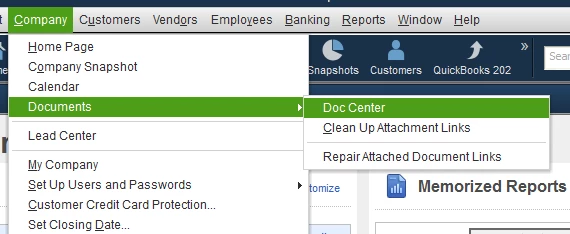
The location of the folder is where your company file is stored. Although you can access the contents by going to the Company menu, selecting Documents, and finally Doc Center.
Note: Creating a backup file won't back up the attachments folder. So, you'll want to manually copy it and paste it somewhere in your computer for safe keeping.
For more details about attachments, you can open this article: QuickBooks Document Center: FAQs and common issues.
For the clients, each company file has a separate data base. So, you'll want to enter their information manually in another file or import your clients list (easiest way if you're handling multiple clients).
There are different ways to import and export your data. I recommend checking this article for the steps: Import and export data in QuickBooks Desktop.
Feel free to check our articles if you need help managing your data in QuickBooks Desktop Accountant. We have just about anything ranging from handling your customers to paying your taxes. Browse them in the general help page (select a topic first then look for an article).
Ready to help you out again with other concerns in QuickBooks Desktop. Just say the word in the reply section below.
