Get 50% OFF QuickBooks for 3 months*

Buy now
Switch to QuickBooks and 70% off for 3 Months
May 18, 2020
Solved

Quantity on Purchase Orders incorrect

  • May 18, 2020
  • 1 reply
  • 11 views

Hello,


I recently switched from Sage50 to QuickBooks Premier Desktop and have been adjusting the inventory. I already changed the inventory on hand to match what we have in the warehouse and closed any open purchase orders that were already received. However, when I run a report on our inventory stock status, all the products I have ever bought have that full amount as "On PO".

For example, a few days ago I ordered 35 of an item. Yet On PO shows I have 2,000 on purchase orders, which is not true. Others have 9,000, etc. I believe the system is using purchase order data from as far back as 2017, even though those purchase orders are all marked as Closed.


How can I change the PO quantity of products in order to reflect the correct amount?


Thank you!
Best answer by Charies_M

I'm glad to have you here, MargaDLS.


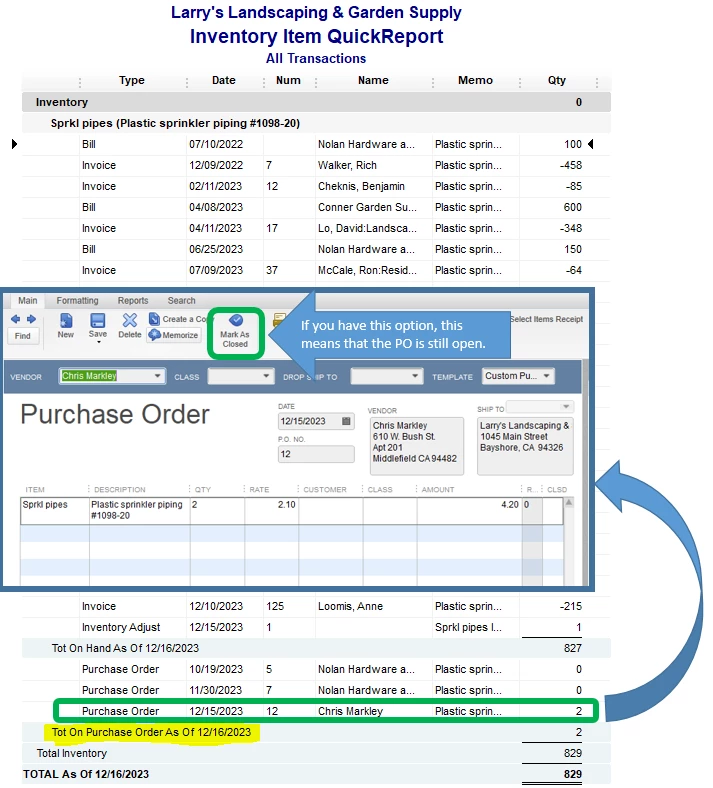
If you have run the Inventory Item QuickReport in QuickBooks Desktop, the On Purchase Order section shows all the open Purchase Orders (PO's) for a specific date.


I've attached a sample screenshot so you'll know what I'm referring to:

In your case, since it's showing PO's that were marked as closed, then it can be a sign of a damaged data.


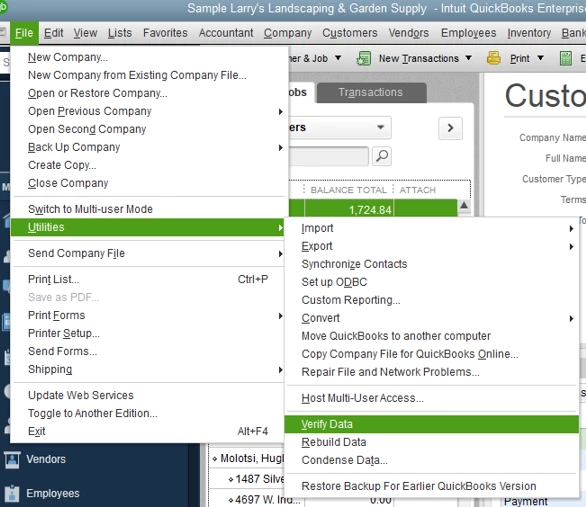
To fix this, we can run a Verify and Rebuild Utility Tool to your company file. This helps repair any data damage in the system. Below are the steps on how to do this:


  1. From the File menu.
  2. Click on Utilities.
  3. Select Rebuild Data/ Verify Data.


Let me share this guide on how to adjust an inventory quantity in QuickBooks Desktop: Adjust your inventory quantity or value in QuickBooks Desktop.


I'm always here whenever you need help or if you have follow-up questions. Stay safe and enjoy the rest of the day!

1 reply

Charies_MAnswer
Level 9
May 18, 2020

I'm glad to have you here, MargaDLS.


If you have run the Inventory Item QuickReport in QuickBooks Desktop, the On Purchase Order section shows all the open Purchase Orders (PO's) for a specific date.


I've attached a sample screenshot so you'll know what I'm referring to:

In your case, since it's showing PO's that were marked as closed, then it can be a sign of a damaged data.


To fix this, we can run a Verify and Rebuild Utility Tool to your company file. This helps repair any data damage in the system. Below are the steps on how to do this:


  1. From the File menu.
  2. Click on Utilities.
  3. Select Rebuild Data/ Verify Data.


Let me share this guide on how to adjust an inventory quantity in QuickBooks Desktop: Adjust your inventory quantity or value in QuickBooks Desktop.


I'm always here whenever you need help or if you have follow-up questions. Stay safe and enjoy the rest of the day!

MargaDLSAuthor
May 18, 2020

Thank you very much for your guide, the Rebuild tool sorted the problem out!

May 18, 2020

Hi MargaDLS. I'm glad to hear your issue was resolved. Just be sure to remember, if you need anything else we're always here to help in the QuickBooks Community. Please have a great rest of your day as well.