
Get 50% OFF QuickBooks for 3 months*

Buy now
Switch to QuickBooks and 70% off for 3 Months
June 27, 2025
Solved

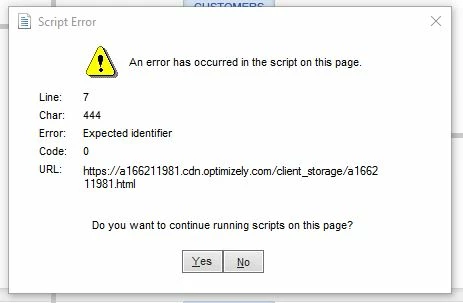
Script Error "Expected Identifier" - QB Desktop 2019

  • June 27, 2025
  • 3 replies
  • 0 views


Worked ok yesterday, this morning got this error.  Have done the following already.

- verify data, rebuilt data

- Quick Fix My program

- QB program Diagnostic Tool


Close the program, and reset the computer.  Error still there.  Please advise, thank you!

Best answer by Mark_AG

Hi there, @Erss


QuickBooks Desktop 2019 uses Internet Explorer rendering engine to load certain web-based modules, such as payments, payroll, and bank feeds. So it will only prevent those internet-dependent forms and UIs from loading properly.


Since QBDT 2019 is already discontinued, you can only use it in offline mode. Therefore, the script error you're seeing only affects online features that are already unsupported. Rest assured, it's safe to ignore these script errors, as they won't affect your daily workflow with QBDT.


Older versions of QBDT are still using Internet Explorer 11, but they're not compatible with newer versions of Windows that have ended their Internet Explorer browser, due to the birth of Microsoft Edge. Learn more from this article: Use our built-in browser in QuickBooks Desktop.


The best option is to purchase the latest QuickBooks Desktop version. You'll be able to use online features without any problem.


Feel free to leave a reply if you have additional concerns with QBDT. We're always ready to help.

3 replies

QuickBooks Team
June 27, 2025

I appreciate the efforts you've taken to remove the error, Erss . We can add Intuit as a trusted website in your settings. Let's work together to get you back to your business.


A damaged Windows user profile, previously unsaved changes, or disabled script processing tools and features in QuickBooks can lead to this error, especially since you are using the discontinued version of QBDT 2019. To resolve this, consider adding Intuit as a trusted site. This will allow QuickBooks to connect to the Intuit servers without restrictions and help fix the error.


  1. Press Windows + R, and type inetcpl.cpl, press Enter, and from under Settings, go to the Security tab.
  2. Under the Trusted Sites section, add *Intuit.com as a trusted website and return to the Trusted Sites window.
  3. Now unmark the Require server verification (https:) option.
  4. Exit the Trusted Sites window and unmark the Enable Protected Mode option.
  5. Close the internet settings and try to rerun QuickBooks Desktop. 


If you still get a script error after following the recommended troubleshooting steps, I encourage you to contact our customer support. They can assist you in checking your account and guide you through the resolution process.


You can also consider upgrading to a newer version to enjoy new features, improved performance, and enhanced security. For more information, you can check this article: Upgrade to QuickBooks Desktop 2024 within the software.


I'd be glad to hear updates from you after following the steps I provided above. Please don't hesitate to click the Reply button and we'll be right here to help you anytime.

ErssAuthor
June 27, 2025

Got it, so this error is an error not connecting to QB server?  

As of now, you are not able to "update" QB desktop 2019, even to the last update is that correct?

ErssAuthor
July 1, 2025

Can no one tell me exactly what does the script error effect on QB?

Mark_AGAnswer
Level 1
July 1, 2025

Hi there, @Erss


QuickBooks Desktop 2019 uses Internet Explorer rendering engine to load certain web-based modules, such as payments, payroll, and bank feeds. So it will only prevent those internet-dependent forms and UIs from loading properly.


Since QBDT 2019 is already discontinued, you can only use it in offline mode. Therefore, the script error you're seeing only affects online features that are already unsupported. Rest assured, it's safe to ignore these script errors, as they won't affect your daily workflow with QBDT.


Older versions of QBDT are still using Internet Explorer 11, but they're not compatible with newer versions of Windows that have ended their Internet Explorer browser, due to the birth of Microsoft Edge. Learn more from this article: Use our built-in browser in QuickBooks Desktop.


The best option is to purchase the latest QuickBooks Desktop version. You'll be able to use online features without any problem.


Feel free to leave a reply if you have additional concerns with QBDT. We're always ready to help.

ErssAuthor
July 1, 2025

Thank you for giving a real answer!

July 3, 2025

I went to internet options, then security tab, then added the script url to restricted sites. Haven't seen it since.

I'm using 2019 stand alone version of Desktop Pro


July 3, 2025

All the other fixes don't work because the Script error is mainly for the online overpriced version. Haven't had any problems with forms or how the Desktop version works, since I denied its access.