Get 50% OFF QuickBooks for 3 months*

Buy now
Switch to QuickBooks and 70% off for 3 Months
April 23, 2020
Question

Budget input not showing correctly

  • April 23, 2020
  • 1 reply
  • 5 views

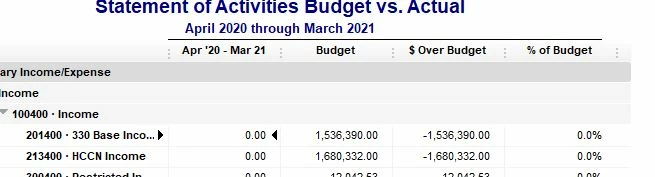
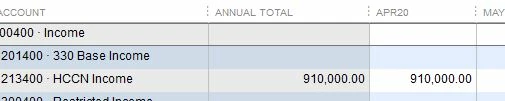
I am using QB Pro 2018 Desktop.  I have used QB for 20+ years and have encountered an issue that has never been a problem.  New fiscal year and I enter the new year budget.  No problems and the line totals show what I enter.  When I run a Budget vs. Actual report, the budget amount is different.  It is also adding inactive accounts that have no budget for the new year.  I have closed out, rebooted my PC, verified my

data and anything else I could think of.  Still happening this morning.  A snip of my input and my budget vs. actual is shown below.  Any ideas on how to fix this one?  This is a first for me.  Thanks!


1 reply

MarsStephanieL
Level 6
April 23, 2020

Hi there, JLREllis.


Thank you for letting me know what you've done to fix this. There are times that the program won't respond properly because of the codes in it. To isolate this, you can Upgrade QuickBooks Desktop (QBDT) to its latest release. Then check back if you have the correct record. Here's how to upgrade:


  1. Go to the Help menu and select Update QuickBooks Desktop.
  2. Select Update Now and select the Get Updates button.
  3. Wait for the confirmation that the update is downloaded.
  4. To finish the update to restart the program.


If you are still not able to see the correct report, you can now perform to verify the program. 


Also, you can check this article to check ho to map it correctly: Create a budget or forecast in QuickBooks Desktop.


I'll be a few clicks away if you have any other concerns. Stay safe.