
Get 50% OFF QuickBooks for 3 months*

Buy now
Switch to QuickBooks and 70% off for 3 Months
April 12, 2019
Solved

Creating a clearing account

  • April 12, 2019
  • 4 replies
  • 10 views

For my quickbooks online i need to create a clearing account. How can i create this account. Can any one provide me the steps to create it.

Best answer by

It's nice to see you again in the Community, @aveshnaik007.


I'd be glad to help create a clearing account in QuickBooks Online.


Just follow these simple steps:
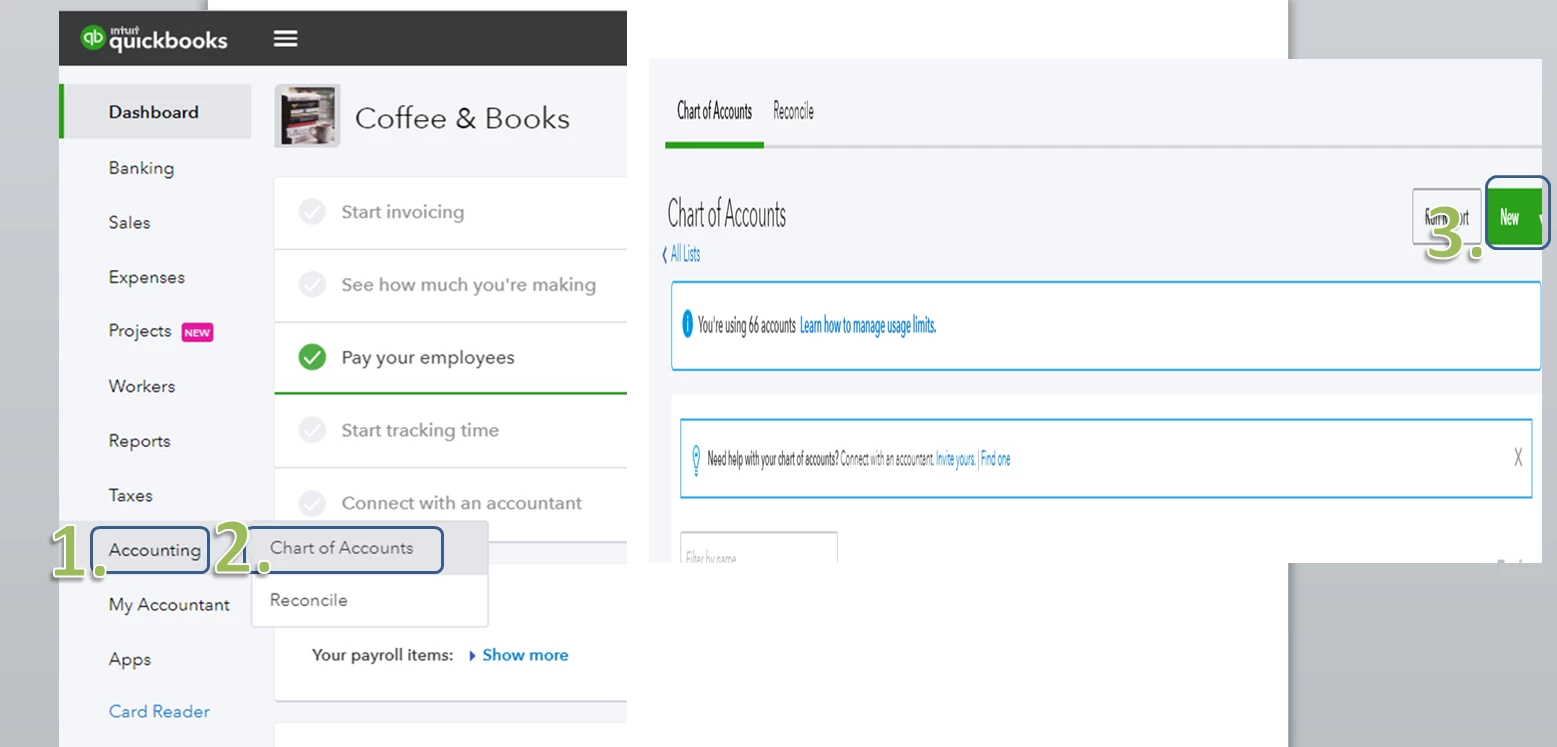
 

  1. Sign in to your QuickBooks account and go to Accounting on the left-side panel.
  2. Select Chart of Accounts.
  3. On the Chart of Accounts screen, click the New tab.
  4. Choose Bank for the Account Type. You may choose any detail type you want for your clearing account.
  5. Type in the Name for the clearing account.
  6. Make sure you do not type in any amount on the balance before clicking Save and Close.


That should do it. You can now move money from one account to another account using the clearing account.


Also, if you need some references in the future, you can always access our site: Help articles for QuickBooks Online.


Should you need further assistance in using the clearing account, please let me know. I'm always here to help. Have a great weekend. :)

4 replies

Answer
April 12, 2019

It's nice to see you again in the Community, @aveshnaik007.


I'd be glad to help create a clearing account in QuickBooks Online.


Just follow these simple steps:
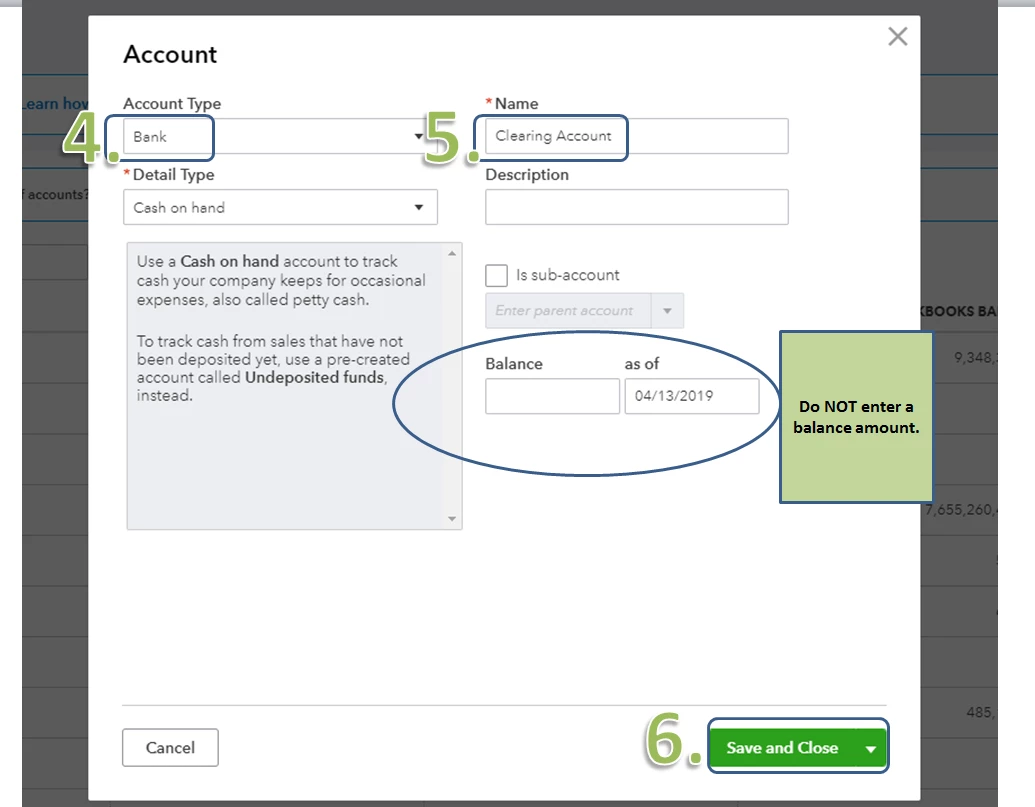
 

  1. Sign in to your QuickBooks account and go to Accounting on the left-side panel.
  2. Select Chart of Accounts.
  3. On the Chart of Accounts screen, click the New tab.
  4. Choose Bank for the Account Type. You may choose any detail type you want for your clearing account.
  5. Type in the Name for the clearing account.
  6. Make sure you do not type in any amount on the balance before clicking Save and Close.


That should do it. You can now move money from one account to another account using the clearing account.


Also, if you need some references in the future, you can always access our site: Help articles for QuickBooks Online.


Should you need further assistance in using the clearing account, please let me know. I'm always here to help. Have a great weekend. :)

April 15, 2019

Thank you for the solution. 

JasroV
Level 8
December 17, 2020

I’m here to share some insights on how a clearing account works, @1935 1475 8633 749.


In QuickBooks, a clearing account is used to move money from one account to another without moving it directly. This is like a holding account that holds your fund until you’re ready to move it.


This account is also called a Barter or Wash Account that has a balance of $0.00 because we always take out the amount we put in. Also, you won’t have to reconcile this account as this doesn’t hold any funds.


To learn how a clearing account works, you can follow the steps below:


  1. From your QuickBooks Online (QBO) account dashboard, Go to the + Menu.
  2. Select Journal entry.
  3. Add the Account Receivable (A/R) or Account Payable (A/P) account from which you are moving money.
  4. Enter the Clearing account.
  5. Save the Journal Entry.
  6. Create a second journal entry.
  7. Add the Clearing account.
  8. Enter the AR or AP account to which you moving money, then click Save and close.
  9. In either Pay Bills or Receive Payments, link the Journal Entries together.

You can also check this article for more details about this. Although it’s for QuickBooks Desktop (QBDT), it also applies to QBO in using a clearing account: Set up a clearing account.


I’d also recommend working with your accountant for additional guidance. They can advise you on what account A/R or A/P account to use. If you’re not affiliated with one, you can check our ProAdvisor page and we’ll help find one from there.


Once everything is settled, you might want to read this link that serves as your guide in reconciling your accounts effectively: Reconcile an account in QuickBooks Online.


Let me know if there’s anything else you need help in managing your accounts in QuickBooks. I’d be more than happy to assist you. Take care, and keep safe.

July 15, 2021

Client received a number of deposits which, i believe, were deposited into a currently closed account. But the banking transaction was accepted into an open account. Thus, they were never reconciled away.

I have created a clearing account and move all of the transactions into it. I have 21 payments for a total of $655, all but one in 2019. 

Now I'm at a loss of what to do to zero the clearing account. These were payments on accounts. I can't just delete the payments because that would affect the balances on the accounts.

Need some ideas?

JessT
Moderator
July 15, 2021

Hi jwpemberton,


Thanks for joining in the thread. I'll guide you to move the deposits on your client's records, so you can reconcile their account.


Instead of creating a clearing account, you can open each deposit and replace the bank account with the new one, where those payments were posted in reality. Or, create a transfer for each to move the funds to the new account. Then, delete your transactions in the clearing account afterward.
 

Change the bank account:

  1. Open one deposit transaction.
  2. Change account in the Account field.
  3. Click Save and close.


Create transfers:

  1. Click on +New. and choose Transfer.
  2. Select the old account in the Transfer Funds from field.
  3. Choose the new account in the Transfer Funds to field.
  4. Enter the amount and the date based on the payment transaction.
  5. Click Save and close and do the same steps for the remaining deposits.


Speaking of reconciliation, I've got an article with steps and a video clip to guide you through the process. Please check this out: Reconcile an account in QuickBooks Online.


Let me know if you need more help as you move the deposits or as you reconcile your client's account. Have a great day!

July 15, 2021

Sounds good, except that the account that they may have gone to is closed, zeroed, reconciled.

So i just don't know what to do with the money! Call it Miscellaneous Income?

January 22, 2024

When I selected Bank for the Account Type, there was nothing under Detail Type that fit.  I had to choose Other Current Liabilities to find Payroll Clearing as an option.
