Get 50% OFF QuickBooks for 3 months*

Buy now
Switch to QuickBooks and 70% off for 3 Months
March 5, 2021
Solved

Inventory Assembly Average Cost incorrect

  • March 5, 2021
  • 3 replies
  • 3 views

I set up an Inventory Assembly item following Quickbooks instructions.  The Total Bill of Materials Cost did not transfer to the Average Cost field.  I then went to the "Build Assemblies" option under "Activities."  I had 1,000 assemblies to build, and it transferred 1/2 of the Total Bill of Materials Cost in the average cost field.  How can I get Total Bill of Materials Cost to equal the Average Cost field?

Best answer by LieraMarie_A

Let me share some insights on how the average cost works, @sfreese70.


The average cost is the total amount of cost of all of the inventory you have divided by the number of items. The total bill of materials (BOM) cost would differ from the average cost if you purchased the BOM at different rates. 


QuickBooks also uses the weighted average cost to determine the value of the item and the amount debited to COGS when you sell it. This article discusses this a little further: Understand Inventory Assets And COGS Tracking 


Here's an example:

  1. You purchase an item for $5.00. The average cost is $5.00.
  2. You purchase a second item for $5.50. The average cost is now (5 + 5.5) / 2 = 5.25.
  3. You sell an item. The inventory/COGS transaction debits COGS for $5.25 and credits inventory for $5.25.
  4. You purchase another item for $5.00. Now your average cost is (5.25 + 5.00) / 2 = 5.13.


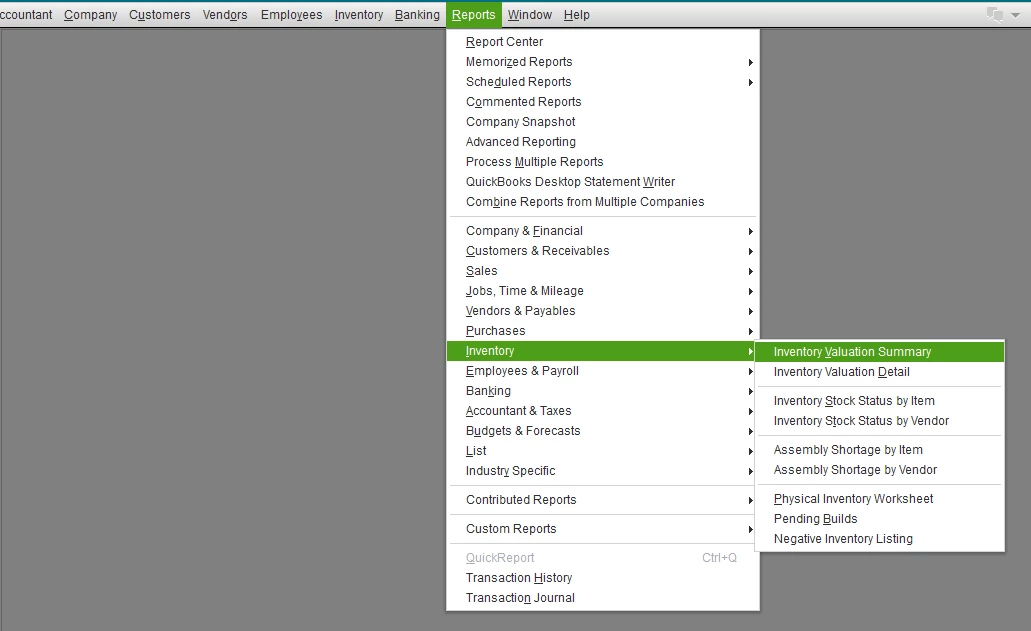
This is how QuickBooks determines the average cost. You can run the Inventory Valuation Summary report. This shows you how QuickBooks got the item's average cost.

  1. Select Reports, then select Inventory.
  2. Select Inventory Valuation Summary.
  3. Set the dates to All.
  4. Double-click the item.


Don't hesitate to visit us and post questions anytime you need help with inventory tracking. The QuickBooks Team is always here to answer them for you.

3 replies

LieraMarie_A
Level 8
March 5, 2021

Let me share some insights on how the average cost works, @sfreese70.


The average cost is the total amount of cost of all of the inventory you have divided by the number of items. The total bill of materials (BOM) cost would differ from the average cost if you purchased the BOM at different rates. 


QuickBooks also uses the weighted average cost to determine the value of the item and the amount debited to COGS when you sell it. This article discusses this a little further: Understand Inventory Assets And COGS Tracking 


Here's an example:

  1. You purchase an item for $5.00. The average cost is $5.00.
  2. You purchase a second item for $5.50. The average cost is now (5 + 5.5) / 2 = 5.25.
  3. You sell an item. The inventory/COGS transaction debits COGS for $5.25 and credits inventory for $5.25.
  4. You purchase another item for $5.00. Now your average cost is (5.25 + 5.00) / 2 = 5.13.


This is how QuickBooks determines the average cost. You can run the Inventory Valuation Summary report. This shows you how QuickBooks got the item's average cost.

  1. Select Reports, then select Inventory.
  2. Select Inventory Valuation Summary.
  3. Set the dates to All.
  4. Double-click the item.


Don't hesitate to visit us and post questions anytime you need help with inventory tracking. The QuickBooks Team is always here to answer them for you.

sfreese70Author
March 5, 2021

This is so helpful!  Thanks so much!

January 18, 2023

Has this issue in the thread ever been resolved?  We are encountering the calculated average cost is not updating even if you say set the new cost to be .01 with 1010 in stock on valuation summary it should be 10.10 value however it says over 18,000 why?  We have tried all that customer service has suggested yet they cannot even give answer as to why it keeps picking a value of 117.00 for average calculated cost in item listing and valuation.

I need answers to complete and finalize my inventory for financial purposes.

QuickBooks Team
January 18, 2023

Hi there, @howard1144. I want to make sure you get the help you need.

To ensure we're on the same page, can you add a screenshot of how you've set up the assembly as well as the reports or any important details that can help us fix the problem? Any extra information is appreciated.


In addition, if you're experiencing other problems within your company file, please let me know. I'm here to lend a hand.


Looking forward to your reply.

January 19, 2023

There are no other issue within my company file.  QB Support had me run verification of files; updates, reboot, and tons of other diagnostic stuff to reboot everything to sign in and same issue still appears...calculated value in many items is not accurate.  example is a spacer that legit cost in market 1.17 but we make it and have it set at cost of .01 (example) with 1010 in stock but when we run valuation summary stock value is at 118,000 rather then 10.10.  I am have issue getting screen shot to paste here.


February 2, 2023

I'm having an issue where our inventory value doesn't seem to get relieved properly when building an assembly, which then causes our inventory value to be insanely overstated afterwards.


See attached image where the Calculated Avg seems to be 'fine and normal' throughout October.


November hits and we build an assembly, yet the inventory value doesn't get properly reduced.


Anyone have any idea what's going on?

JessT
Moderator
February 2, 2023

Hi jsharpe,


Thank you for joining the conversation. I'll share the information why the average cost is not calculated properly when building an assembly and guide you to fix it.


The Average Cost of an assembly item is calculated based on the cost of inventory parts. Therefore, you need to make sure that the individual parts have their own costs. Otherwise, you won't get an average cost, like in the screenshot below. 


After knowing which item it is, edit it, and add the cost. Then, go back to the assembly item and deselect and reselect that item.


On the other hand, if you want to find references for QBDT, just click the Topics menu above and select a topic.


Please let me know if you have questions as you do some edits. I'm just around to help.

September 26, 2023
 

I did exactly like you said and I am still having the same problem.   Please help me resolve.