
Get 50% OFF QuickBooks for 3 months*

Buy now
Switch to QuickBooks and 70% off for 3 Months
March 14, 2021
Solved

QBSE applying the wrong foreign exchange rate

  • March 14, 2021
  • 1 reply
  • 3 views

I connected my Wise Business (formerly TransferWise) account in QB Self-Employed to automatically import payments made by overseas clients


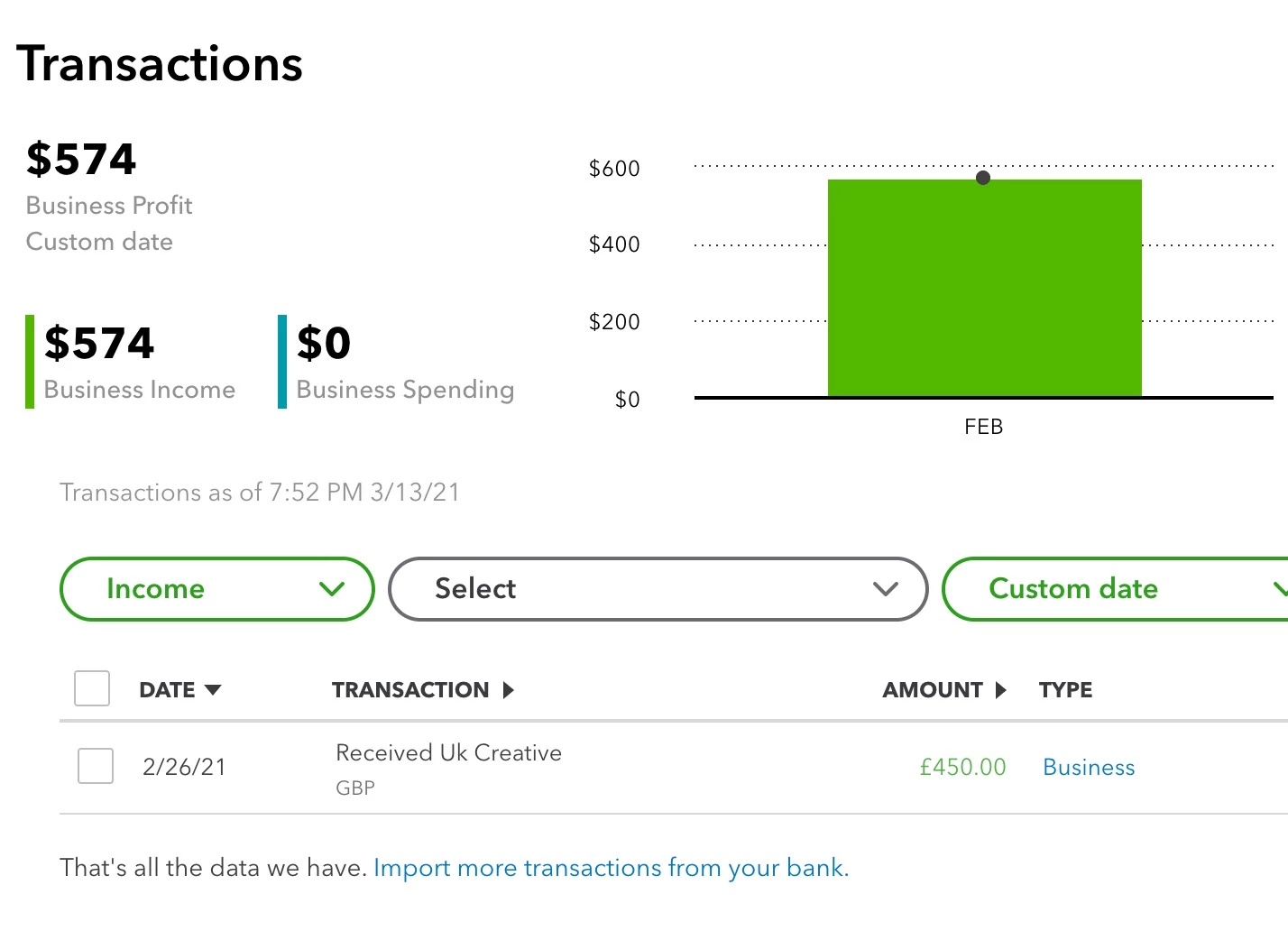
I received a payment for £450 GBP however it appears QBSE is recording it in income as $574 when it should be ~$626


Any ideas why this might be happening or what I can do to remedy it? Cheers
 

Best answer by Fiat Lux - ASIA

@hugh-m 

If you are using QBSE US version, you can only utilize the bank feed of Wise for your USD bank account. You have to import the data manually for other currencies.

https://wise.prf.hn/l/64dl92k


1 reply

Adrian_A
Level 8
March 14, 2021

We can manually enter the correct rate, hugh-m.


Since Multi-Currency is unavailable in QuickBooks Self-Employed, we can exclude the downloaded transaction. Then, we'll have to manually record the amount.


Here's how we can exclude the item:


  1. Click the Transactions tab.
  2. Select the transaction.
  3. Click the Exclude this transaction box.
  4. Select Save.


Afterward, you're good to enter the correct rate. You can do that by clicking the Transactions tab and then select Add transaction. Then, select the date. You can enter a DESCRIPTION for easily tracking. Enter the AMOUNT of $626 then, select a CATEGORY AND TAGS. Click Save.


Once done, you can categorize the items. I've added this reference as your guide: Categorize transactions in QuickBooks Self-Employed.


There you have it, hugh-m. I'm just a post-away if there's anything that I can help. Keep safe!

hugh-mAuthor
March 14, 2021

Thanks Adrian_A, I was previously adding them manually however since Wise is offered as an account integration I would prefer to use that, if possible.


Doing it manually means I also have to add Wise transaction fees as a separate transaction, whereas if I connect the account it separates them automatically. 

Moderator
March 14, 2021

Hello, hugh-m. 


Thank you for getting back to us. Yes, that is correct. Just make sure you enter the amount correctly once the account connected it will match with the data in your bank account. 


From here, you can now categorize transactions in QuickBooks Self-Employed. See this reference for more information about schedule C and expense categories in QuickBooks Self-Employed to report your self-employed income and expenses.   


If you have any further questions or concerns, please don't hesitate and reach back out to me. I'm always here to help you. Stay safe!