
Get 50% OFF QuickBooks for 3 months*

Buy now
Switch to QuickBooks and 70% off for 3 Months
February 27, 2019
Solved

Check numbers

  • February 27, 2019
  • 1 reply
  • 19 views

I forgot to enter check number when QB ask me to enter. I left the "CHECK NO" column blank and click on [OK] (see figure below).
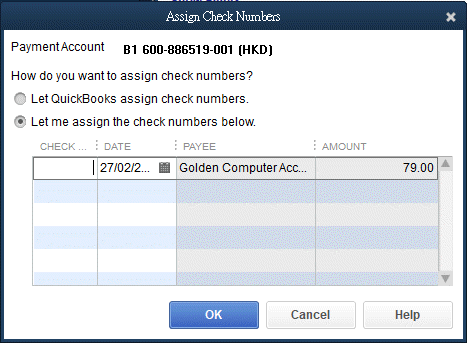
Then I could not find any "Bill Pmt -Check" row with blank num. Is there any way to re-enter a check number?
Best answer by

Hello BenTam,


Allow me to jump in to this thread and provide clear steps on how to enter the check number.

  1. Click on List and choose Chart of Accounts.
  2. Double-click on the bank account.
  3. Look for the check.
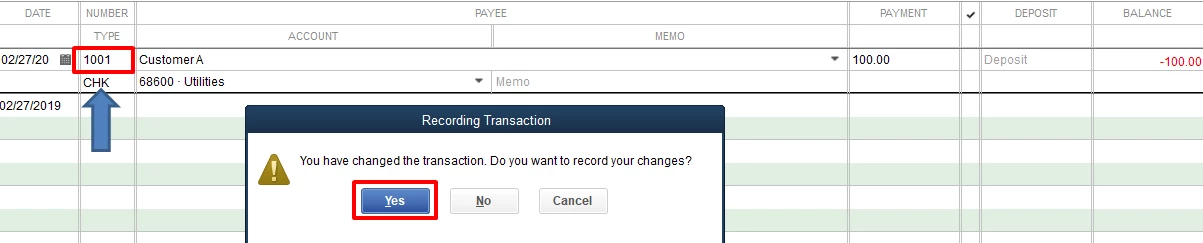
  4. In the NUMBER/TYPE column, replace the To Print with the check number.
  5. Press Enter on your keyboard and click on Yes when prompted to record the changes.

I've attached a screenshot for a visual guide. 


Let us know if you have any questions. Thanks!

1 reply

Level 5
February 27, 2019

Just go into Checking Register.  If you use the Home Screen it should be on the right or open the Chart of Accounts (Ctrl/A) and go into Checking from there.


Find the transaction and double click on the Payee Name.  That will open a window with the actual check.  Add the check number at the top and click on Save at the bottom.  You'll get a warning, but since you're not actually changing anything to do with the bill or payment, just say Yes/Okay.


BenTamAuthor
February 27, 2019

Hi Pete,


I am using QuickBooks Desktop Premier Edition 2018. Should I select Banking->Use Register?


Do you mean the following screen? Where should I input the Check Number?

BenTamAuthor
May 3, 2019

Suddenly, when entering out of sequence checks while reconciling my bank account in quickbooks desktop 2018 premier, I am having trouble.  As I click through and accept my entry, the next number automatically populates, which is okay, because I can change it, but it used to stop on the first tab (date) and then go on to the entry of the check number (which would automatically populate the the next check number which I frequently have to change, then to vendor name, then the amount, then the account to post to.  Now it doesn't stop on the check number field, but automatically goes to the vendor name field, so always have to take my mouse and click up on the check number field and fix it, which takes a lot more extra time when entering several checks at once. Is this new?  Did I click on something by mistake?  


Hi heatherbird


I am still new to QB. I have not yet used the print check feature of QB. Maybe I can help you after I have the experience. Sorry about that!