
SUMMER SAVINGS 90% OFF QuickBooks for 3 months* Ends 8/27

Buy now
Switch to QuickBooks and 70% off for 3 Months
March 19, 2019
Solved

Deleted payroll check accidentally

  • March 19, 2019
  • 13 replies
  • 114 views

I deleted payroll checks that I thought were duplicates on my reconciliations page from 2018 went to look up payroll information and those checks are gone from the employee payroll, how can I remake checks?

Best answer by BettyJaneB

Hi there, @Rattleonco.


Glad to have you here in the Community. I'd be happy to help share some information on how you can recreate paychecks in QuickBooks Desktop.


If you've created a backup copy of your company file prior to the deletion of paychecks, then you still have the option to restore it. If not, you'll need to recreate an unscheduled payroll and enter the same information of the paychecks that you've deleted. 


To do that:
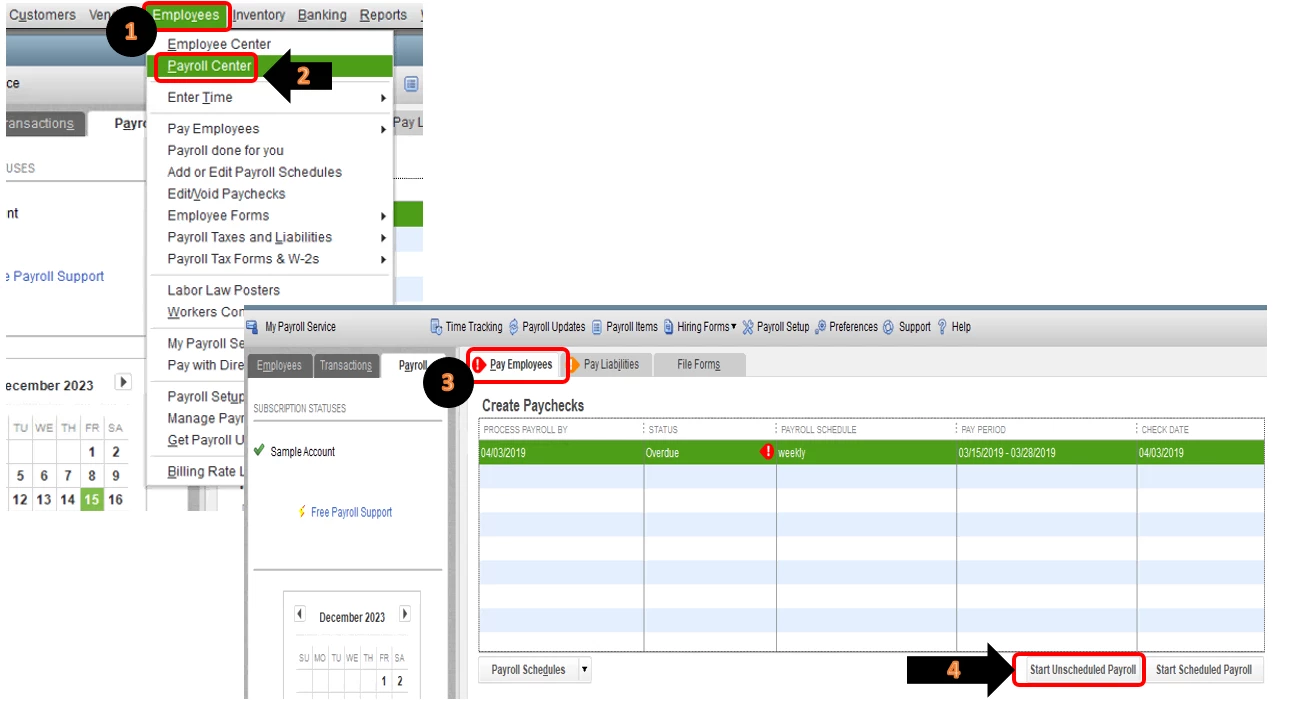
  1. Click on Employees at the top menu bar.
  2. Select on Payroll Center.
  3. In the Pay Employees section, select on Start Unscheduled Payroll.
  4. Select the employee or employees you're paying.

To get more information about creating paychecks in QuickBooks Desktop, please refer to this article: Create paychecks.


That should do it!


Keep me posted if there's anything else you need about recreating paychecks in QuickBooks. I'm always up for further assistance. Wishing you and your business continued success.

13 replies

BettyJaneB
Level 9
March 20, 2019

Hi there, @Rattleonco.


Glad to have you here in the Community. I'd be happy to help share some information on how you can recreate paychecks in QuickBooks Desktop.


If you've created a backup copy of your company file prior to the deletion of paychecks, then you still have the option to restore it. If not, you'll need to recreate an unscheduled payroll and enter the same information of the paychecks that you've deleted. 


To do that:

  1. Click on Employees at the top menu bar.
  2. Select on Payroll Center.
  3. In the Pay Employees section, select on Start Unscheduled Payroll.
  4. Select the employee or employees you're paying.

To get more information about creating paychecks in QuickBooks Desktop, please refer to this article: Create paychecks.


That should do it!


Keep me posted if there's anything else you need about recreating paychecks in QuickBooks. I'm always up for further assistance. Wishing you and your business continued success.

March 20, 2019

I have pulled up the copy how do I restore the paycheck?  Thank you for helping me  :)

January 23, 2020

Hello there, @Rattleonco.


Thanks for getting back to us. I'm here to help recreate the deleted paycheck in QuickBooks Desktop.


As mentioned by my colleague, you can restore it if there is a backup of your company file prior to the deletion of the paycheck. Since you have a copy ready you'd just recreate it.


Here’s how:

  1. Choose Start Unscheduled Payroll in the Pay Employees section.
  2. Select the name of the employee you’re paying and click Open Paycheck Detail.
  3. Enter the same original details.
  4. Override taxes to match with the copy.
  5. Hit Save & Close.
  6. Click Continue, then Create Paychecks.


You can refer to this article for the details: Create paychecks in QuickBooks Desktop Payroll.


This information should get you back in line. If there’s anything else you need help with, let me know by leaving a comment. I'm more than happy to assist you. Take care!


Thank you for these answers! They've helped me restore a paycheck I deleted by mistake.

When I finished recreating it, QB is now prompting me to send the info to Intuit. This was a paper check that we issued already and not a direct deposit. We sent the info when we processed the original paycheck.

Do I have to send the info to Intuit, or is there a way to dismiss the request?

If not, am I messing anything up with doubling the amount of taxes withheld for this employee?


Thank you again for your advice!

Liviu