
Get 50% OFF QuickBooks for 3 months*

Buy now
Switch to QuickBooks and 70% off for 3 Months
December 14, 2022
Question

Manage Payroll Cloud Services

  • December 14, 2022
  • 4 replies
  • 38 views

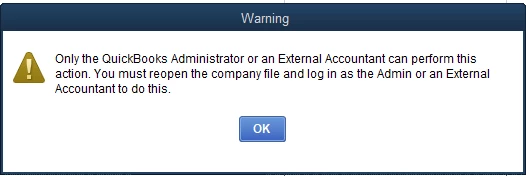
In QB, I am set up as a Secondary Admin for Intuit Account User Management.  I also have roles as Payroll Manager and Payroll Processory.  However, I am unable to access the Manage Payroll Cloud Services link so that I can invite our employees to use the Intuit Workforce portal.  The error message I receive is shown below.  What role do I need to have in order to access Payroll Cloud Services link?
 

4 replies

JessT
Moderator
December 14, 2022

Hi RWRobbins,


Hope you're having a wonderful day!


Only the primary admin or an external accountant user can manage the Payroll Cloud Services. I recommend having the admin login to QuickBooks, so you can add employees to your Workforce account.


Feel free to go back to this thread if you have any other concerns. Take care!

July 15, 2024

That makes no sense. Payroll manager should be able to do all aspects of their job. You are going to burden a higher level of staff to send out an invite??