
Get 50% OFF QuickBooks for 3 months*

Buy now
cancel
Showing results for 
Search instead for 
Did you mean: 
Announcements
Simplify payday and set payroll to run automatically on QuickBooks.Explore QuickBooks Payroll
Talmaggies
Level 1

Antivirus flagging QuickBooks directories as malicious

Hi

Last week, we tried installing QuickBooks Premier 2024 but got alerts from our Antivirus (Deep Instinct) that some of the DLL files were malicious.  We download the installer directly from Intuit's website like we did before.

I just wanted to know if anyone has experienced this behavior lately or if there is another source from which I can get the downloads.

Examples of the directors that get blocked are:

C:\Windows\SysWOW64\tx12_css.dll
C:\Windows\SysWOW64\Gsprop32.dll
C:\Windows\SysWOW64\SmartTabs28.ocx
C:\Windows\SysWOW64\tx12_ic.dll
C:\Windows\SysWOW64\tx4ole12.ocx
C:\Windows\SysWOW64\spr32d30.dll
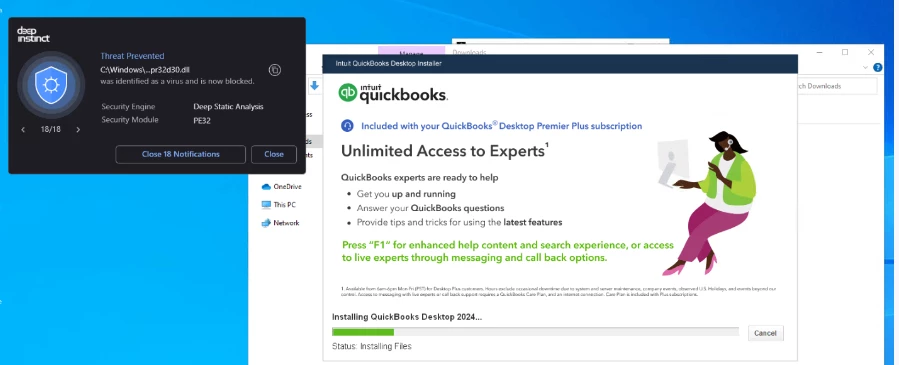


image.png

9 Comments 9
Fiat Lux - ASIA
Level 15

Antivirus flagging QuickBooks directories as malicious

Your EPP flagged those files incorrectly. Can you force your EPP to ignore them?


Screenshot 2025-01-21 075038.png

Talmaggies
Level 1

Antivirus flagging QuickBooks directories as malicious

We can exclude those files but I just wanted to check with the community and anyone else who has experienced this behavior lately.

Could quarantine these files cause an H202 error in QuickBooks?

patrickcpa56
Level 3

Antivirus flagging QuickBooks directories as malicious

Hi

i have used QB pro desktop for over 30 yrs

my staff and i showed others how to use QB for many businesses and personal books

went to enterprise version when it came out and even had an ill-fated QBO experience that when we went back to desktop, QB destroyed 30 yrs of my corporate date.


I am retired, i record for just me and my corp. $1299 is what qb wants to charge

i was told that i could have a desktop pro by having a license I dont go online

I am the only user and i do no p/r except for my own, which i do in excel


QB, unless i am talking to a salesman, does not help at all

when I went from QBO to desktop (thank god!) it was messing up all information badly, office of the president stepped in as i raised quite a ruckus (really good at that)


it has taken my IT guy 2 days to get around the QB subscription, I am worried that Intuit will stop me again from using QB


I was told you have a work around also.

it was so much easier to pay $399 and slip in a disc.


Intuit does not want employees, and AI does not cut it for most people.

I remember just calling the 800# and getting an answer in 3 minutes.

I wish i could totally walk away, but my personal history is QBW for over 30 yrs as well, condensed at certain years after backing it up


thank you for listening

CPA_56@yah...c.m


Fiat Lux - ASIA
Level 15

Antivirus flagging QuickBooks directories as malicious

@patrickcpa56 

Click on our username and you will find our website address to send an email. We may offer a workaround to access your historical data for good.

patrickcpa56
Level 3

Antivirus flagging QuickBooks directories as malicious

please email me at

[removed]


***_**@*****.***

Chrea
Level 8

Antivirus flagging QuickBooks directories as malicious

@patrickcpa56 

You should contact them directly. Check their profile and you can send your email later. You can't share your email address here.

Taxman26
Level 1

Antivirus flagging QuickBooks directories as malicious

Yes, I am experiencing the same issue, and it started after I updated my software.

Taxman26
Level 1

Antivirus flagging QuickBooks directories as malicious

For the money we are paying QB, we should not have to resort to any workarounds—does anyone know if QB has responded with a fix for this issue?

MichaelaS
QuickBooks Team

Antivirus flagging QuickBooks directories as malicious

Hello, Taxman26. I understand how concerning it is to see security alerts on your accounting directories. Antivirus flagging often triggers an H202 error, which occurs when something blocks the multi-user connection to your server computer. This error means your workstations cannot communicate with the company file stored on the host server.

This can be a tricky error as this involves Windows Administrative access and complex network permissions, I recommend consulting with an IT professional. They can safely configure your network and antivirus exclusions to bypass these blocks and restore your connection.

You can find the detailed manual troubleshooting steps in this article: Fix error H202.

Taking this step ensures a stable, uninterrupted connection for the entire team. It helps QuickBooks run at its best and prevents the software from being accidentally disconnected by your security scans, keeping your daily workflow smooth and efficient.

Please don't hesitate to leave us a response if you have other questions or concerns.

Need QuickBooks guidance?
Log in to access expert advice and community support instantly.

Need to get in touch?

Contact us