
Get 50% OFF QuickBooks for 3 months*

Buy now
Switch to QuickBooks and 70% off for 3 Months
August 19, 2020
Solved

Runaway sql anywhere process. QB enterprise 2020

  • August 19, 2020
  • 3 replies
  • 8 views

 I'm a tech working with a client. To start, this is not a performance issue so much as a process issue. everything is setup correctly. Its a brand new VM, 4 cores 16gb of ram. there are only 5 users.

the problem at hand is  the sqlanywhere process (quickbooksdb 30) on the server is a steady 25%. this bogs down workers trying to use it. It starts up fine. then after 30 minutes, the service spikes to 25% and stays there till everyone closes and the process stops.

I have gone through the tools, the company file is fine according to the program.

Tried all the fixes and tweaks. turned off search features. i can't get that process to go back to 0% or at least under 5%. This problem has been consistent on 2 servers with this data. can there be something wrong with the data that QB tool can't find?
Best answer by scottsterud_CT

Wow! we finally got the right tech!!!!


this problem was solved by condensing data. This means it was the data that was the problem. Condensing it cleared whatever errors existed.


https://quickbooks.intuit.com/learn-support/en-us/data-utilities/use-the-condense-data-utility/00/203359


read carefully before you do it.

3 replies

RenjolynC
Level 9
August 20, 2020

I'll share details about your concern, scottsterud_CT.


The main executable file for QuickBooks Database Manager is QBDMgr.exe, and the SQL Anywhere Network Server prompt is linked to it. This file might have accumulated some invalid entries which affected your computer's performance. 


You'll want to run QuickBooks as a Portable Copy, or reach out to our Technical Support Team. They have the tools to configure the settings and provide troubleshooting steps specifically to the network server. 


Before doing so, please check out our support hours here. Then, follow these steps:


  1. In your QuickBooks Desktop program, go to Help QuickBooks Desktop Help.
  2. In the Have a Question window, click the Contact Us link at the bottom.
  3. From the Contact Us page, select any topics.
  4. Under Here's how to connect with a QuickBooks expert section, click the Get Phone Number button.

Please let me know how it goes or if you have other concerns. Take care and stay safe.

August 20, 2020

Is this possible to run 5 users as a portable copy?

katherinejoyceO
Level 9
August 20, 2020

Thanks for joining this conversation, @scottsterud_CT


At the moment, running 5 users as a portable copy isn't possible in QuickBooks. Also, Quickbooks will automatically change its file size into a large one when you open the portable company file you've created. 


For future reference, you'll want to send your data to your accountant. Read through this article for more insights and steps: Use the Accountant's Copy.


Feel free to message again should you have additional questions. We're always delighted to help. 

August 27, 2020

Just to update.


we have tried every fix quickbooks support can muster. Still no resolution.


after 20 minutes, the process spikes and we can't do anything.

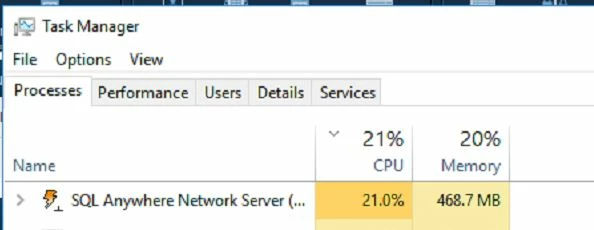
the attachment seems to show only 1 CPU maxed out. the other 3 cores are basically unused.

it also shows the qbdbmgrN process is sitting at 25% CPU.

we are desperate for answers

Pabz_L
August 27, 2020

@scottsterud_CT.


Thank you for sharing additional information, @scottsterud_CT. I also appreciate you for performing some troubleshooting steps to fix this issue. 


To address this concern immediately, I recommend contacting our Phone Support Team. This way, you can have a screen sharing session so that this issue will be given an accurate resolution. 


Here’s how. 


  1. Login to your QuickBooks Desktop. 
  2. Go to the Help tab.
  3. Select QuickBooks Desktop Help.
  4. In the Have a Question window, click the Contact Us link.
  5. Then, select any topics.
  6. Under Here's how to connect with a QuickBooks expert section, click the Get Phone Number button.


You can also use this link as a reference to look for an article if you’re having other issues with QuickBooks Desktop: Help article


Please know that you can always leave your comment below if you have any other questions. Have a nice day!

August 27, 2020

Give me a reply that means something. i already have 3 canned responses that say this. please read the whole thing before responding The support team has no idea why its happening.

scottsterud_CTAuthorAnswer
September 4, 2020

Wow! we finally got the right tech!!!!


this problem was solved by condensing data. This means it was the data that was the problem. Condensing it cleared whatever errors existed.


https://quickbooks.intuit.com/learn-support/en-us/data-utilities/use-the-condense-data-utility/00/203359


read carefully before you do it.

November 13, 2020

I’d like to tag onto this thread to see if anyone can help me figure out whether the Quickbooks ProPlus 2020 company file that I have on my server could possibly be constantly reinstalling an ODBC driver?  I’m sorry if this is a really basic and uneducated question.  I’m not a developer.  I’m an end-user who is running into issue where two other programs on my server keeps running up against an updated driver (from somewhere on my server) that it’s incompatible with.  My IT guy does not do back end stuff and can’t help me.  He’s wondering if there’s another program on my server that keeps downloading and installing a new driver, so I’m wondering if it’s Quickbooks. Does this make sense to anyone?  I’m including a screenshot from workstation that I took yesterday when Quickbooks froze and wouldn’t do anything.  I see that there’s an SQL Anywhere Server on my computer.  I have no idea what it is or why it’s there.