

Get 50% OFF QuickBooks for 3 months*

Buy now
Switch to QuickBooks and 70% off for 3 Months
ntuitiveitisnot
April 22, 2020
Question

Invoice email message adding tracker?

  • April 22, 2020
  • 2 replies
  • 0 views

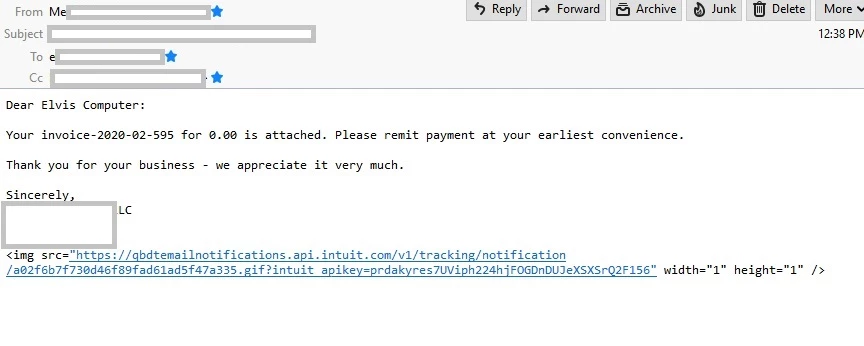
Why is every emailed invoice accompanied message have this tag line attached at end?

Support CHAT was useless - they wouldn't open any image of this I sent them


Just upgraded to Quickbooks 2020 and this annoying add-on is triggering spam detectors at all my customers
 

2 replies

QuickBooks Team
April 22, 2020

Thanks for bringing this to us, ntuitiveitisnot.


My colleague, Rejeil_O, have already answered a similar question you've posted. You can refer to this link if you haven't checked it yet: https://quickbooks.intuit.com/learn-support/en-us/other-questions/re-do-bugs-ever-get-fixed/01/545791#M38721.


You can always be updated with the latest news and features in QuickBooks by visiting our intuit blog.


Feel free to post any QuickBooks questions. I'm always here to help.

ntuitiveitisnot
April 24, 2020

The problem still exists with standard service invoice included with QB 2020

May 3, 2020

Having same "issue" and to me it is an issue, not a feature enhancement as suggested.  The link provided by goes nowhere, is confusing and does not look professional.  I want it gone.  And the solution linked to Rejeil_O by Anna isn't a solution.  I understand the suggestion of reviewing the template and of course already did that before looking here.  The template has only what should be there, no indication of adding this weird html reference.  If the link jumped to something meaningful, perhaps I could see it as useful.  But a blank screen?  Really?  This is only the second month of sending out my invoices in this QB Desktop version so just now really investigating.  


ntuitiveitisnot have you gotten any further or are you also at a dead end with this?


QuickBooks Team
May 3, 2020

Providing the best experience with the product is what we aim for, LizD1.


I appreciate you for performing the solutions provided by my colleague. Aside from attaching a screenshot or images in your template to remove the link, let's try creating a new email template


The Income Tracker Batch Email function doesn't use the templates in the Preferences page. Instead, try using Send Forms under the file menu to use the templates you've added in QuickBooks. 


To send the invoices via Income Tracker, choose the new email template in the Send Batch Email window. Then, click the Send Now option. 


You can check out this guide about sending sales forms in QuickBooks Desktop. This article shows you how to handle sales forms by batch.


If the same thing happens, I'd suggest contacting our Technical Support Team. They'll pull up your account in a secure environment and check further on what they can do. 


Here's how to reach them:


  1. Click the Help icon on the top menu. 
  2. Choose QuickBooks Desktop Help
  3. Tap Contact us.
  4. Select QuickBooks Setup&Navigation and select File Setup & Management
  5. Choose Start a Message or Get Phone Number to connect with our support. 

I have a link here that provides you with articles about managing your invoices: https://quickbooks.intuit.com/learn-support/en-us/sales-and-customers/invoices/08?product=QuickBooks%20Desktop.


Feel free to reply to this thread if you need a hand with creating recurring transactions or any QuickBooks related. I'll be here to help. Keep safe and healthy.