
Problem With Backordered Column In Layout Designer
Hello. I have been using QB Enterprise for many years now and have run into a problem recently that I need help with.
Over the years, we have run into a problem where our item numbers do not fit in the Item column. Simple fix was to go into the Layout Designer and increase the width of the column.
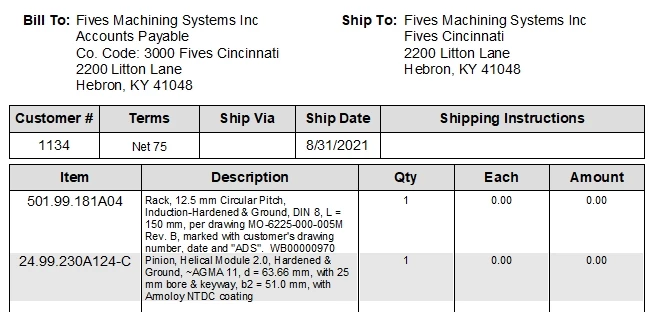
Recently we started using the Backordered column for our Sales Orders. This column only shows up when an order is partial invoiced. We noticed that when you print a new Sales Order without invoices against it, the item column width changes, so we would go into Layout Designer and increase the width of the column.
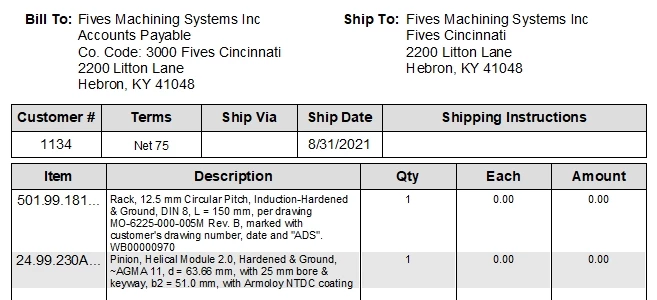
However, when you invoice against this Sales Order, the Item column snaps back to an even smaller width. No matter how many times we change the column width, it always goes back to a small width. This is a big problem for us because our Item Number get cut off then.
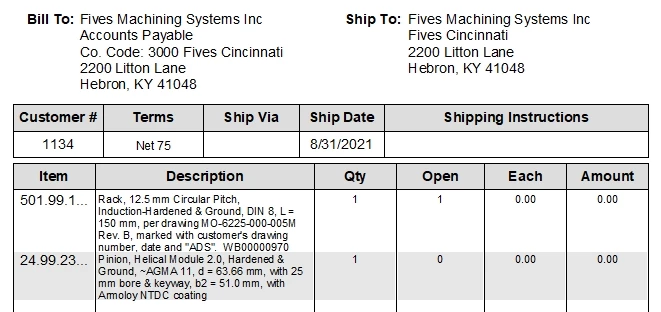
As a temporary fix, we have changed the font type and point size to make the Item Numbers fit in the small column. But at 9 point font, it is barely readable and will cause problems when we are pulling items to ship.
For me, this small column width issue seems to be a bug. It only does this when the backordered column is enabled. I talked with tech support and they were of no help. They asked me to verify and rebuild our company file which I did twice and it didn't help.
Can someone please help figure out this issue as it is impacting our day-to-day company work.
Thanks.
John Entwistle