Get 50% OFF QuickBooks for 3 months*

Buy now
cancel
Showing results for 
Search instead for 
Did you mean: 
Announcements
Sagarpatil
Level 1

Entry Point Not Found Dynamic Link Library Error

getting errors while extracting data for QuickBooks.
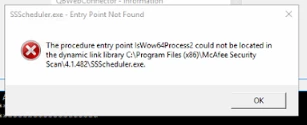
 

image.png

3 Comments 3
Carneil_C
QuickBooks Team

Entry Point Not Found Dynamic Link Library Error

The error you encountered appears when there are program failures locating a specific entry point within a dynamic-link library (DLL) during runtime, @Sagarpatil. Here are some information and troubleshooting steps to help you out.


Beforehand, I'd like to ask what you're using that results in this error. Are you using Adobe while QuickBooks is open? Additional information can help me provide you with an accurate resolution.


In the meantime, we can run a QuickBooks Tool Hub that helps address errors with PDF readers and provides a fine experience while using the software. 


Before we start, let's secure a backup of your company file to reinstate your accounting data if you ever run into a problem with it, and proceed with the steps below:


  1. Download and install the latest QuickBooks Tool Hub.
  2. Once installed, open the tool hub and go to the Program Problems.
  3. Click QuickBooks PDF & Print Repair Tool.
  4. Start QuickBooks Desktop and open your data file.


Alternatively, we can follow Solution 2: Restart and reset your temp folder permissions outlined in this article: Fix PDF and Print problems with QuickBooks Desktop.


If this is an Adobe Acrobat-related issue, we have steps that you can follow to fix your Acrobat Reader. Otherwise, contact the Adobe Acrobat Reader support directly. 


Moreover, you can scan these resources to configure your printing settings to produce copies in PDF:


The entire Community space is always here to help if you still have issues managing your files or app-integrated concerns. Take care!

Chrea
Level 8

Entry Point Not Found Dynamic Link Library Error

@Sagarpatil 

Try to disable your McAfee. 

seguse
Level 2

Entry Point Not Found Dynamic Link Library Error

If you get this error:


qbmapi64.exe - entry point not found.
The procedure entry point __CxxFrameHandler4 could not be located in the dynamic link library C:\program files\intuit\quickbooks enterprise solutions 24.0\d2dcomplier_47.dll


Try the following:

1. Uninstall QuickBooks
NOTE: Don't reboot and no need to uninstall anything else besides the main program.


2. Rename the "Intuit" folder with -old in the following locations
C:\Program Files\
C:\Program Files\Common Files
C:\Program Files (x86)\
C:\Program Files (x86)\Common Files

Start, Run, %temp%, click Local (in the address bar up top)


3. Reboot. Re-install latest version by going to intuit.me/download. After re-install, check for updates and install the latest updates.


4. If still not working, try doing a repair on all Microsoft Visual C++ Redistributable things. If still not working, uninstall all the Microsoft Visual C++ Redistributable and re-install only the latest x84/x64 versions.


5. If still not working, check if Microsoft Office/O365 is installed and see if it's 64-bit. If it is, uninstall and re-install 32-bit instead. If this is a RDS server, use the Office Deployment Tool. Make sure all users have Business Premium license which is required for Shared Computer Activation.


Open CMD (admin) and browse to directory that has setup.exe and your xml file.

setup /configure "configuration.xml"


XML Example (adjust to your needs):
<Configuration>
<Add OfficeClientEdition="32" Channel="Current">
<Product ID="O365ProPlusRetail">
<Language ID="en-us" />
<ExcludeApp ID="Lync" />
</Product>
</Add>
<Property Name="SharedComputerLicensing" Value="1" />
<Updates Enabled="TRUE" Channel="Current" />
<Display Level="None" AcceptEULA="TRUE" />
</Configuration>

Need QuickBooks guidance?
Log in to access expert advice and community support instantly.

Need to get in touch?

Contact us
