
SUMMER SAVINGS 90% OFF QuickBooks for 3 months* Ends 8/27

Buy now
Switch to QuickBooks and 70% off for 3 Months
March 3, 2021
Question

Intuits My Time App

  • March 3, 2021
  • 36 replies
  • 139 views

I am using QB for Mac 2016 and have been for several years without any issues.  I recently went into the Employees tab and went to the "Download My Time" button to see what that integration was all about.  I was able to download and install the program on my Mac running 10.14.6 (Mojave) and when it went to the setup screen it says It can not find the company file.
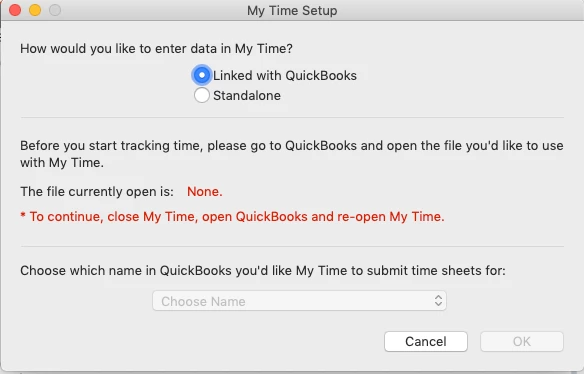
 

I reached out to support and they keep pointing me to mytime.com saying they need to help me and when I did mytime.com says they are a scheduling company not a time tracking company.  After reviwing the My Time App I see it is an Intuit product and apparently no one in support knows how to support it.
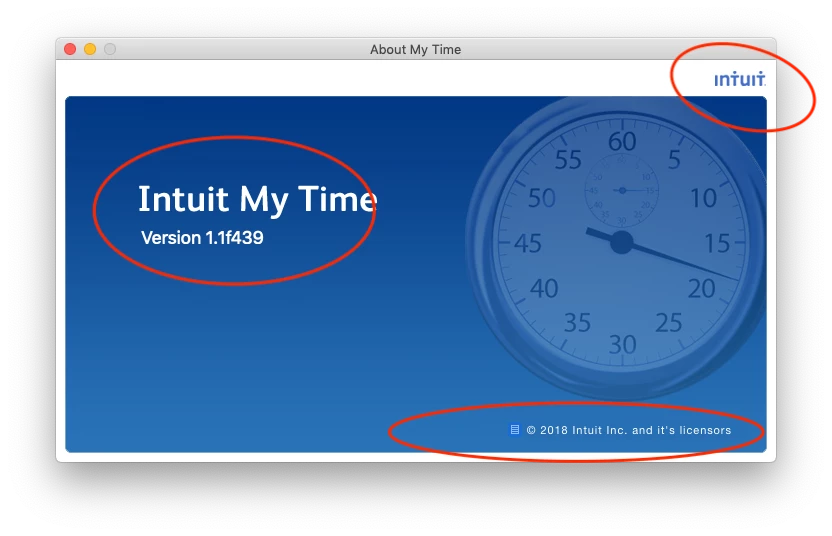
 

I am hoping someone here can shed some light on the situation.  I would like to get this working as I have been manually entering this in and would like to see how this program works.


FYI I have tried

  • rebooting the computer.
  • closing and opening my company file
  • closing my company file and opening a sample file (my Time doesn't see that file either)
  • verifying the company data file


Thanks for any help.

36 replies

Tori B
QuickBooks Team
March 3, 2021

Hey there, @Bgerber4


Thanks for reaching out to the Community for support. I'm happy to provide some insight into the My Time app.


Some users have found it helpful to uninstall the My time app version 1.1.f439. Once the My Time app has been uninstalled, you can download the new version of My Time which is 1.2.0.44. Grab the download of the new version here: Get your free My Time v1.2.x download. From there, you'll need to close QuickBooks and save a Backup. Once you've closed and saved a backup, Reopen QuickBooks and open My Time.


That should do it! Please let me know if you have further questions. I'm always around to lend a hand. You can reach out to the Community at any time. Take care! 


Bgerber4Author
March 3, 2021

thank you for the response.  I did try that before posting this and Unfortunately the V1.2 app is not supported on my version of mac os 10.14.6 (Mojave).

Level 8
June 14, 2022

I have done everything that has been suggested and am still not able to connect My Time to QuickBooks. Here are the versions I have: 

QuickBooks Desktop Mac 2020 19.1.12.1048 R13

My Time 1.3.0.472 R16

macOS Monterey 12.4 (21F79)


Launching My Time gives the dialog box to select QuickBooks but won't let me do that. Launching My Time tracking directly from QuickBooks does nothing. Attempting to connect to an existing time back up also does nothing--no response from My Time at all. I have uninstalled, reinstalled, redownloaded, restarted. Nothing is working.


Hi @beezdezines and @Siriously.


For you, @beezdezines, I can see that you're running a newer version of QuickBooks Desktop for Mac Plus 2022 with the v. 21.0.4 R5 to a Mac OSX 12.3.1 (Monterey). However, you're running an outdated version of Intuit My Time 1.2.0.444 that isn't compatible with your QBDT for Mac and OSX.


In this case, I recommend creating a backup (ending in .imt) and uninstalling your current My Time version. Then download and install this more updated compatible version (My Time v1.3.x) to your QuickBooks for Mac 2022 and Mac OSX (Monterey) 12.3.1. Here's how to download it successfully:
 

  1. Open this link: Get your free My Time v1.3.x download.
  2. Right-click on the Download Now button, then click on the Copy link address.
  3. Paste the link on a new tab, then hit the Enter key to download the application.


For you, @Siriously, I recommend upgrading your QuickBooks version to QuickBooks Desktop for Mac 2021 version or higher to keep it compatible with your My Time 1.3.0.472 R16 and Mac OSX Monterey 12.4 (21F79) version.


If the issue persists for both of you, I recommend contacting QuickBooks Desktop for Mac support.


Please let me know how it goes. If you have other questions in mind, please place a comment below. We'll make sure to help you out. Take care and have a nice day for both of you.