
Get 50% OFF QuickBooks for 3 months*

Buy now
Switch to QuickBooks and 70% off for 3 Months
April 21, 2020
Question

Level 3 data

  • April 21, 2020
  • 3 replies
  • 2 views

EVERY time I try to receive a payment, check merchant service deposits, or a few other things, I get a box:  
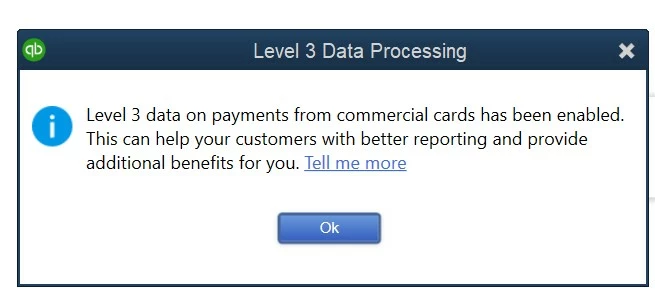
 

Sometimes, I get these 2 or 3 times in a row.

How do I disable the message?  And I don't care about Level 3 data (I don't accept credit cards).


Oh, and the Tell me more link goes to a dead page.

3 replies

Level 9
April 21, 2020

Thanks for checking this with us, JerryL1


I want to make sure your issue with Level 3 Data Processing message gets resolved.


You can use the Turn off pop-up messages for products and services feature in QuickBooks Desktop. This can help prevent QuickBooks Payments pop-ups from showing. I'll show you how to do this below:


  1. Go to Edit and choose Preferences.
  2. From the General tab, check the box for Turn off pop-up messages for products and services.
  3. Click OK to save changes.

All you need to know about the Level 3 data processing and your QuickBooks Payments accounts can be found in this article: What merchants need to know about Level 3 data processing.


If the prompt continues after performing the above steps, I recommend contactig our Contact Payments Support.​ They have the special tools to help disable the message for you.


Let me know if you need more help. I'm always happy to lend a hand. Wishing you the best of luck!

Jlo66Author
April 21, 2020

Disabling pop up messages had no effect.


In talking with Payments support (case [removed]), they are unable to disable credit cards for me, even though I don't want them. And the pop up message problem has been reported by others, and has been referred to Development.  There is no ETA.


I would hope that Quickbooks would try to expedite the solution.  This is very frustrating to get this pop up repeatedly,10-12 times an hour.  There seems to be a huge divide between Quickbooks and Quickbooks Payments.  I pay for both, they are both Intuit, yet they don't work well together.


August 2, 2022

Still, today, with the latest version, this still does not work.  We have been trying for years to get rid of it.  I have sent vidios to support showing having to click past it for every invoice auto created.  If I have 100 invoices, that is 100 clicks.

katherinejoyceO
Level 9
April 22, 2020

Thanks for coming back, @JerryL1. I appreciate you for voicing out your sentiments here in the Community. It means so much to us that you let us know what you need and expect with our product.


Aside from working on the reported issue, I will also take note of your feedback and share it with the development team. This way, they can review and consider this matter to make it more functional the way you expect it to be. 


Additionally, you can update your QuickBooks Desktop. This will also help resolve common or unexpected errors within QuickBooks Desktop.


I'm always here to listen and help should you have additional concerns. Take care. 

November 3, 2021

How do I not participate in this Level 3 data sharing?  I want to remove it but there doesn't seem any way for me to do that.

QuickBooks Team
April 13, 2022

I am experiencing this issue where a pop up message comes up:

Level 3 Data Processing

It shows up every time I try and email an invoice. I need to email +200 invoices a week. 

+100 statements weekly. 

The owner and I have spent hours and hours on the phone with QB. Does anyone know of a solution as of April, 2022? If so, please let me know. Thank you, JS-USWT


This isn’t the kind of experience I want you to have when emailing your invoices, JS-USWT.


Let me share some information about the Level 3 data pop-up message. Then guide you in the right direction on how to handle this one.


Level 3 data are line-item details about a credit card purchase such as items, quantity, and other order info. This level of data is only shared when you process a commercial card and sends the detailed information to Visa and MasterCard.


For additional information, you can read this article: What merchants need to know about Level 3 data processing. It contains a table of examples of Level 3 data and their corresponding description. You’ll also see answers to common questions about this QuickBooks Payments feature.


Our goal is to make QuickBooks the go-to software for small business owners and we're always looking for ways to improve it. You can let our product engineers know that having the ability to turn on or off the Level 3 data pop-up window is a great idea. This allows you to email invoices without seeing the message.


Here’s how:


  1. In your company file, head to the Help menu at the top bar to choose Send Feedback Online and Product Suggestions.
  2. This action will open the QuickBooks Feedback window.
  3. From there, click the Type of Feedback drop-down to select Product Suggestion.
  4. Press the Product Area drop-down and choose Product Suggestion.
  5. Click the Product Area drop-down and pick the correct topic.
  6. Type your product suggestions in Here is my suggestion box.
  7. Fill in the remaining fields.
  8. Click Send Feedback to submit.


For future reference, the following link contains topics that will guide you on how to create a refund request, fix card reader issues, process customer payments, and manage your payments account: QuickBooks Payments FAQ.


Keep me posted if you still have additional questions or concerns about Level 3 data processing. I’ll be glad to get this taken care of for you. Have a good one.

September 19, 2023

I just spent two hours with Intuit Tech letting me know in the end that this will not go away ever.  They said this has to do with being compliant with the financial institutes.


This just started with my QB today.

September 19, 2023

Mine too! If it's not going away then they need to lower the price because it's costing me money---my assistant sent out 100 invoices today--she timed and it takes roughly 30 seconds to click reset etc. Basically it cost me $16--just today!