
Get 50% OFF QuickBooks for 3 months*

Buy now
Switch to QuickBooks and 70% off for 3 Months
June 11, 2024
Question

Unwanted/automatic changes

  • June 11, 2024
  • 2 replies
  • 9 views

Hi,

QBO is making automatic changes. For this particular sample, we made a correction but system decided to revert the change the following day at 4:39 am. This is not the first occurrence and have noticed that it happens with bills that have already been marked as paid. The system will mentioned that it was edited by one of the users although we are very sure that it was not one of us.


How do I disable the system from doing these automatic changes?
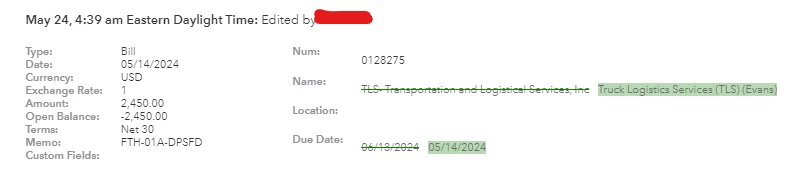


2 replies

MsNorthPND1881
QuickBooks Team
June 11, 2024

I understand the convenience of audit log history for your bills in QuickBooks Online (QBO). I am here to provide details to assist you with the automatic changes you have encountered in QuickBooks Online, @rpineda2.


Moreover, the audit Log keeps track of all account activity, such as user sign-ins, changes to QuickBooks settings, changes to customers, vendors, employees, and payroll submissions. QBO doesn't automatically change bill transactions. The program keeps records and requires users to update information manually. For more details, on what the audit log can do and how to use it to keep an audit trail click the link.


If you have confirmed that the user didn't make those changes, I recommend performing browser troubleshooting steps.  Start by updating the bill with correct information using an incognito window. These are the shortcut keys:


  • Google Chrome: Ctrl + Shift + N
  • Microsoft Edge: Ctrl + Shift + N
  • Firefox: Ctrl + Shift + P
  • Safari: Command + Shift + N


If it works, proceed to clear your browser's cache. You can also use other supported browsers. Alternatively, you can also delete and recreate the bill to check if the transaction is not defective.


Finally, you can check this article to learn how to run basic reports in QuickBooks Online: Run reports in QuickBooks Online.


If you have any other follow-up questions about your invoice, billing, or audit log transactions, please let me know by adding a comment below. I'll be here to help you.

rpineda2Author
June 11, 2024

Thanks for your response.


We will need further assistance. After multiple failed attempts at getting issue resolved, issue keeps re-occurring and to say the following sentence "The program keeps records and requires users to update information manually" means that QBO has a hole open where automatic changes are happening. 


System is keeping an audit log and is making it appear as if one of our users did the change. This is sensitive financial data that we are dealing with and we would like to urgently request the help of a developer to look into this matter. 

Moderator
July 9, 2024

Thank you for your response. I contacted the team and received an investigation number. The customer support staff let me know there was a glitch on the QB side on Friday night. I would like to get my QB restored to a backup from before this glitch happened. Do you do nightly backups? I also would like to know (for the future) how can I do a manual backup? We have Quickbooks online plus.


I appreciate you for taking the step of contacting our support team, MKAccountant. I'm here to share details on how you can back up your company file in QuickBooks Online (QBO).


Saving a backup of your QBO company data is only available on the QBO Advanced version. If you want to maximize the said feature, you may consider upgrading your subscription.


If you've decided to upgrade your QBO plan, you can review this article to guide you on storing the backup: Back up and restore your QuickBooks Online Advanced Company. It also provides information on the data or files you can and can't back up.


Furthermore, please be reminded that you can only restore files within one previous calendar year. Saved backups older than one year are not retrievable by the company.


You may also make a copy of your existing QBO Advanced company and use it to start a new one. This feature is handy in copying your existing company data into a new Advanced QBO company file.


Tag me on this thread if you have a follow-up question regarding saving a backup of your company or any other concern with your transactions in QuickBooks. I'll make sure to get back to you promptly.

September 3, 2024

We are having this problem.  We have been on the phone with for five hours with QBO support and so far they have told us that it is either a browser cache issue, or a third party app issue.  They have not been able to provide any evidence for these, and we are continuing to have the issue.  Did anyone here ever get their issue resolved, because being on with QBO online support is getting us no where.  Their tier two person somehow is unable to tell us what is triggering this automatic change, and will not escalate this to tier three.  

September 3, 2024

Thanks for joining the thread, @JRobinsonSynergy. Spending five hours on the phone without a resolution is undoubtedly overwhelming, and I can understand how frustrating it must be not to have clear answers regarding your issue.


To resolve this matter, your case will be escalated to our Next Level Help team. They will review your comments in the Community and recent interactions with support. You can expect to hear from an expert within 1-2 business days.


We genuinely want to assist you and ensure you get the support you need. In the meantime, if anything else arises or you have further questions, don't hesitate to reach out in the Community. We're here to help you through this.