
Get 50% OFF QuickBooks for 3 months*

Buy now
Switch to QuickBooks and 70% off for 3 Months
February 2, 2022
Question

Vendor Refund

  • February 2, 2022
  • 8 replies
  • 12 views

I'd like to record a vendor refund in Quickbooks Desktop For Mac, 2019, using scenario 1 described in the instruction here:

https://quickbooks.intuit.com/learn-support/en-us/help-article/vendor-management/record-vendor-refund-quickbooks-desktop/L5CAplhmk_US_en_US


I have done steps 1 and 2.  I'm stuck on step 3c, 'Select Set Credits and apply the Bill Credit', because there is no option to set credits in the pay bills screen.
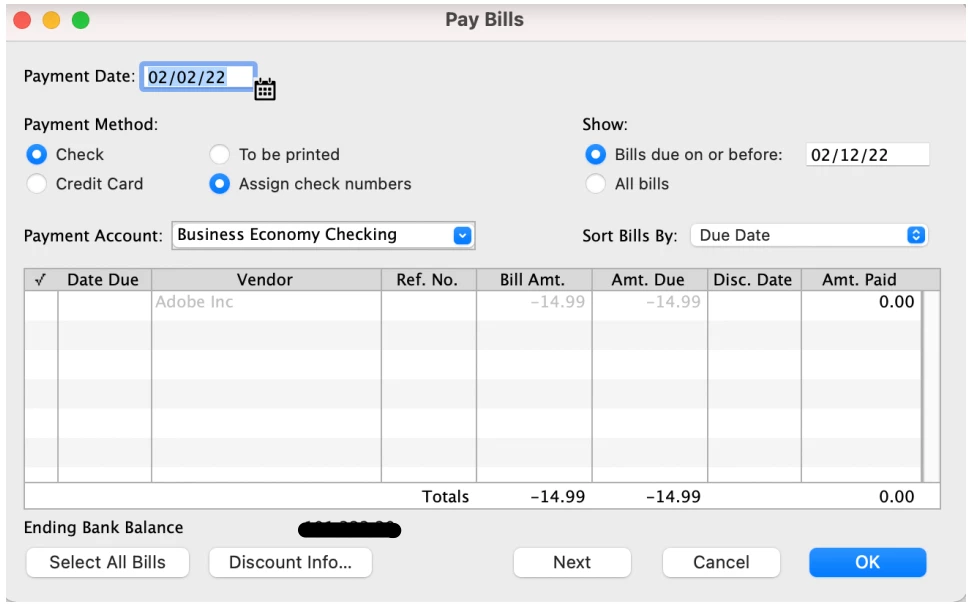
Where can I find the 'set credits' option is Quickbooks Desktop for Mac?

8 replies

Level 9
February 2, 2022

Hello @tandy1000, I'll help record a vendor refund.


In QuickBooks Desktop for Mac, the refund or credit created is linked to the vendor's profile and can be found in the discount section. Therefore, we'll have to click the Discount Info button and select Credits to see the vendor refund recorded.


I'll add the article you shared to continue following the rest of the steps needed to record and apply the refund: Record a Vendor Refund in QuickBooks Desktop for Mac.


I've also got you this reference for a compilation of articles to use while working with vendor bills and credits: QuickBooks Desktop for Mac - Vendors and Expenses.


If there's anything else that I can help you with aside from recording a vendor refund, please let me know by leaving a comment using the Reply option below. I'll be here to lend a hand. Take care always!

tandy1000Author
February 2, 2022

When I click the "Discount Info" button, I get a warning that says "You can only discount bills."  There's no credit option.

tandy1000Author
March 3, 2022

Hi tandy1000,


The article you shared is for QuickBooks Desktop for Windows. I'll be happy to share insights about this.


It's a bit different in QuickBooks for Mac because when you make bill payments, the credit and bill to be paid should be selected in the Pay Bills window so the credit will be applied as payment to the bill. You can click Select All Bills if you don't see the credit that you're looking for.


Please refer to the article about entering credit for a vendor. It provides additional details on how you can create vendor credits and apply them as payments to your bills. It has screenshots, too.


If you have other questions in mind, please don't hesitate to go back to this thread. The QuickBooks Team is always here to help.


I don't understand how the debit card charge and subsequently debit card refund is properly accounted for.  The sequence of events was


(1) I purchased a subscription service from Adobe Inc

(2) Adobe Inc charged my debit card $14.99 on 1/5/22

(3) Adobe Inc refunded my debit card $14.99 on 1/6/22


If I simply enter a Bill for $14.99 on 1/5/22 and a credit for $14.99 on 1/6/22, the two can cancel each other out in the Pay Bills window.  That makes sense, but then I have no record of the money going out and coming back in in the register for my checking account register in Quickbooks.  The transactions simply aren't there, which causes a problem if I attempt to reconcile my quickbooks transaction history with my bank account statements.


How should I handle the transactions in my Quickbooks checking account register?