
Get 50% OFF QuickBooks for 3 months*

Buy now
Switch to QuickBooks and 70% off for 3 Months
January 11, 2023
Question

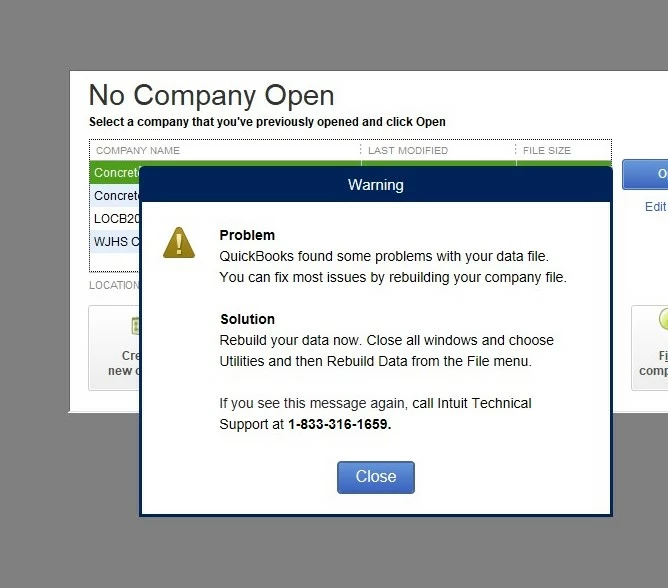
Warning Message

  • January 11, 2023
  • 1 reply
  • 0 views

Has anyone else encountered this message?  I have rebuilt the data file several times but it makes no difference - this warning keeps popping up and blocking me from doing much else.

1 reply

Fiat Lux - ASIA
Level 14
January 12, 2023

It is a scam message. When you call the number, they will ask you to pay a fee to fix it. Chat Intuit Support and ask them to remove malicious files from your machine. Otherwise, send me a private message to help.

HONDO33Author
January 13, 2023

I downloaded the tool hub and most of the day yesterday it seemed to work better.  Then at the end of the day, I got the same message, so apparently it hasn't been fixed.

QuickBooks Team
January 13, 2023

QB Tool Hub won't fix the problem. You have to delete malicious files as I mentioned earlier.


Thanks for sharing this with us, and I appreciate your effort in performing the QuickBooks tool hub, @HONDO33.


I can see your frustration with being unable to access your company file in QuickBooks Desktop. I'm here to point you in the right direction to resolve this error encountered in your company.


We can call our QuickBooks Desktop support team to examine further if there's a persistent issue regarding the error you experience in the QuickBooks Desktop company file. 


Here's how:


  1. Go to Help.
  2. Choose QuickBooks Desktop Help.
  3. Click Contact Us.
  4. On the pop-out window, select Search for Something else.
  5. Enter a specific keyword about your concern.
  6. Choose a way to connect with us: Get a callback.


You can also visit our Help articles page to see the system requirements, tips, and tricks on managing your QBDT software.


Please update me on how this goes, @HONDO33. I'll keep an eye on this post for your response. have a great weekend!