Solved
Adjust Foreign Currency Vendor Balances
I have several foreign currency vendors. I paid them up in full, but on reports I still have with them a Home Currency balance. What can I do to adjust this?

I have several foreign currency vendors. I paid them up in full, but on reports I still have with them a Home Currency balance. What can I do to adjust this?
Quote: Balances that show up on the Vendor Balance Summary report are unpaid amounts. Changes in exchange rates won't result to a home currency balance on the report as they're reported as Exchange Gain or Loss.
I don't see that happening.
Please see snapshots below & see my issue:
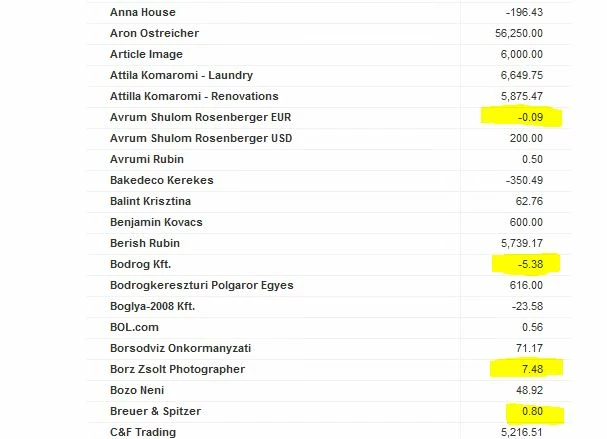
Capture 1 - This is from my Vendor Balance Summary Report
These are from my Vendor Center
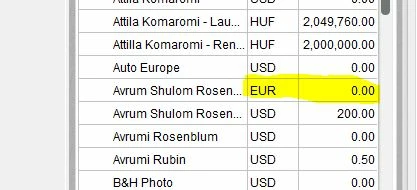
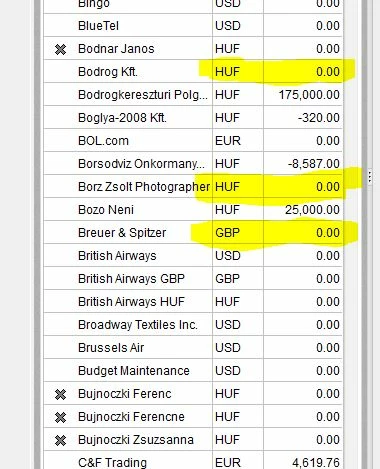
See that the vendors' balance in the vendor center are zero, that is they are paid in full, yet on the Vendor Balance Summary they show up with a balance. I only have this with foreign currency vendors, and the reason this happens is presumably, because QB calculates the Balance on the Report separately and not from the vendor center.
Hello there, KM402.
Thanks for keeping us informed on how everything goes on your end. Also, I appreciate the screenshots you've added to this thread.
The Home Home Currency Adjustment looks for non-zero foreign balances to revalue. In QBDT, any foreign balances that are zero are ignored when home currency adjustment transaction is about to be created.
For now, you can create a journal entry to fix the balances on the report. The General Journal Entry technique comes in handy whenever you close a foreign bank account or zero out the balance from your reports. However, I highly recommend consulting your accountant to keep everything accurate and properly tracked. Here's how:
For additional information, you can check this article: Create a journal entry in QuickBooks Desktop for Windows.
Still, you can read through the articles shared by my colleagues above for more tips and information about handling reports and currencies:
If you have other concerns with adjusting foreign currencies and QuickBooks reports, don't forget to stay in touch with this thread. We're all right here for you, KM402.
Enter your E-mail address. We'll send you an e-mail with instructions to reset your password.