
Get 50% OFF QuickBooks for 3 months*

Buy now
Switch to QuickBooks and 70% off for 3 Months
October 8, 2018
Solved

Mark-up amount showing on invoices

  • October 8, 2018
  • 2 replies
  • 50 views

My mark-up amounts are showing on my invoices to customers and of course I don't want that. How do I change that?

Best answer by vpcontroller

@jesspro


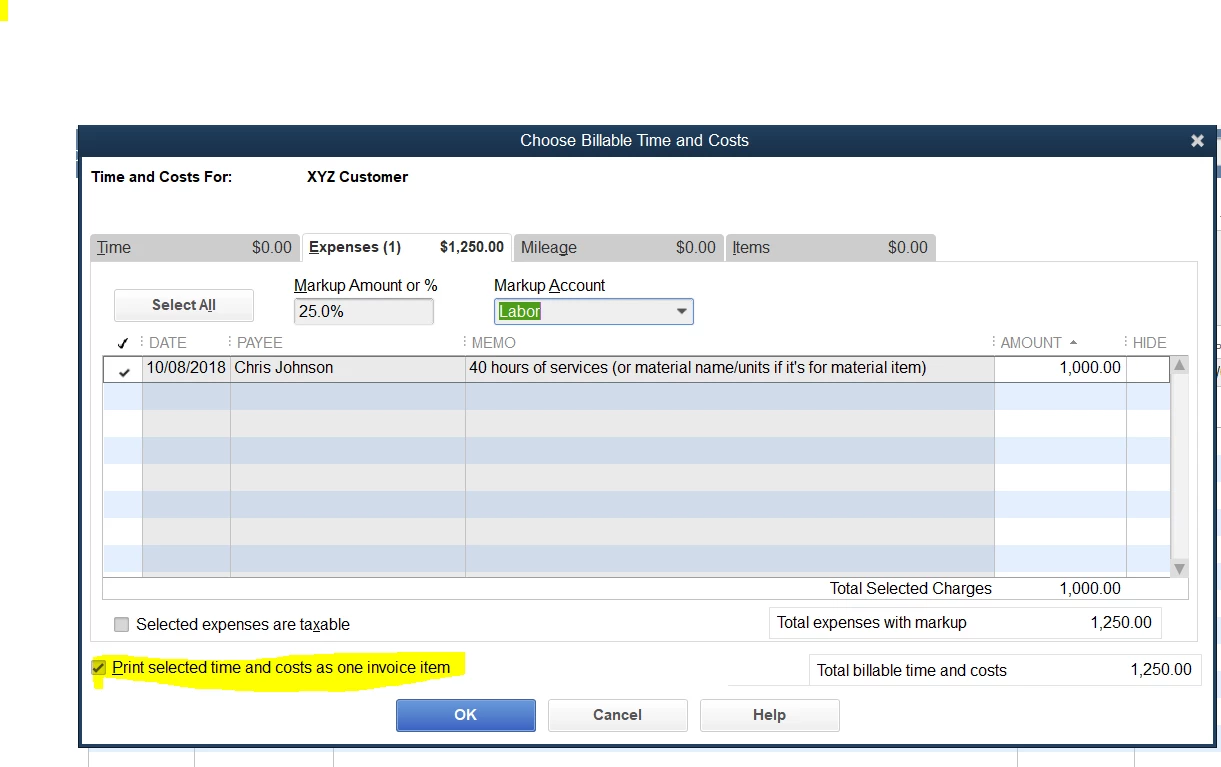
To hide MarkUp on Invoice, you will need to select box "Print selected time and costs as invoice item" at the bottom. See attached screenshot below for reference.


Also, copy "25lb. of ... T-shirt" description and paste it to the "Total Reimbursable Expenses" description line. That way you will see the Product name description on the Invoice.

.
2 replies

vpcontroller
Level 7
October 8, 2018

@jesspro


To hide MarkUp on Invoice, you will need to select box "Print selected time and costs as invoice item" at the bottom. See attached screenshot below for reference.


Also, copy "25lb. of ... T-shirt" description and paste it to the "Total Reimbursable Expenses" description line. That way you will see the Product name description on the Invoice.

.

May 30, 2019

I just tried that and it isn't working....any suggestions? 

June 5, 2019

It's nice to see you here in the Community, @brooke5.


There are two scenarios you can consider in adding a mark up on your invoices. Let me provide them to you and help you from there.


Just to clarify, which version of QuickBooks Desktop are you using? If you're using QuickBooks Enterprise, you can refer to the steps provided by my colleague @KhimG.


But if you're using another version of QuickBooks, you can create a new item for the markup and add it to your invoices. Note that you'll need to manually calculate for the markup price and edit it on the invoice.


To create a new item, you can follow the steps below:

  1. Click on List from the menu bar.
  2. Choose Item List.
  3. From the Item drop-down, click on New.
  4. Choose the Type.
  5. Enter the Item Name, then choose the Account.
  6. Click on OK.

Once done, you can now add the mark up to your invoice.


Please know that you can always get back to me if you have other questions. I'd be happy to help.


I'm on Quickbooks Online Plus - 


I'm attempting to invoice a billable expense. Have enabled the mark up and left it blank in the settings area so i can by line item calc it out on the bill. Have done that successfully.


My invoice shows the new line item of the mark up just fine, but it prints on the invoice. I have already made sure that the invoice form i'm using does not have the "show markup on billable expenses" check box marked....yet it is still showing up on my invoice.


In a youtube video i noticed there was some grey italic text stating on the invoice document that this line won't show to customers....that does not appear on my invoices when using the proper form.


Ideas?

January 25, 2024

Hi there....We use Quickbooks Online and when we invoice we would like to show the Markup as it is all inter company invoicing.  How do we show the markup as a separate line on the invoice.  Right now it shows the markup but when we send the invoice to the client it puts everything on one line.

QuickBooks Team
January 25, 2024

Welcome to the Community space, @Nikki M.


I am here to share some insights on how to show the markup on your invoice when sending it to your customers in QuickBooks Online (QBO).


First, you'll need to create a billable expense, here's how:


  1. Click the +New icon. 
  2. Choose Expense.
  3. Add the Payee's name.
  4. Select a category and enter the amount.
  5. Check the Billable box and add the customer's name.
  6. Enter the needed details.
  7. Click Save and close.


Once done, recreate the invoice and add the billable expense.


  1. Click the +New icon, then select Invoice.
  2. Choose the customer's name from your billable expense.
  3. Click the little arrow in the upper-right-hand corner.
  4. Select Add on the billable expenses.
  5. Click Save.


Moreover, I'm adding this helpful article as your reference in managing your expenses in recording invoice payments in QBO: Record invoice payments in QuickBooks Online.


Please don't hesitate to return to this post if you have other concerns in managing your invoices and expenses in QBO. I'll be here to lend a hand. Have a good one!


January 25, 2024

We are doing this now.  However, we add a markup.  When the invoice is created and sent to the client it groups the markup amount in with the original category.  We want the markup to show up as a separate line on the invoice.  So lets say we have supplies and a markup, we want the invoice to show 2 lines, one for the supplies amount and one for the markup.  That way when we get the invoice in the other company we can separate the markup from the supplies amount.