We can reactivate both the customer profile and the project so that you can edit or delete transactions, Queen.
Here are the steps to do it:
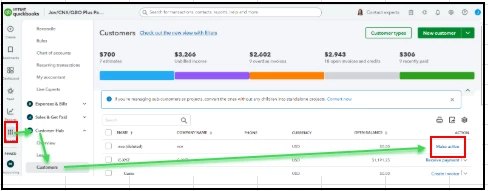
- Go to My apps > Customer hub > Customers.
- Locate the delated customer.
- Then click Make active.
But, if the transaction is from a closed financial year, I would recommend avoiding any edits or deletions to entries from 2024 to prevent issues with finalized books or tax filings.
You can consider creating an offsetting entry with the same amount, date, and category as the original deposit to cancel out the error while keeping 2024 intact and accurate. This will effectively cancel out the error while leaving 2024 intact and protecting its integrity.
Add a memo in the offset transaction explaining why it was created (e.g., "Adjustment for erroneous deposit created in 2024; original entry could not be deleted due to customer deletion."). This serves as a reference for you or anyone reviewing your books in the future.
You can also check in with your accountant. They can offer additional options tailored to your specific situation.
You can always get back to the Community space if there's anything else you need. We're here to help.
