Turn on suggestions
Auto-suggest helps you quickly narrow down your search results by suggesting possible matches as you type.
Showing results for
Get 50% OFF QuickBooks for 3 months*
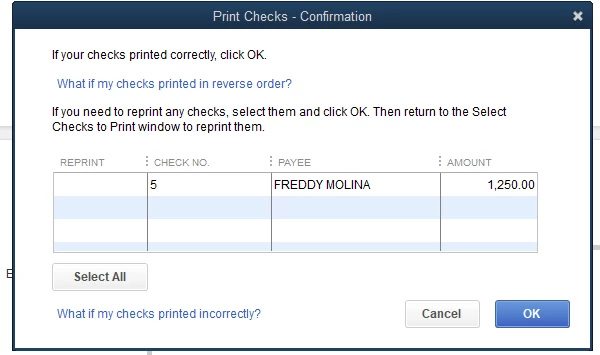
Buy nowHello! Can I Disable this confirmation windows? It because I don't want that people have access to this reprint option.
Hi @fnorori13,
Thank you for dropping by here in the Community. I can provide some clarification about printing checks in QuickBooks Desktop.
Currently, the option to disable the Print Checks confirmation is unavailable. You'll need this pop-up window to confirm if transactions prints correctly.
However, you can modify user access to restrict people from accessing the reprint option. Modify the user roles and exclude printing within QuickBooks (see screenshot below).
In case you need the steps, here's how:
I've attached an article you can use to resolve printing errors using the Print and PDF Repair tool: Troubleshoot PDF and Print problems with QuickBooks Desktop.
Hit that Reply button anytime you have further questions or concerns about printing transactions. Have a great day ahead.
Hi @AlcaeusF
I have the following situation: I have two person printing checks in two separate offices, right. So, one day someone print the Check N°100 and for mistake Click the option reprint in the "pop-up window to confirm if transactions prints correctly” then came the second person a look the Check “to print” and print the Check N° 102 for a second time, resulting in a duplicate payment to our vendor.
How can I avoid this situation?
If i use the option that you describe me, we disable the option to Click on Reprint in the check windows but not the option in the pop up windows.
I hope that I could illustrate you with my example.
Thank you
Thanks for coming back for more support, @fnorori13. I understand the need to disable the option in the pop-up windows.
I appreciate you sharing your thoughts and I'll relay this to our engineers for consideration on future enhancements.
You also want to send your suggestions to help us improve our website, products, and services for you by visiting this link: Quickbooks Feedback.
Let me know if you have any other questions about reconciliation. I'll be here to help some more.
You have clicked a link to a site outside of the QuickBooks or ProFile Communities. By clicking "Continue", you will leave the community and be taken to that site instead.
For more information visit our Security Center or to report suspicious websites you can contact us here
