
Get 50% OFF QuickBooks for 3 months*

Buy now
Switch to QuickBooks and 70% off for 3 Months
November 29, 2022
Solved

Accounts payable cleanup

  • November 29, 2022
  • 1 reply
  • 6 views

The accounts payable report at 12/31/2021 includes a lot of transactions that cancel each other out - accounts payable and payment amounts, that net to Zero.  I'd like the A/P report to show only the true Accounts payable at 12/31/2021.  What is the best way to clear old items that net so that they don't clutter the report?


Wonder if bills were entered and when checks were cut they were not 'matched' and so I'm seeing both.

Or I see a bill and then two expenses entered that offset the amount of the bill.
 

Best answer by Rubielyn_J

Let me help generate the Accounts Payable report in QuickBooks, @minnesotamom.


When you open a report and set the date to 12/31/2021, it will show all transactions that you've made on that period. 


Since it also shows old items, we can add some filter to display the data you want. Otherwise, export the report to an Excel file. From there, you can remove transactions manually.


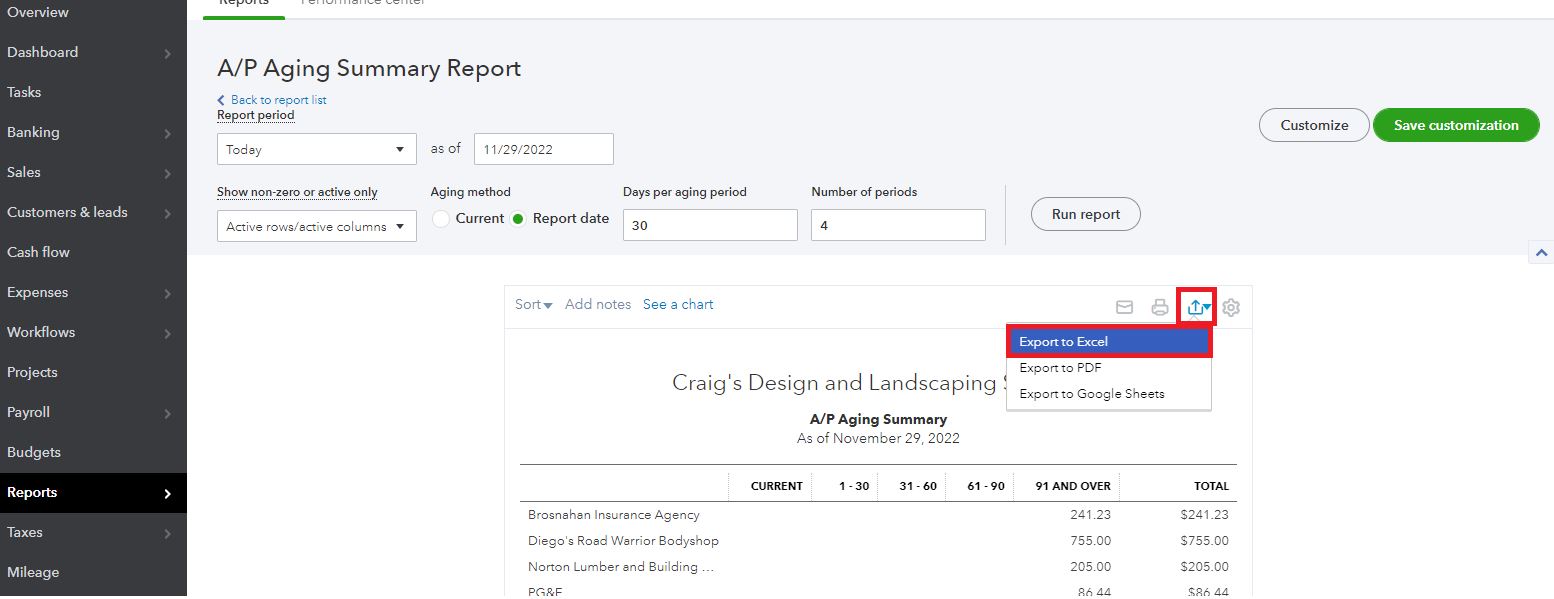
To export a report, here's what you need to do:


  1. Run the A/P report in your QBO account.
  2. Click the Export icon.
  3. Select the Export to Excel option.


Once done, open the Excel file and start removing the transactions you don't want to show in the A/P report.


Additionally, I've attached some relevant articles you can utilize to help personalize and manage your reports in QuickBooks:


Feel at ease to leave a comment if you have further concerns with running A/P reports. I'll be around to help you. Stay safe!

1 reply

Rubielyn_J
Level 8
November 29, 2022

Let me help generate the Accounts Payable report in QuickBooks, @minnesotamom.


When you open a report and set the date to 12/31/2021, it will show all transactions that you've made on that period. 


Since it also shows old items, we can add some filter to display the data you want. Otherwise, export the report to an Excel file. From there, you can remove transactions manually.


To export a report, here's what you need to do:


  1. Run the A/P report in your QBO account.
  2. Click the Export icon.
  3. Select the Export to Excel option.


Once done, open the Excel file and start removing the transactions you don't want to show in the A/P report.


Additionally, I've attached some relevant articles you can utilize to help personalize and manage your reports in QuickBooks:


Feel at ease to leave a comment if you have further concerns with running A/P reports. I'll be around to help you. Stay safe!