Get 50% OFF QuickBooks for 3 months*

Buy now
Switch to QuickBooks and 70% off for 3 Months
August 27, 2024
Solved

Class reporting and budgeting

  • August 27, 2024
  • 2 replies
  • 4 views

I tried searching for info on budgeting by class and all I found were conflicting responses to someone on the ability or inability to report on class actual compared to budget, but nothing on whether or not users could even create a budget by class.


If QB thinks the ability to provide data by class is a worthwhile and valued method of showing the composition of expenses by various categories, they might logically think that people who need that level of data would also have a need to budget by those classes and to report actual results compared to those budgets. For the previous inquiry about this, one QB employee said it was possible, and another QB employee twice said that it wasn't possible. How in $&#@  are us poor users supposed to make use of that kind of response? Why don't QB employees who are given the job to answer questions on the forum people who definitely know the answers to the questions OR find someone who does know to answer the question??? 


SO .... please find someone who knows the answer, and tell us


1. Can we budget by class?

(Example: one GL account for, lets say, "Advertising".  5 classes exist.  Can we budget an amount for Advertising for each class that would then show the total bedget for the one GL # AND the appropriate budgeted amount for EACH CLASS?)


2. Can we report on each class that would show P&L for each class?


3. Can we get a report by class that shows what the actual income & expense is for that class AND the appropriate budgeted amount for each GL item?  


If the answer is NO to any one of those, how can QB make anyone believe that CLASS is a worthwhile feature for any company that also plans via a budget????????


I would really like to hear from a USER ....
Best answer by BigRedConsulting

Thanks. What I really meant was after entering all the class budgets, could I print a P&L that is not by class, and the total budgeted amounts on such a report would equal the total of all of the individual class budgets?  The overall organizational budget would be the sum total of all of the individual class budgets and the total of the income and expense actual totals would likewise be the total of all the actual activity that has been entered in all of the class actuals. ????


Essentially under the premise that each class is but a single component of the organization and therefore the grand total of each of the classes (actual activity and/or budgeted amounts) would equal the organizations total. The user shouldn't have to manually add all the totals together to get the grand total. True?  ?????


Also, your sample shows a wide report of a number of classes for the P&L: if I assumed that I could run a P&L actual to budget for only one class, would I be correct? Because our events (class reporting) occur at different times of the year, we would want to focus on an individual class when it was the time of year for that particular class. ?????


RE: What I really meant was after entering all the class budgets, could I print a P&L that is not by class, and the total budgeted amounts on such a report would equal the total of all of the individual class budgets?


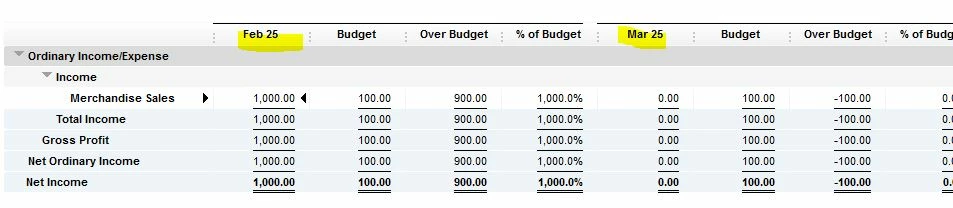
Oh. Yes, given that the budget by class exists, then you can create a budget vs. actual report for the overall budget, by account.


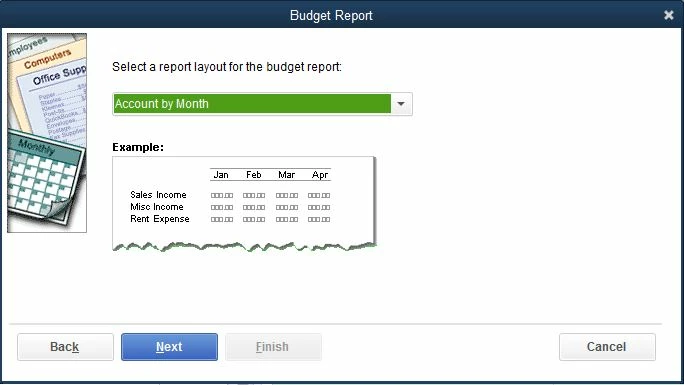
When you run the budget report, you're given options on how to structure it. Choose account my month:


Then the report will look like this:

Also, on this report by date period, you change it to Year or All or other period as needed instead of Month.


RE: Also, your sample shows a wide report of a number of classes for the P&L: if I assumed that I could run a P&L actual to budget for only one class, would I be correct?


Yes, you can start with a budget report that shows/includes all of the classes and then filter it for only one class.

2 replies

August 28, 2024

Hello there, Deadwood Al. Let me help you manage your class reporting and budgeting in QuickBooks Desktop (QBDT).


For your first question, you can go to the Company tab. I'll outline the detailed steps below:


  1. Go to the Company, click Planning & Budgeting then choose Set Up Budgets.
  2. On the upper right of the page, click the Create New Budget.
  3. Click the arrow for your preferred year.
  4. Tick the Profit and Loss (reflects all activity for the year) radio button and hit Next.
  5. Tick the Class radio button and hit Next.
  6. From the Choose how you want to create a budget page, tick the Create a budget from scratch radio button and hit Finish.


After that, follow these steps on how to budget by class:


  1. From the Set Up Budgets page, click the Budget dropdown and choose your created class.
  2. Click the Current Class dropdown and input the amount in the field.
  3. To enter the amount for each class, repeat the step 2 process.


For the second question, you can run the report by following the steps below:


  1. Go to Reports.
  2. Click the Company & Financial, then choose Profit & Loss by Class.


For the third question, you can customize the report to get the actual income and expense. Here's how:


  1. Go to Reports.
  2. Click the Company & Financial, then choose Profit & Loss by Class.
  3. On the upper left, click the Customize Report
  4. Hover over to the Filters tab, and click the dropdown below the Account.
  5. Choose the All income/expense accounts.
  6. Hit OK.


Let me know if you have further questions about managing your class in QuickBooks Desktop. I'm always here to help.

August 28, 2024

For the third question, you can customize the report to get the actual income and expense. Here's how:


  1. Go to Reports.
  2. Click the Company & Financial, then choose Profit & Loss by Class.
  3. On the upper left, click the Customize Report
  4. Hover over to the Filters tab, and click the dropdown below the Account.
  5. Choose the All income/expense accounts.
  6. Hit OK.


I don't see how this would produce a report showing actual compared to budgeted by class. This is the critical piece of the puzzle!  If classes are important enough to prepare a budget for, then they are certainly important enough to be able to know HOW WELL the operation is going in staying within class budget or exceeding or falling short of the planned (budgeted) result. Did I miss something, or did you fail to include a step to measure by class, or is such analysis not available in QuickBooks?


August 28, 2024

I appreciate the step you've taken so far, Deadwood. I also recognize the importance of pulling up a report that compares actual results to the budget by class in QuickBooks Desktop (QBDT). I'll go further and share some information regarding this matter. 


QuickBooks Desktop natively shows reports by the class that demonstrate the actual income and expenses for each class and the budgeted amount for every General Ledger (GL) account. Once a P&L Budget by Class is created, the most relevant report to be generated is the Budget vs Actual Report.


Here's how:


  1. Go to the Reports menu.
  2. Choose Budgets and Forecasts.
  3. Click Budget vs Actual.
  4. Select the P&L Budget that you have created and click Next.
  5. From there, Choose Account by Class from the dropdown then next and tick finish.
  6. On the same page, you can customize the dates to pull up data from certain reporting periods and compare it to your Budget for specific income and expense accounts


More so, I attached this article to allow you to customize any report that you generate: Customize reports in QuickBooks Desktop.


I'll be here if you need anything else. QuickBooks Community is available 24/7. 


BigRedConsulting
Level 15
August 28, 2024

I wasn't sure and so I tried it out.


RE: Can we budget by class?

Yes.


RE: Can we report on each class that would show P&L for each class?

Not quite sure I understand the question, but once you have created a budget by account and class, you can create a Budget v Actual report using that budget, several actually, that show different views of the budget.


RE: Can we get a report by class that shows what the actual income & expense is for that class AND the appropriate budgeted amount for each GL item?  

Yes. Here's an example - created after setting up the budget by class for one income account as a test.

As you start to create a Budget vs. Actual report, pick Account by Class:

The result, by account and class for the reporting period:


August 28, 2024

Thanks Big Red Consulting: perhaps you can also answer the last questions I asked JuryL --- will the total of all budgeted classes roll up into an overall company/organization budget, or do we have to do that manually.


(In case you're wondering, in our current company file we are NOT using class to track various event income and expense. All these questions have to do with planning on utilizing classes in a new company file to avoid creating so many individual GL accounts to provide the event data.)

BigRedConsulting
Level 15
August 28, 2024

RE: will the total of all budgeted classes roll up into an overall company/organization budget, or do we have to do that manually.


If you asking if there a Total croup of columns on the report, then yes: