
SUMMER SAVINGS 90% OFF QuickBooks for 3 months* Ends 8/27

Buy now
Switch to QuickBooks and 70% off for 3 Months
October 25, 2018
Solved

Accounts Receivable by Class

  • October 25, 2018
  • 25 replies
  • 176 views

Is there a way to run the A/R Aging by Class?  I am using QB online for Contractors.

Best answer by vpcontroller

Currently, such an option to run the A/R Aging by Class report is not available in QBO yet.
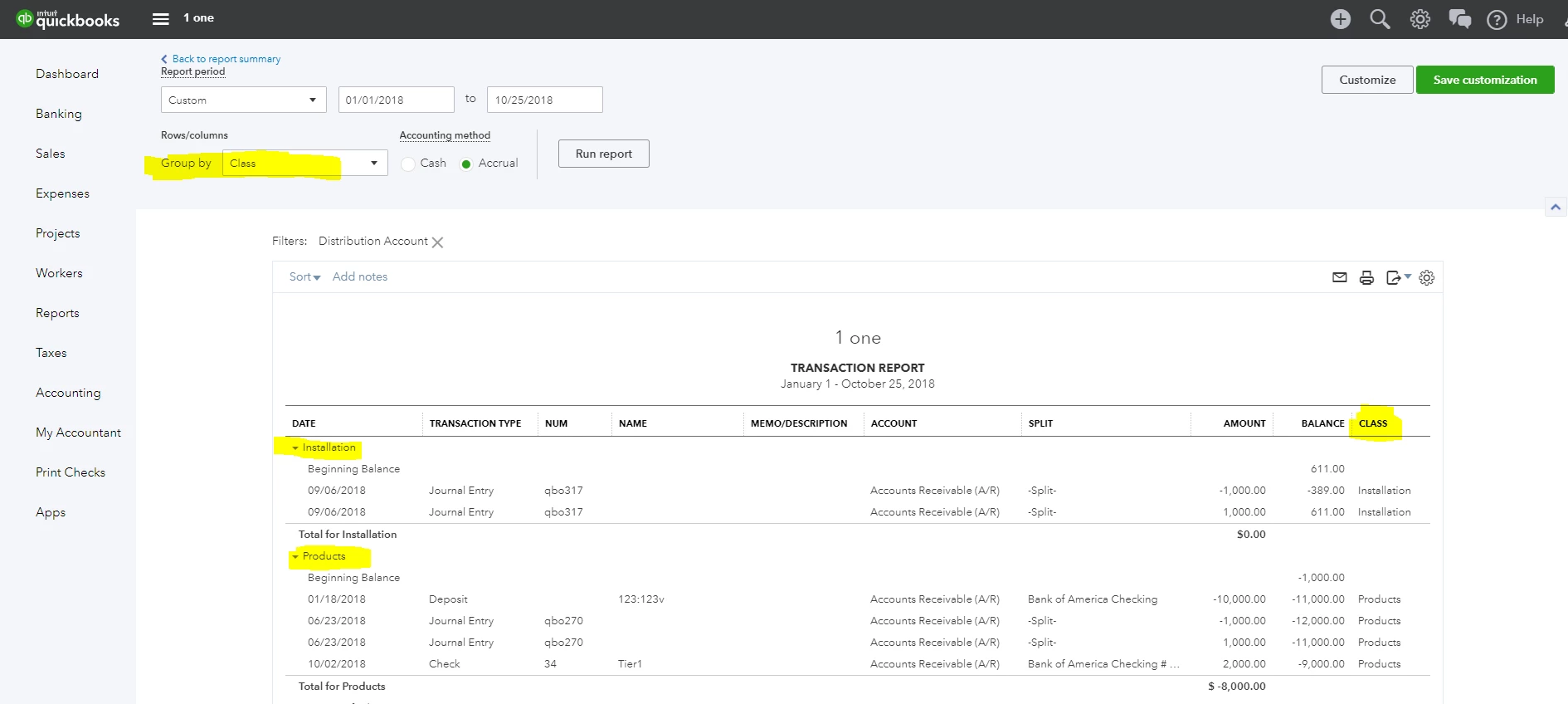
The workaround is to run the Account Receivable transaction report from the Balance Sheet (Run the Balance Sheet report and click the Account Receivable balance amount link). You can Group this report by Class. You can also customize and add a Class column to the report. But it will in AR detail format, not AR Aging format. See screenshot below for reference.

.
25 replies

vpcontroller
Level 7
October 25, 2018

Currently, such an option to run the A/R Aging by Class report is not available in QBO yet.
The workaround is to run the Account Receivable transaction report from the Balance Sheet (Run the Balance Sheet report and click the Account Receivable balance amount link). You can Group this report by Class. You can also customize and add a Class column to the report. But it will in AR detail format, not AR Aging format. See screenshot below for reference.

.

November 7, 2018

Thanks for this response.  I cannot figure out why "class" isn't available in my group by menu.  Can you advise?  I assign classes in AR and AP.  Thanks!

January 20, 2023

Thanks for getting back to this thread, @SuperStar777.


I recognize how relevant to you and your business to have a report not showing a duplicate invoice number. Currently, this option is unavailable in QuickBooks Online.


In the meantime, we can export a report to an Excel file. From there, you can manipulate the statement to show only one invoice number. Let me show you how:


  1. Find and run the report.
  2. Choose the Export icon.
  3. Click Export to Excel.


Additionally, let me share these links to help manage your reports in QuickBooks:


Feel free to comment below if you have follow-up questions about generating reports in QuickBooks. I'm always around to help. Keep safe!


How does one make a request for a product enhancement?  It is still ridiculous that this software can’t do something as simple as an A/R aging by class.  I understand that Intuit has no motivation to make improvements here because there is no meaningful competition in this area…but come on.  

Thank you posting workarounds, but this isn’t a satisfactory solution.   I want to run a report that gives me the information I need.   I don’t want to have to run a different report, dump it to excel and then manipulate it to get the information I want.  


the fact that this thread is more than four years old and there is no solution still I guess tells me all I need to know about how much Intuit cares about it’s customers.