
SUMMER SAVINGS 90% OFF QuickBooks for 3 months* Ends 8/27

Buy now
Switch to QuickBooks and 70% off for 3 Months
October 25, 2018
Solved

Accounts Receivable by Class

  • October 25, 2018
  • 25 replies
  • 147 views

Is there a way to run the A/R Aging by Class?  I am using QB online for Contractors.

Best answer by vpcontroller

Currently, such an option to run the A/R Aging by Class report is not available in QBO yet.
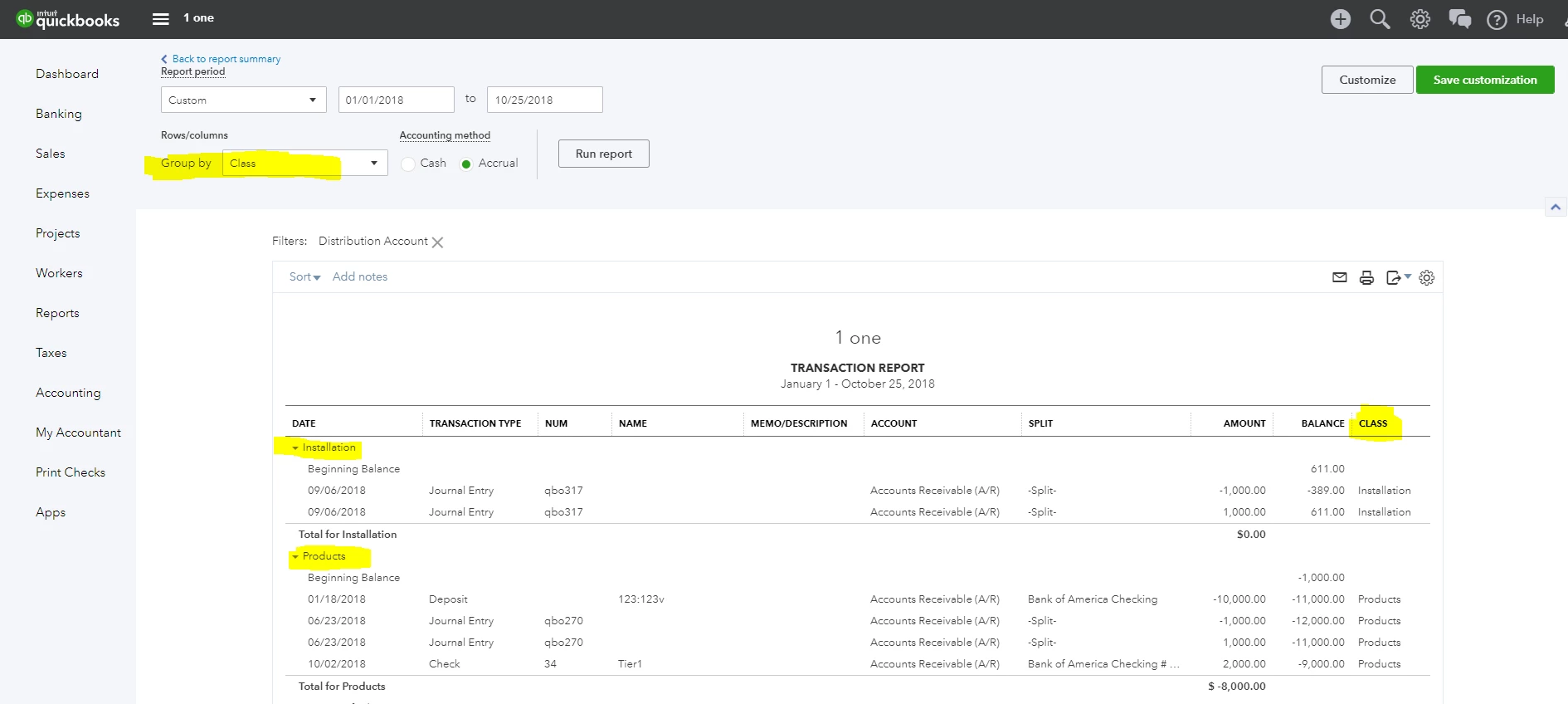
The workaround is to run the Account Receivable transaction report from the Balance Sheet (Run the Balance Sheet report and click the Account Receivable balance amount link). You can Group this report by Class. You can also customize and add a Class column to the report. But it will in AR detail format, not AR Aging format. See screenshot below for reference.

.
25 replies

vpcontroller
Level 7
October 25, 2018

Currently, such an option to run the A/R Aging by Class report is not available in QBO yet.
The workaround is to run the Account Receivable transaction report from the Balance Sheet (Run the Balance Sheet report and click the Account Receivable balance amount link). You can Group this report by Class. You can also customize and add a Class column to the report. But it will in AR detail format, not AR Aging format. See screenshot below for reference.

.

November 7, 2018

Thanks for this response.  I cannot figure out why "class" isn't available in my group by menu.  Can you advise?  I assign classes in AR and AP.  Thanks!

July 25, 2019

Thanks for joining this conversation, @tyelaw.


The option to customize the Custom Transaction Detail report to show invoices that were paid for a specific period is currently unavailable. As a workaround, you can customize it to show which invoices were paid and unpaid.


Here's how:


1. Click the Customize Report option at the upper left.
2. On the Display tab, select Paid on the Columns section.


3. Now go to the Filters tab.
4. Select Paid Status on the Choose Filter section, then choose Either.
5. Hit OK.


To learn more about customizing reports in QuickBooks Desktop (QBDT), consider checking out this article: Customize reports.


Please keep me posted if you have any other issues or concerns. I'll be here to help. Have a great rest of the day!


Thank you for getting back to me.  Is there any way create a report that shows total invoices paid per class for a specific period of time?  Including those invoices that might have been paid during the specified time, but were dated prior to the specified period?  Your assistance is most appreciated!