
SUMMER SAVINGS 90% OFF QuickBooks for 3 months* Ends 8/27

Buy now
Switch to QuickBooks and 70% off for 3 Months
June 22, 2022
Question

Invoice import "cant match customers"

  • June 22, 2022
  • 16 replies
  • 69 views

Hi all,


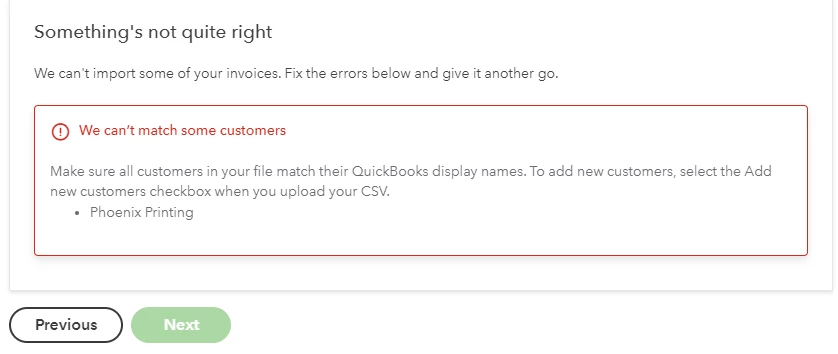
I am having an issue when importing a CSV file with an invoice. I am getting the below error where QB is telling me it cannot match the customer. On my CSV file I copied and pasted the exact display name for the Vendor so I am not sure what the issue can be. 

On the previous screen I even clicked the Add new customers to Quickbooks and when I upload i get an error that states the Customer already exists so clearly the display name is correct. Any help will be appreciated
 

16 replies

Level 9
June 22, 2022

Good to see your post here, Brianchaves.


I'll make sure you'll be able to import CSV file with an invoice in QuickBooks Online (QBO).


When importing your bank transactions, there are certain factors to consider.
 

  • Make sure the file is in a CSV (comma-separated values) format.
  • Ensure to save your data as a CSV or Comma delimited.
  • Check if the file has blank lines if it does delete them.
  • Please make sure to select the column header labels (from the dropdowns) that match the column header labels in your CSV file.
  • Your CSV file should contain the following information: DateDescription, and Amount.

Check out the additional pointers below that will guide you in reformatting your CSV file:

  • 0's are not allowed anywhere in the file, e.g Rs. 0 should be left blank
  • Commas for thousands are not allowed either e.g 2,111 should be 2111
  • Other special characters such as #, %, and & are not allowed
  • Correct any transactions with the amount shown in the description column

Please know that the standard date format is dd/mm/yyyy (01/02/20). I would also recommend shortening your description so that the program will be able to easily read your bank transactions.


Once verified, you can re-import your transactions following the correct format. Here's an article for more information and steps on importing these files, see this article: Manually upload transactions into QuickBooks Online.


For instructions on how to match transactions from the banking page, check out this guide for more insights into this process: Categorize and match online bank transactions in QuickBooks Online.


Feel free to visit these links about reconciliation in QBO as a reference for your next step:

Keep me posted if you have additional questions about QuickBooks. Please know that I've got your back. Wishing you the best.

June 22, 2022

Hi Mod,


The file set up seems to be completely correct so I am unsure why I am getting the error stating that the Customer does not match what is in Quickbooks. 

New Member
June 21, 2024

Hi, I have tried incognito and the problem is the same. The format of the spreadsheet is correct and the customer details are exactly the same on the spreadsheet as they are in QB. Not all of the customers are rejected, some of them will import but many will not. I have not encountered this problem prior to this and have been using QB for the last 3 years with no issue. I have been on chat and the issue has been raised with Tier 2 on 1st May but I have not heard further. I should appreciate a fix for this as soon as possible as manual input of the invoices is not a feasible option in view of volume. 


I also starting having this issue and after copying and pasting the clients to no avail, I checked the .csv file itself to find errors. I downloaded the sample .csv file and copied and pasted the column headers to my .csv file. It worked! I don't know if it somehow got a typo in the spreadsheet that was only affecting certain client names or what, but it seems to have fixed the issue.