
SUMMER SAVINGS 90% OFF QuickBooks for 3 months* Ends 8/27

Buy now
Switch to QuickBooks and 70% off for 3 Months
January 25, 2021
Solved

Making corrections to transactions

  • January 25, 2021
  • 7 replies
  • 77 views

Can I make corrections to a banking transaction after it has been reconciled?  For instance, I may need to change the categories and/or descriptions

    Best answer by Mark_R

    I've got you covered, @Atas2020.


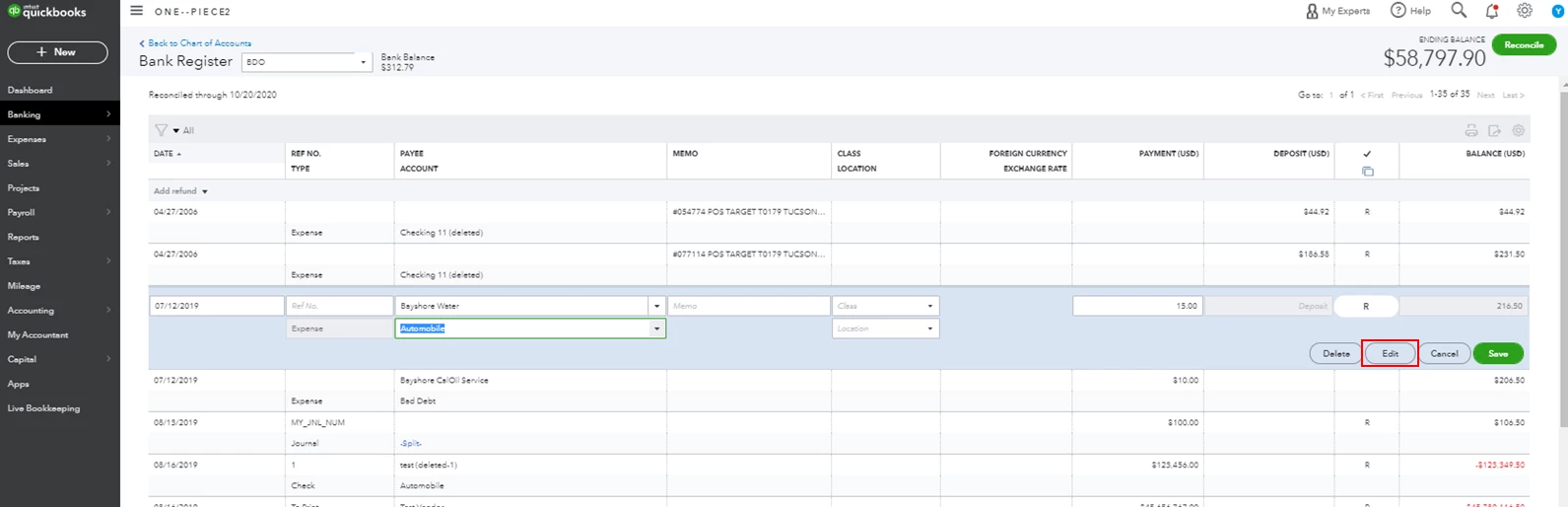
    Yes, you can make corrections to reconciled transactions and change their category or description. Changing anything but the amount and the account on any given transaction won't change its reconciliation status. You'll just have to directly edit the reconciled transaction and change its category and description. Here's how:
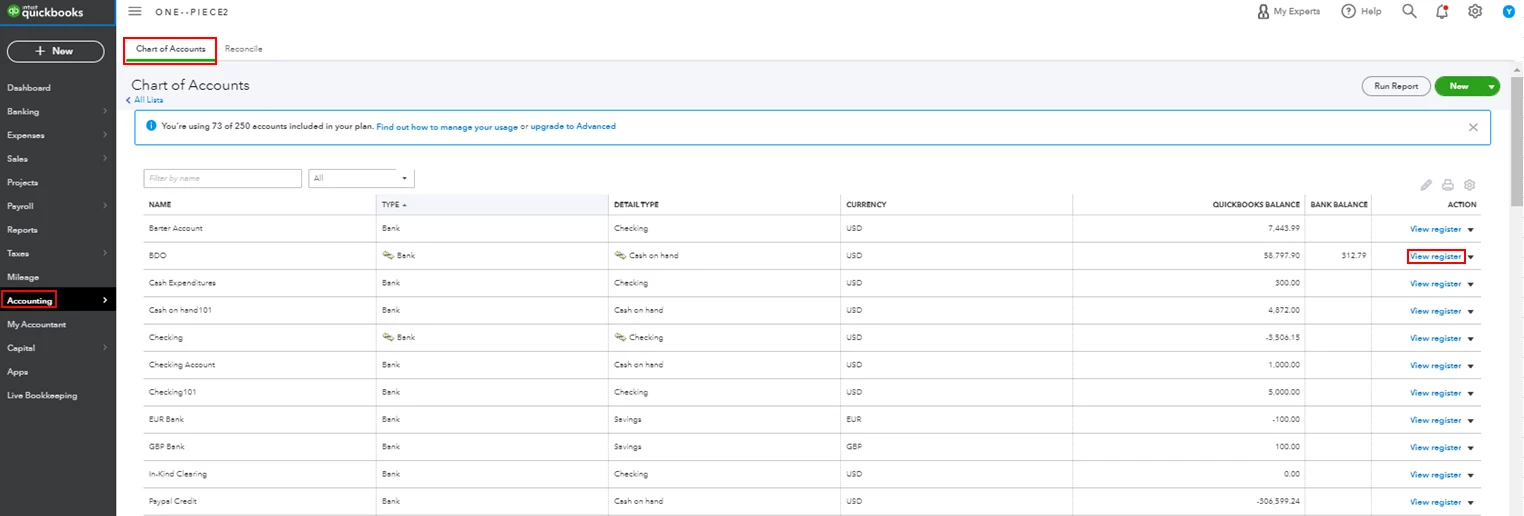
     

    1. Click Accounting from the left menu, then select Chart of Accounts.
    2. Find the bank account from the list and click View register.
    3. Locate and select the transaction you want to change, then hit Edit.
    4. Change the category or description, then click Save
    5. Click Yes to confirm the changes.
    6. Repeat the steps for the rest of the transactions you want to edit.


    Just in case you encounter issues with your opening balances, you can check out this article to learn how to fix it: Fix an opening balance to match a bank statement.


    Should you need any additional assistance while managing your reconciled transactions, you can leave a comment below. I'll be sure to get back to you.

    7 replies

    Mark_RModeratorAnswer
    Moderator
    January 25, 2021

    I've got you covered, @Atas2020.


    Yes, you can make corrections to reconciled transactions and change their category or description. Changing anything but the amount and the account on any given transaction won't change its reconciliation status. You'll just have to directly edit the reconciled transaction and change its category and description. Here's how:


    1. Click Accounting from the left menu, then select Chart of Accounts.
    2. Find the bank account from the list and click View register.
    3. Locate and select the transaction you want to change, then hit Edit.
    4. Change the category or description, then click Save
    5. Click Yes to confirm the changes.
    6. Repeat the steps for the rest of the transactions you want to edit.


    Just in case you encounter issues with your opening balances, you can check out this article to learn how to fix it: Fix an opening balance to match a bank statement.


    Should you need any additional assistance while managing your reconciled transactions, you can leave a comment below. I'll be sure to get back to you.

    January 18, 2022

    I get payments from PayPal and I transfer them to my LLC bank account. those transfers are being listed as uncategorized asset. how to I make them as just INCOME?

    Level 9
    January 18, 2022

    Hello there, @BRAIDEDXBANDIT.


    It could be that you've made a payment from a connected account and transferred it to an account that is not connected to QuickBooks. Also, if you're using the bank rule feature, the bank feed can automatically categorize the transactions as a Transfer to Uncategorized Asset.


    To correct the category of the uncategorized assets, you can follow these steps.


    1. Go to the Transactions or Banking menu.
    2. Select the Banking tab, then choose the appropriate bank account.
    3. Under the Categorized tab, locate the payment. Then, correct the categorized account.
    4. Then, Add.


    Still, I'll share these articles so you'll get more ideas about managing bank transactions in QBO:


    Please let me know how it goes. I'll be around to help you further. Take care always.

    January 18, 2022

    I get payments via PayPal, which I then transfer to my LLC bank account. quickbooks made them all Uncategorized asset" but I need them listed as INCOME. how do I do that?