
Get 50% OFF QuickBooks for 3 months*

Buy now
Switch to QuickBooks and 70% off for 3 Months
January 25, 2021
Solved

Making corrections to transactions

  • January 25, 2021
  • 7 replies
  • 45 views

Can I make corrections to a banking transaction after it has been reconciled?  For instance, I may need to change the categories and/or descriptions

    Best answer by Mark_R

    I've got you covered, @Atas2020.


    Yes, you can make corrections to reconciled transactions and change their category or description. Changing anything but the amount and the account on any given transaction won't change its reconciliation status. You'll just have to directly edit the reconciled transaction and change its category and description. Here's how:
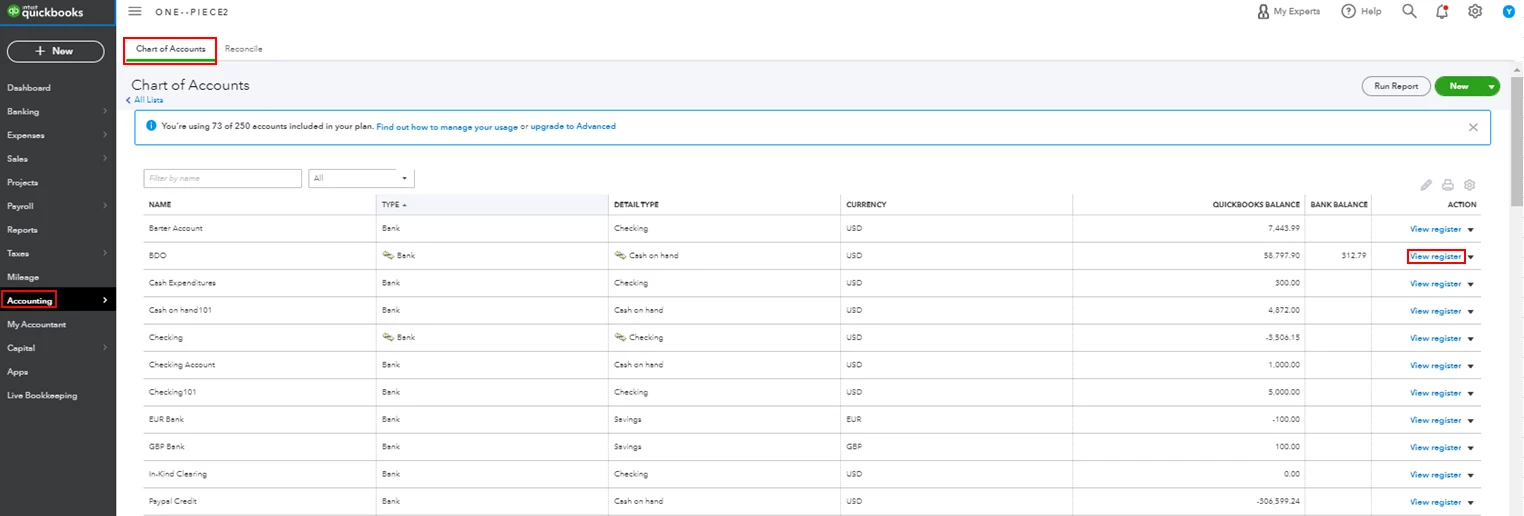
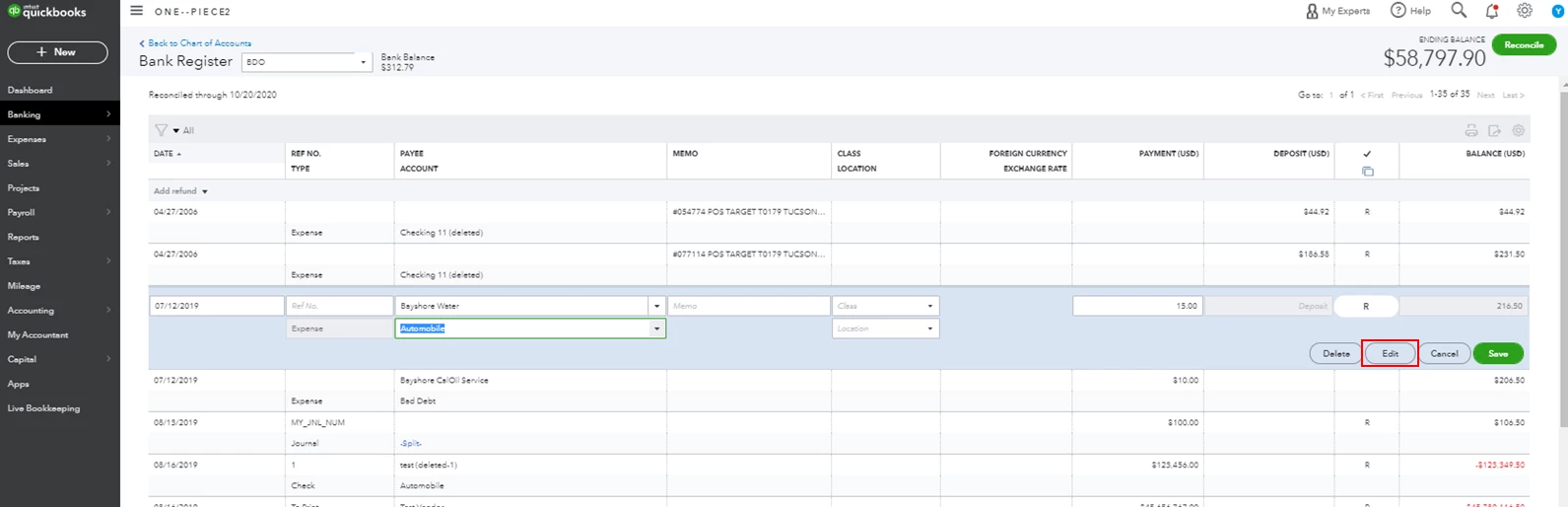
     

    1. Click Accounting from the left menu, then select Chart of Accounts.
    2. Find the bank account from the list and click View register.
    3. Locate and select the transaction you want to change, then hit Edit.
    4. Change the category or description, then click Save
    5. Click Yes to confirm the changes.
    6. Repeat the steps for the rest of the transactions you want to edit.


    Just in case you encounter issues with your opening balances, you can check out this article to learn how to fix it: Fix an opening balance to match a bank statement.


    Should you need any additional assistance while managing your reconciled transactions, you can leave a comment below. I'll be sure to get back to you.

    7 replies

    Mark_RModeratorAnswer
    Moderator
    January 25, 2021

    I've got you covered, @Atas2020.


    Yes, you can make corrections to reconciled transactions and change their category or description. Changing anything but the amount and the account on any given transaction won't change its reconciliation status. You'll just have to directly edit the reconciled transaction and change its category and description. Here's how:


    1. Click Accounting from the left menu, then select Chart of Accounts.
    2. Find the bank account from the list and click View register.
    3. Locate and select the transaction you want to change, then hit Edit.
    4. Change the category or description, then click Save
    5. Click Yes to confirm the changes.
    6. Repeat the steps for the rest of the transactions you want to edit.


    Just in case you encounter issues with your opening balances, you can check out this article to learn how to fix it: Fix an opening balance to match a bank statement.


    Should you need any additional assistance while managing your reconciled transactions, you can leave a comment below. I'll be sure to get back to you.

    May 18, 2023

    When I follow these steps there is no option to actually change any part of the item in the register. It will not let me change the vendor, register, amount, nothing. I cannot delete the item either. Why is this happening? 

    Level 8
    May 18, 2023

    I'm here to provide you with clarification and shed some light on that, MLFS.


    QuickBooks Online allows making corrections to banking transactions even after they have been reconciled. We can edit the categories and descriptions to reflect the correct information. 


    After expanding/clicking the entry, you'll notice that certain fields are greyed out to maintain the integrity of the reconciliation process and prevent unintended changes. To modify them, select the Edit button to be routed to the original transaction. From there, you can directly enter the updated details. Just make sure that you have the appropriate permissions to perform the action.


    If can't see the options above, open your company through a private window. QBO saves temporary internet files to load the pages faster. At times, they accumulate too much and get outdated causing strange behaviors. This mode prevents site data from being stored in the system. These are the shortcut keys:


    • Google Chrome: Ctrl + Shift + N
    • Safari: Command + Shift + N
    • Mozilla Firefox: Ctrl + Shift + P


    If that works, go back to your regular browser and clear its cache and cookies to start over fresh. Switching to other supported browsers can also help further isolate the issue.


    Keep in mind that the changes could put you out of balance the next time you try to reconcile. Therefore, performing corrections should be done carefully with the proper understanding of the implications. 


    It is important to exercise caution and follow best practices to ensure the accuracy of your financial records. If you're unsure or need expert advice, I encourage consulting with an accountant.


    For more resources while working with your books, check out these articles:


    Whether it's about a specific process or any other area you need assistance with, feel free to post your questions below. I'll get back as quickly as I can to answer them.

    January 18, 2022

    I get payments via PayPal, which I then transfer to my LLC bank account. quickbooks made them all Uncategorized asset" but I need them listed as INCOME. how do I do that?