
Get 50% OFF QuickBooks for 3 months*

Buy now
Switch to QuickBooks and 70% off for 3 Months
December 23, 2022
Solved

Record a vendor refund

  • December 23, 2022
  • 1 reply
  • 115 views

There are many posts out there about vendor refund in quickbooks online, but *all* of them include supplier credit, something that most of us don't have since we are on the low tier. 


My scenario the vendor has already refund me directly in my bank account. I need to categorize this income. Help me? 🙂

Best answer by Klent

I'll be more than happy to assist you with your concern, trixobird.


We can simply create a bank deposit in QuickBooks Online to account for the refund you received from your vendor. Here's how to do it:


  1. Click the + New button.
  2. Choose Bank Deposit.
  3. Go to the Add funds to this deposit section.
  4. Enter the reimbursed amount and choose the appropriate account.
  5. Add a memo as needed, then click Save and close.
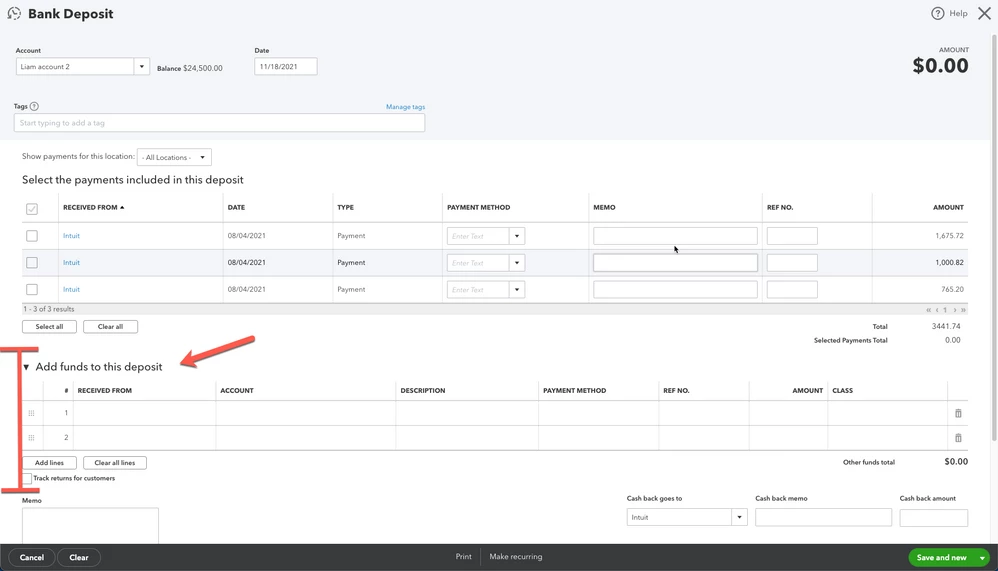


To learn more about handling supplier credits, feel free to read this article: Enter vendor refunds in QBO.


If you need more help in accomplishing your other tasks, please let me know by adding a comment below. I'll always have your back. Happy Holidays, trixobird!

1 reply

KlentAnswer
Level 8
December 23, 2022

I'll be more than happy to assist you with your concern, trixobird.


We can simply create a bank deposit in QuickBooks Online to account for the refund you received from your vendor. Here's how to do it:


  1. Click the + New button.
  2. Choose Bank Deposit.
  3. Go to the Add funds to this deposit section.
  4. Enter the reimbursed amount and choose the appropriate account.
  5. Add a memo as needed, then click Save and close.


To learn more about handling supplier credits, feel free to read this article: Enter vendor refunds in QBO.


If you need more help in accomplishing your other tasks, please let me know by adding a comment below. I'll always have your back. Happy Holidays, trixobird!

December 28, 2023


I followed the instructions you had below. I'm still having trouble categorizing my refunds off my bank feed  since I already received my refunds from my vendors. Some of the other refunds matched when I followed the steps to bank deposit. 

  1. Click the + New button.
  2. Choose Bank Deposit.
  3. Go to the Add funds to this deposit section.
  4. Enter the reimbursed amount and choose the appropriate account.
  5. Add a memo as needed, then click Save and close.
 
 
June 12, 2024

What if it is not a bank deposit and instead Credit Card refund?

I can create Credit Card refund, but unable to "Check" to clear Vendor Credit.


Time to move to Zoho...