Get 50% OFF QuickBooks for 3 months*

Buy now
Switch to QuickBooks and 70% off for 3 Months
August 2, 2017
Solved

Sales Report that shows sales orders each individual rep has written for a fiscal year

  • August 2, 2017
  • 5 replies
  • 26 views

Hello,

      Is there a way to run a sales report that shows how many sales orders each individual rep has written for a fiscal year?  Not the total amount but the actual number of tickets written.  Our sales staff is wanting to know how many tickets they have each written but we can't figure out how to acomplish this.  Could you please give me a set of instructions on how to acomplish this task?


Thanks In Advance


(Title has been edited by moderator for clarity)
    Best answer by

    Hi DCrain, 


    What version of QuickBooks are you running?  In my sample file on QuickBooks Desktop, I run a similar report by creating a Sales By Rep Detail report and then I change the filtering to show Non Posting transactions. 


    Customizing the report to show non-posting transactions is important because QuickBooks will only show transactions that have affected the balance and P&L accounts by default. 


    To create the report:

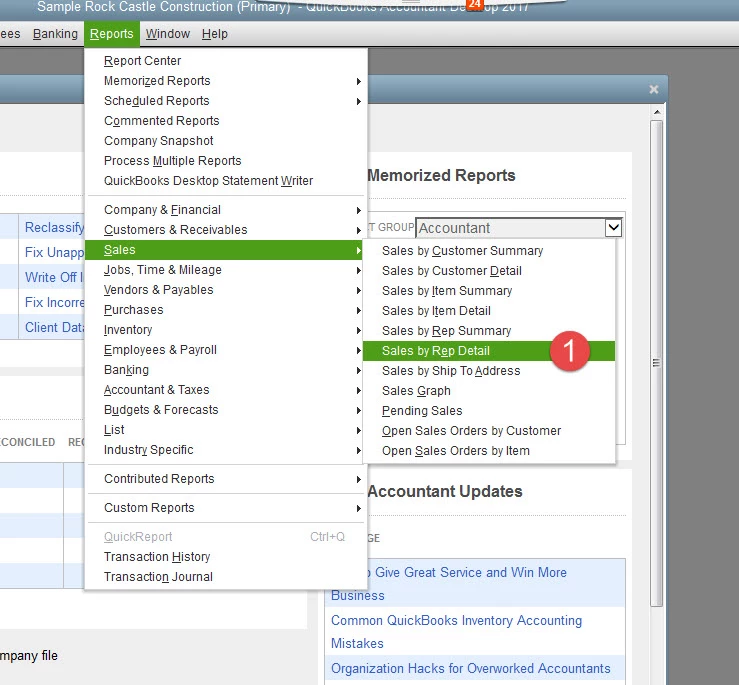
    • Go to the Reports menu at the top of the screen then choose Sales and then Sales Rep By Detail
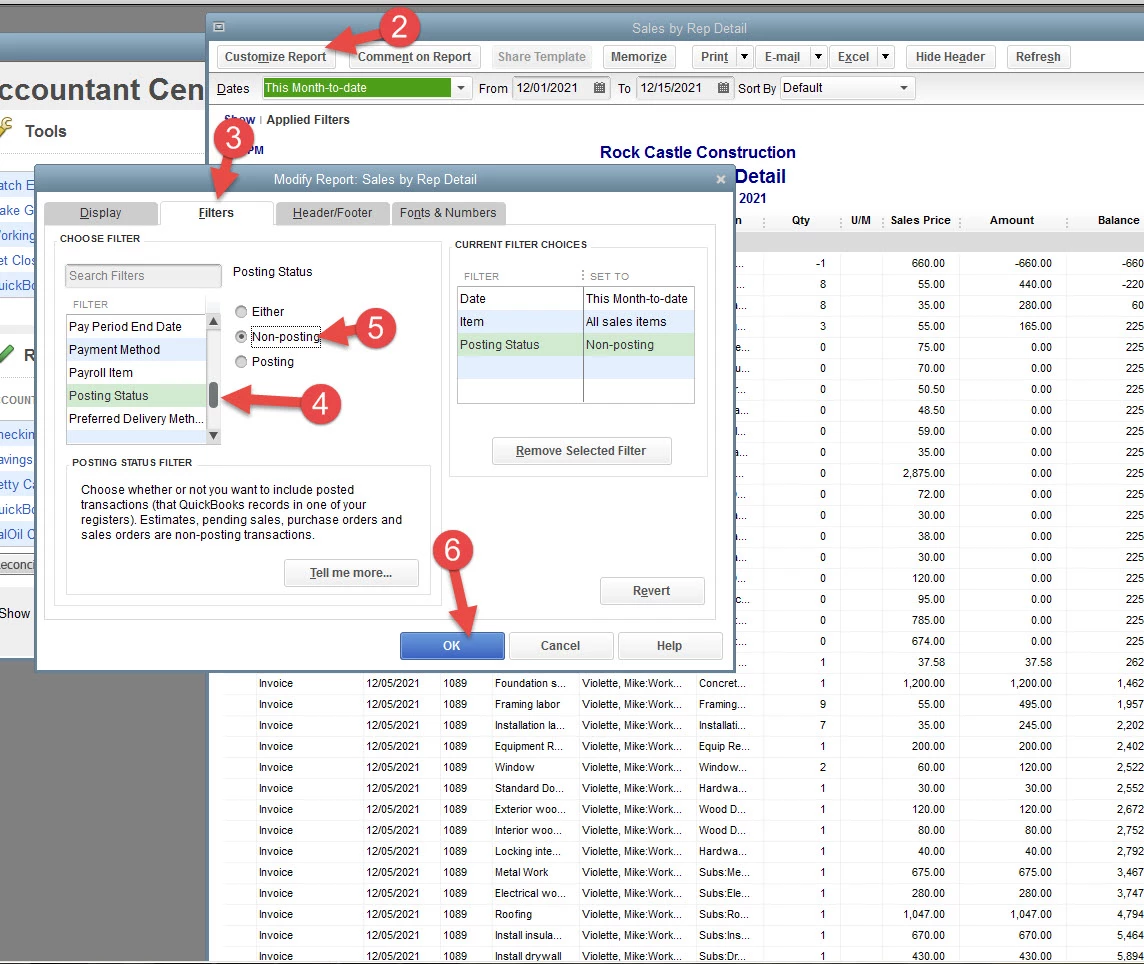
    • Click Customize Report
    • Choose the Filters tab
    • In the Choose Filter area, choose Posting Status
    • Set the Posting Status to Non-Posting

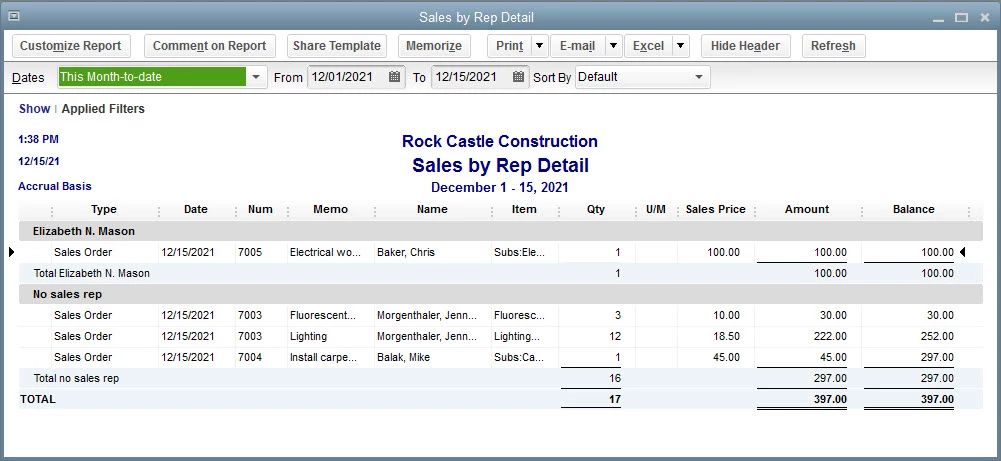
    Then press OK to display the report.  


    *If your reps are also on Estimates, they will be displayed as well. If this is the case, you may want to set the Transaction Type filter to show only sales orders. 


    Here are some screenshots that could show you what to expect:


    5 replies

    Answer
    August 2, 2017

    Hi DCrain, 


    What version of QuickBooks are you running?  In my sample file on QuickBooks Desktop, I run a similar report by creating a Sales By Rep Detail report and then I change the filtering to show Non Posting transactions. 


    Customizing the report to show non-posting transactions is important because QuickBooks will only show transactions that have affected the balance and P&L accounts by default. 


    To create the report:

    • Go to the Reports menu at the top of the screen then choose Sales and then Sales Rep By Detail
    • Click Customize Report
    • Choose the Filters tab
    • In the Choose Filter area, choose Posting Status
    • Set the Posting Status to Non-Posting

    Then press OK to display the report.  


    *If your reps are also on Estimates, they will be displayed as well. If this is the case, you may want to set the Transaction Type filter to show only sales orders. 


    Here are some screenshots that could show you what to expect:


    February 2, 2021

    @-1 wrote:

    Hi DCrain, 


    What version of QuickBooks are you running?  In my sample file on QuickBooks Desktop, I run a similar report by creating a Sales By Rep Detail report and then I change the filtering to show Non Posting transactions. 


    Customizing the report to show non-posting transactions is important because QuickBooks will only show transactions that have affected the balance and P&L accounts by default. 


    To create the report:

    • Go to the Reports menu at the top of the screen then choose Sales and then Sales Rep By Detail
    • Click Customize Report
    • Choose the Filters tab
    • In the Choose Filter area, choose Posting Status
    • Set the Posting Status to Non-Posting

    Then press OK to display the report.  


    *If your reps are also on Estimates, they will be displayed as well. If this is the case, you may want to set the Transaction Type filter to show only sales orders. 


    Here are some screenshots that could show you what to expect:


    Thanks it's working for me. Perfectly.
    March 6, 2021

    yes for me too,


    Yes for sure.

    August 25, 2017

    I highly appreciate the info like this! I currently working on improving my email marketing and sales activity. I've started using this soft recently https://voiptimecloud.com/inside-sales-software/ . It works great, when it comes to sales order reports!

    July 15, 2022

    Same Here. Thank you so much for such a detailed guidance. I have tried multiple accounting software but quickbooks is really the best.


    Regards,

    reverb

    October 27, 2020

    Thanks for picking out the time to discuss this. It is extremely helpful for me. Thanks for such a valuable help again.word counter

    January 5, 2021

    Amazing Tutu Thanks I check My  Sales Order Music.

    April 14, 2022
    This post has been deleted.

    Quickbooks perfectly solves the problem of creating a financial report! In my free time I love to draw and create step by step drawing tutorials!