
SUMMER SAVINGS 90% OFF QuickBooks for 3 months* Ends 8/27

Buy now
Switch to QuickBooks and 70% off for 3 Months
March 20, 2018
Solved

Sub Account Balance Sheet Report

  • March 20, 2018
  • 26 replies
  • 139 views

New to QB Online. I have my main bank account and sub accounts. I was in 2003 Before and had sub account balance sheet reports for fiscal year. My reports were supposed to be migrated over, but they did not. How do I create the same thing on QBOnline. It does not give me the option in the balance sheet to just choose certain account
Best answer by

Bummer. I was told that they did when I moved from 2003 to online. This is for my church and I want to create a balance sheet for each dept head so they know what they have available for their budget. Can you think of any other report that will give me what I need


Hey Dale (@fishing4dale)


I had another thought. @Rustler, while it may require a bit of manual work initially, would it make sense to create and save customized P&L reports by church department with all the relevant parent and sub-accounts for said department? 


26 replies

March 21, 2018

Hey Dale,


Welcome to the community and QuickBooks Online. Are you interested in running targeted reports for particular accounts or creating reports for only (and all) of your sub-accounts?


For the prior, go into the Accounting Tab and go to your Chart of Accounts. Find the specific sub-account you want to run a report for, click the () and then "Run Report." This limits the report (which is customizable) to just the one account. 


For the latter, go back into your Chart of Accounts and click the "Run Report" button on the top right. This brings up an account list and summary of everything in your CoA. To filter for specific sub-accounts, click the "Customize" button at the top, expand the "Filter" section, check the Account box and then scroll through the drop-down menu to toggle the specific accounts you want to include in your report.


QuickBooks Desktop and Online have different workflows, each has its own character, but once you learn them both they're equally easy to navigate. I was the opposite, I started with QuickBooks Online and am now exploring the features of QuickBooks Desktop.


I hope this helps! 

May 16, 2019

I spent 7 hours with Help Desk and then they concluded, QB Online is is designed to limit reports to Parent Account only and you cannot display the sub-accounts in P&L and Balance Sheet. I complained that this renders QB Online useless since I can see the Total Account balance from a bank statement. I asked why the Chart of Accounts includes such detailed sub-accounts and allows me to enter the detailed data, but cannot retrieve it. I was referred to leave a request in Feedback to the Engineers. Can anyone help me?

May 24, 2019

Hello there, @jwhllc.


Let me share a few information about the sub-accounts in the P&L and Balance Sheet report.


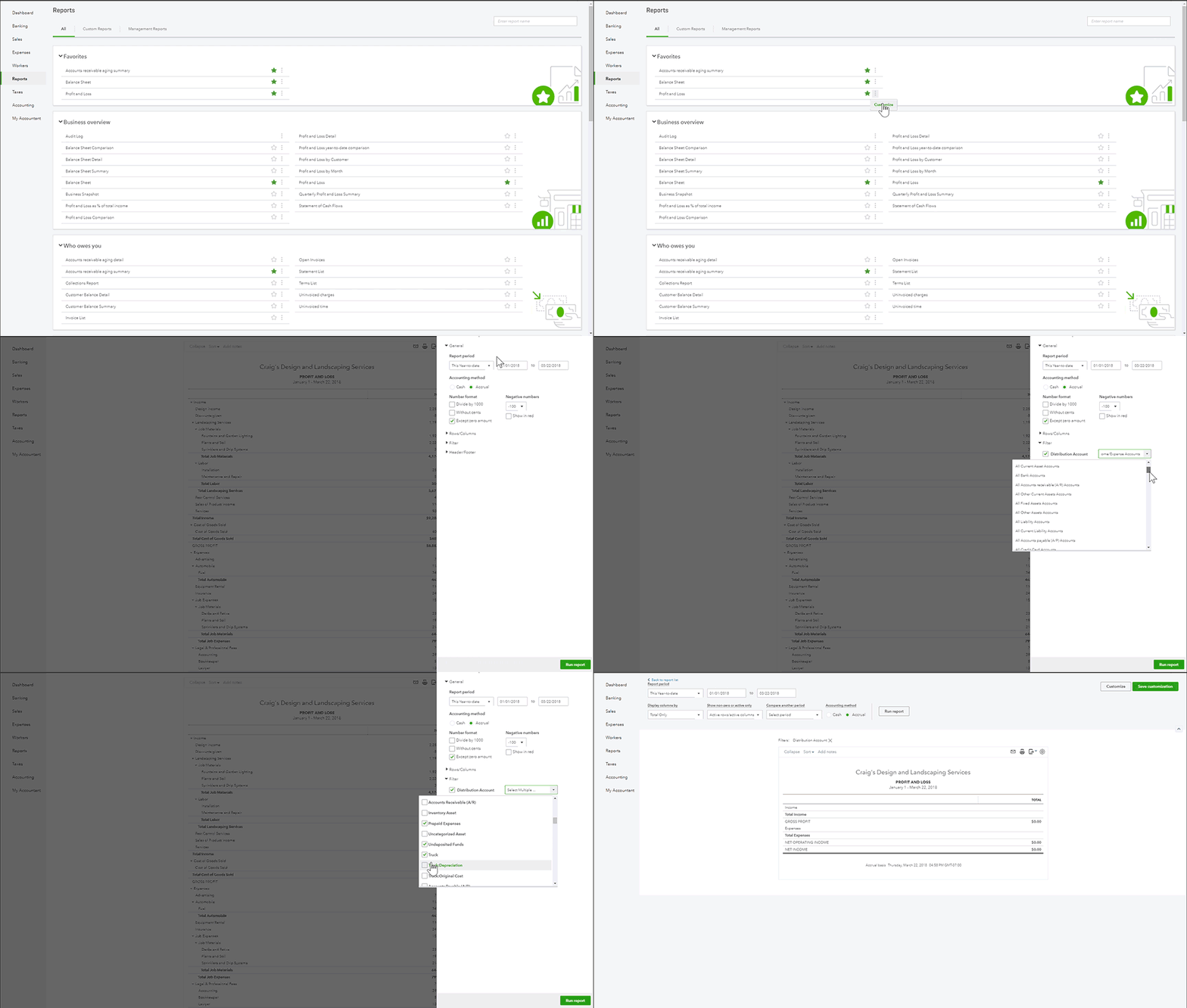
Once you've created sub-accounts, they'll surely show on the Profit and Loss and Balance Sheet report. You'll just need to customize the report to show the sub-accounts their respective parent accounts.


To do it, please follow the steps below:


  1. Click Reports.
  2. Search for Profit and Loss or Balance Sheet.
  3. Click Customize.
  4. Select Filter to drill-down.
  5. Check the box beside Distribution Account.
  6. Select the sub-accounts you want to display on the report.
  7. Hit Run report.

I've attached screenshots below for your reference.


Balance Sheet report screenshot.

You can also read this article for your reference: How to Customize Reports.


Also, in case you need tips and related articles in the future, visit our QuickBooks Community help website for reference: QBO Self-help.


That's it! Please let us know if you have any other questions about the P&L and Balance Sheet report. We're always here to help.


Hello Mark_R


With the standard balance sheet that is produced, why is it that only the accounts receivable header appears and ignores the type and detail type of other current assets and does not produce sub totals for them.


To be clear:

We have 3 accounts set with the following types

Accounts receivable - Accounts Receivable

Trading Account - Cash and cash equivalents

Savings Account - Cash and  cash equivalents


The report will add a header for the accounts receivable and report the total, but wil just list the two bank accounts under this and then provide a total for the current assets. 


I note as well that when you produce a Summarized Balance Sheet it will include the above two bank accounts as "Other Current Assets"


I expect there is a setting that has not been ticked.


Thanks for your help


Regards


Rob W

December 14, 2020

hie, i want to run a report with full details of my inventory value at hand including its sub-accounts which i created as inventory: demonstration and inventory: held by agent for sale. how do i go around it with QuickBooks online

Moderator
December 14, 2020

Don't sweat, @Eazi. Running an inventory report in QuickBooks Online (QBO) is easy as 1 2 3.


You can run the Inventory Valuation Detail report to show the QTY on hand and its value, including the sub-accounts (sub-product/service). Here's how:


  1. Sign in to your QBO account.
  2. Click Reports from the left menu.
  3. Search for the Inventory Valuation Detail report.
  4. From there, you'll see the full details of your inventory qty on hand and its value.

Here's an article you can read to learn what reports to use to view your inventory status in QBO: Use reports to see your sales and inventory status.


For your future reference, you might also want to check out these articles to know how to customize and memorize reports in QBO:


Should you need any assistance managing your inventory, I'm available here to help any time!

December 28, 2020

hie Quickbooks, some of my customers wanted transact in forex, and i wanted to shift from my home currency to the currency that my customer wanted to use to transact with me. How can i do it so that it will display the required currency in question for that specific customer