SALE EXTENDED 70% OFF QuickBooks for 3 months*   Ends 12/8

Buy now
cancel
Showing results for 
Search instead for 
Did you mean: 
Announcements
Simplify payday and set payroll to run automatically on QuickBooks. Explore QuickBooks Payroll
mmcdpines
Level 2

reconciliation question

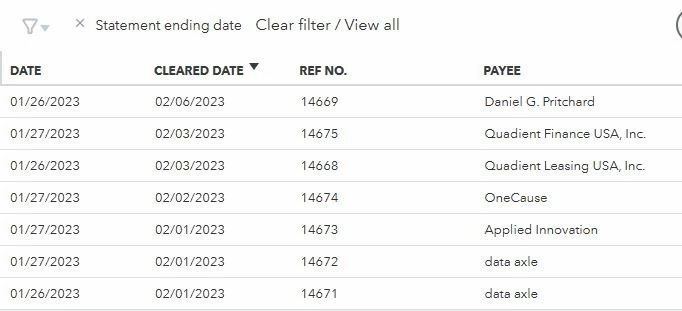
Hi.  I don't understand what is happening when we reconcile.  Currently we are reconciling January 2023.  I am using end of statement date (but I have also tried custom dates). The issue is that my screen shows items marked "cleared in February 2023."  How can I be seeing items marked cleared in February when I have not even reconciled January?  See attached photo.  Thanks for any help.


Capture.JPG


Solved
Best answer February 17, 2023

Best Answers
MaryLandT
Moderator

reconciliation question

I see you wish to reconcile a transaction that cleared prior to its transaction date in QuickBooks Online, mmcdpines.


Let me provide some ideas so you can have this done in no time. Your bank statement must always be the basis for reconciling transactions. 


In your case, it's normal to see transactions cleared in February 2023 since the bank account is connected to Online Banking.


To continue with the reconciliations, only mark transactions that show on the bank statement. Don't forget to check the opening balance. This maintains the accuracy and consistency of the numbers. For more information and detailed steps, check out this article: Reconcile an account in QuickBooks Online.


I'm also adding these helpful articles about managing online banking transactions and fixing any reconciliation errors that you might encounter.


Working with you is a pleasure for me. Keep in touch for more help about banking topics. We're here to back you up 24/7. Take the best care always and have a wonderful weekend!

View solution in original post

2 Comments 2
MaryLandT
Moderator

reconciliation question

I see you wish to reconcile a transaction that cleared prior to its transaction date in QuickBooks Online, mmcdpines.


Let me provide some ideas so you can have this done in no time. Your bank statement must always be the basis for reconciling transactions. 


In your case, it's normal to see transactions cleared in February 2023 since the bank account is connected to Online Banking.


To continue with the reconciliations, only mark transactions that show on the bank statement. Don't forget to check the opening balance. This maintains the accuracy and consistency of the numbers. For more information and detailed steps, check out this article: Reconcile an account in QuickBooks Online.


I'm also adding these helpful articles about managing online banking transactions and fixing any reconciliation errors that you might encounter.


Working with you is a pleasure for me. Keep in touch for more help about banking topics. We're here to back you up 24/7. Take the best care always and have a wonderful weekend!

mmcdpines
Level 2

reconciliation question

Thank you.  I had guessed that it had to do with online banking but I thought those February cleared transactions would be screened out from the January reconciliation screen if I select a date range or end of bank statement date.

Need QuickBooks guidance?
Log in to access expert advice and community support instantly.

Need to get in touch?

Contact us