This issue is actually caused by rounding the time totals to 5 decimal places. QuickBooks shouldn't be adding the ROUND function in the case of time totals, because time is stored in Excel with far more fidelity than 5 decimal places, and since the formatting of the cells as time will hide any small fractions for display in any case.
Date/time values are actually stored as numbers in Excel, where one day = 1.0 and so one second = 0.0000115740740740741 (which is 1/86,400, 86,400 being the number of seconds in a day). In order for the expected totals to be right every time, that fidelity is required - down to the second.
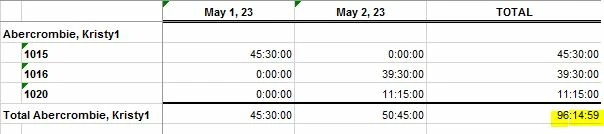
You can see the issue if you add seconds to the time format of the cells. Because the two daily totals are rounded to 5 decimal places, their sum isn't 15 minutes of the hour, but instead 14 minutes and 59 seconds:
This can be seen in more detail if you re-format the cells as decimals and include a lot of fidelity. After doing that, and adding a second total row with no rounding, you can see how much time is lost in the process of rounding, in this case 0.00000666666666:
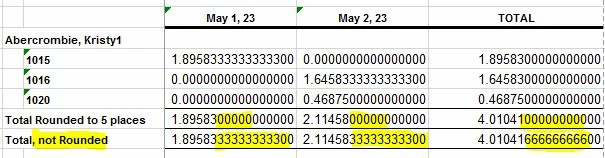
As it turns out, 0.00000666666666 is more than a 1/2 of a second, and so the sum of the time is one second short on your report from QuickBooks, because Excel can only represent time to the second. And so when formatting the results without seconds - as on the original report - it appears you're one minute short, when you're really only one second short.
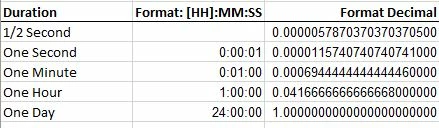
Here's a table demonstrating how seconds, minutes, and even hours cannot be accurately represented in Excel using 5 decimal places. An hour, for example, requires 16 decimal places, a minute 17 and a second 18:
And so, the only ways to fix this are:
1) Remove all of the ROUND functions from the totals on the reports.
2) Change all of the ROUND functions to round to 18 decimal places.
Either way, then you will get the correct result when the totals are themselves summed.
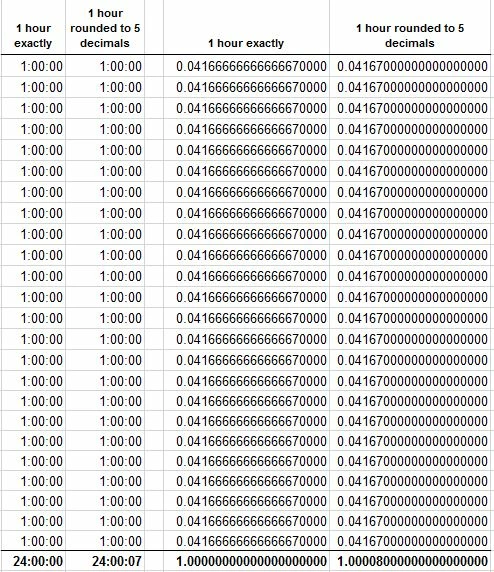
Here's a straightforward example of the problem created when rounding time to 5 decimals. Here, the table contains 24 rows, each with one hour entered. In the first column, hours are entered precisely as an hour, and the second column uses the ROUND function on each row, rounding the value in the first column to 5 decimal places. The result on each row looks the same, but it is not. And, so, when the rows are totaled at the bottom the rounded column has an extra seven seconds. You can see why this happens in the second set of columns, where the same internal values are entered, but they're formatted as decimals. On each row, the time is rounded, in this case up, from 0.0416666666666667 to 0.04167, and so the total includes an extra .00008, which converts to seven seconds: