You could save up to 25% on transaction costs².
Speak with us now to see if you qualify.
Talk to sales 1-800-515-8366
Monday - Friday, 6 AM to 4 PM PT

Table of contents
Table of contents
Many construction projects look profitable at the start. The estimate is approved, the budget is in place, and work gets underway. The challenge comes later, when actual costs start coming in, change orders pile up, billing schedules shift, and project performance no longer matches the original plan. Maintaining the margin you expected at the outset often depends on how quickly you can spot and respond to those changes.
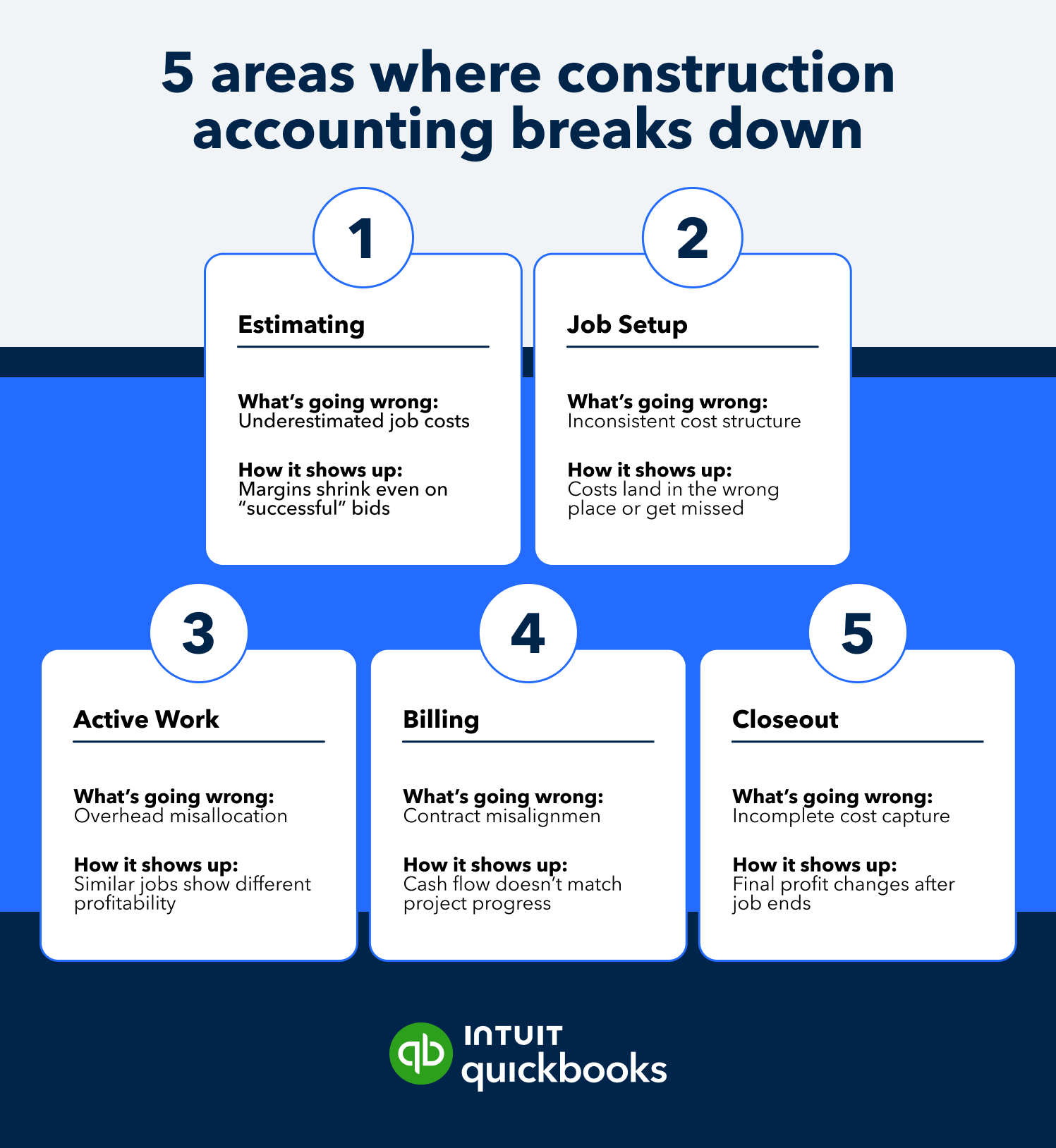
This guide breaks down five common construction accounting mistakes and how to correct them. You’ll see how each one shows up during a project and what to change to keep costs, reporting, and profitability aligned, so that you can trust your numbers at every job stage.
Scan this table to quickly identify where breakdowns may be happening in your workflow.

Financial data often ends up spread throughout estimating tools, accounting systems, and spreadsheets. Each team builds its own approach to tracking costs, which leads to inconsistencies that are difficult to reconcile.
Misalignment shows up quickly. Project managers track costs one way, accounting records them another, and reports don’t fully match. Teams spend time validating numbers instead of using them to make decisions.
Here’s how that disorganization shows up across teams:
Centralize financial data and standardize job-level accounting across every project. Use a defined cost structure for labor, materials, subcontractors, and overhead.
Many construction leaders are looking for greater connection between project and business operations. According to the Intuit QuickBooks 2026 Construction Profitability Report, 92% of construction decision-makers agree that having one system to manage construction projects and business operations is highly appealing.
With a shared system of record, project managers, controllers, and leadership all work from the same reporting. Variances surface earlier, and job performance can be evaluated using reliable data.
Estimates set the financial baseline for every project. When they are based on incomplete inputs or aren’t updated as conditions change, the numbers stop reflecting actual job costs. The disconnect becomes visible once actual spend starts coming in and no longer aligns with the projected spend.
Change orders, labor fluctuations, and material pricing can all push actual costs away from the original estimate.
Here’s how weak cost forecasting shows up during the job:
Compare estimated and actual costs throughout the project lifecycle, not just at closeout. Update forecasts as new information comes in, including approved change orders, material cost shifts, and labor adjustments.
Reviewing job performance through forecast updates, WIP reports, and cost-to-complete analysis helps teams spot changes in expected margins before they affect the final outcome. Project managers and finance teams can then adjust based on current project conditions rather than waiting until closeout.
Overhead is often treated as a broad percentage or is applied inconsistently across projects. Without a defined allocation method, costs such as equipment, supervision, insurance, and administrative expenses are distributed unevenly. As a result, it can be difficult to see what each job actually entails.
The issue becomes more pronounced when managing different job types. A labor-heavy project and a material-heavy project won’t absorb overhead the same way, yet many teams apply a single approach across both. That leads to distorted job costs and unreliable profit margin comparisons.
The impact becomes clear during job reviews, especially when similar projects produce very different margin results without an operational explanation.
Here’s how those inconsistencies can show up:
Define a uniform method for allocating overhead costs based on resource use. This may include applying overhead by labor hours, project duration, or a structured percentage tied to specific cost drivers.
Review allocation methods regularly to confirm they still reflect how work is performed. As job mix, labor models, or material costs change, overhead distribution should adjust with them.
A consistent allocation approach gives finance and operations a more accurate view of job performance. Teams can more easily compare projects and identify where margins are holding or slipping.
Job costs are often reviewed after the fact, once reports are finalized or accounting closes the books. By that point, the numbers reflect what already happened, not what’s currently unfolding on the job. That delay limits how quickly teams can respond to changes in labor, materials, or subcontractor costs.
Timing gaps create missed opportunities to address cost overruns during the job. A project may appear on track, only for issues to surface weeks later.
In practice, teams end up working without a current view of job performance:
Connect job costing directly to live financial data so costs are captured as they occur. Labor, materials, and subcontractor expenses should flow into job reports without delay, giving teams an up-to-date view of performance.
With real-time visibility, project managers can spot variances early and adjust before costs escalate. Finance teams gain a more accurate picture of job health throughout the lifecycle, not just at the end.
Contract terms often sit outside the day-to-day financial workflow. Payment schedules, retainage, and cost responsibilities may be defined upfront, but they aren’t always reflected in how jobs are tracked or forecasted. As work progresses, that disconnect can create gaps between expected and actual cash flow.
The impact becomes clear as billing and costs fall out of sync with the terms agreed to at the start of the project.
Here’s where issues start to surface:
Review your construction contract terms early and incorporate them into job costing and forecasting.
Payment timing, retainage, and cost responsibilities should be reflected in how revenue and expenses are tracked throughout the project. Contract timing can also affect project forecasts and margin expectations by influencing when revenue is recognized and costs are incurred over the life of the job.
With contract terms tied directly to financial workflows, billing stays aligned with project progress, and cash flow expectations are easier to manage.
The issues outlined above (e.g., disconnected data, inconsistent job costing, delayed reporting, and cash flow gaps) often stem from how financial systems are structured and used.

QuickBooks Online Advanced with the construction module brings those workflows into one platform, adding the controls, automation, and reporting depth needed to manage complexity with more consistency. It supports real-time job cost visibility, phase-based budgets, and connected billing to help protect margins from the start.
Managing projects across multiple tools and spreadsheets often leads to unreliable data and reporting. QuickBooks Online Advanced centralizes financials so job costs, billing, and reporting live in one place, helping teams maintain more consistent reporting throughout their project portfolio.
Identifying profitability trends and cost variances requires reporting that reflects how projects actually run. Advanced financial reporting tools provide greater visibility into project performance and budget health.
QuickBooks Online Advanced supports forecasting using historical and real-time data. This helps teams compare projected and actual performance as work progresses.
As more people get involved in financial workflows, maintaining control becomes more complex. QuickBooks Online Advanced allows you to assign role-based permissions to up to 25 users, so each team member has access to what they need, without exposing sensitive data.
Aligning billing with project progress and contract terms can help create more predictable cash flow throughout the life of a project.
Every stage of a project can affect the final margin. How you estimate, track costs, and manage billing directly impacts whether profitability stays on target or begins to erode. Structured processes give you the control to protect profitability and keep performance on track from start to finish.

Call Sales: 1-800-285-4854