
Get 50% OFF QuickBooks for 3 months*

Buy now
Switch to QuickBooks and 70% off for 3 Months
July 29, 2025
Solved

cancel Payroll

  • July 29, 2025
  • 3 replies
  • 46 views

When I tried to send Intuit my payroll there was an error that said to try later, when I went back to try to send it I mistakenly clicked start scheduled payroll not realizing it was the NEXT pay period.  Now QB wants to send both payroll periods (nothing has been submitted yet).  If I just delete the paychecks for the next pay period will QB show that pay period again under create paychecks?

Best answer by MichaelaS

Yes, you can delete the paychecks, but QuickBooks will not automatically display the current pay period. To fix this, you will need to edit the incorrectly created payroll schedule and update it to the current pay period, DD119.


 Here's how you can delete the paychecks: 


  1. Go to the Banking menu, then select Use Register.
  2. Choose your bank account, then hit OK.
  3. Please select and open the check in question.
  4. At the top of the paycheck, choose Delete.
  5. In the pop-up box, enter OK.


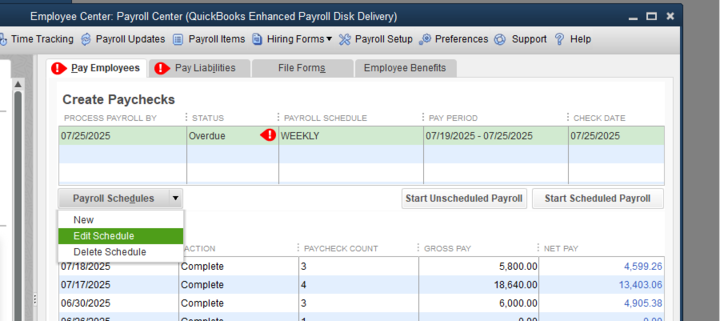
After deleting the paychecks, navigate to the "Pay Employees" window. Highlight the incorrect payroll schedule, click on the Payroll Schedule dropdown, choose Edit Schedule, and update it to the current pay period. Here's a sample screenshot:
 

Please resend your payroll. If the error persists, I recommend contacting our Live Support team for assistance. They have the tools and expertise to investigate and resolve this type of issue in a secure environment.


Please leave us a response if you have other questions or concerns.

3 replies

MichaelaSQuickBooks TeamAnswer
QuickBooks Team
July 29, 2025

Yes, you can delete the paychecks, but QuickBooks will not automatically display the current pay period. To fix this, you will need to edit the incorrectly created payroll schedule and update it to the current pay period, DD119.


 Here's how you can delete the paychecks: 


  1. Go to the Banking menu, then select Use Register.
  2. Choose your bank account, then hit OK.
  3. Please select and open the check in question.
  4. At the top of the paycheck, choose Delete.
  5. In the pop-up box, enter OK.


After deleting the paychecks, navigate to the "Pay Employees" window. Highlight the incorrect payroll schedule, click on the Payroll Schedule dropdown, choose Edit Schedule, and update it to the current pay period. Here's a sample screenshot:


Please resend your payroll. If the error persists, I recommend contacting our Live Support team for assistance. They have the tools and expertise to investigate and resolve this type of issue in a secure environment.


Please leave us a response if you have other questions or concerns.

DD119Author
July 29, 2025

That worked.  Thank you!   

QuickBooks Team
July 29, 2025

You're always welcome, DD119.
 
I’m glad that my colleague’s assistance helped with your payroll concerns. We admire your dedication and patience in following the guidance provided.
 
 Reply here or create a new forum if you have questions about QuickBooks. We're always here to assist you.