
Get 50% OFF QuickBooks for 3 months*

Buy now
Switch to QuickBooks and 70% off for 3 Months
April 12, 2024
Question

PDF/Email issues

  • April 12, 2024
  • 2 replies
  • 4 views

Hello, and thanks in advance for any help or suggestions.


I am having no luck in saving a PDF file through QuickBooks as well as when I try to send an email through 

QuickBooks. I get this message every time : 
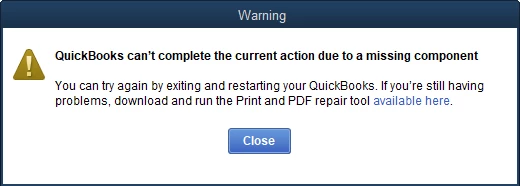
 

I am running the latest version of QuickBooks and it is fully updated. Also, I am running Windows 11 and it is fully updated as well. I have already downloaded the QuickBooks Tool Hub and run the "QuickBooks Print and PDF Repair Tool" and it didn't fix this issue.


Thanks again in advance for any help.

2 replies

QuickBooks Team
April 12, 2024

Hello there, @coden.


I appreciate the steps you've taken so far and allow me to help you fix this issue.


Since QuickBooks Tool Hub doesn't fix the issue, I suggest restarting and resetting your temp folder permissions. Here's how:


  1. Restart your computer and send the email again.
  2. If the issue persists, reset your temp folder permissions by pressing the Windows key +R to open the RUN command.
  3. Now, type  %TEMP% and click Enter.
  4. Right-click an empty area of the temp folder, then hit Properties.
  5. Select Security and make sure all user names and groups in Security have Full Control.
  6. Once the permission has been set to Full Control, you can now save it as PDF again in QuickBooks.


Next, test if you can print to your XPS. Here's how:


  1. Open your Notepad, then type Test.
  2. Select File and Print.
  3. Select the XPS Document Writer, then Print.
  4. Enter a filename and save it on your desktop.
  5. Now, go to your desktop and view the XPS document you printed from notepad.


If the steps above doesn't fix the issue, I recommend proceeding to Solution 3: Create a new template or form in this article: Fix PDF and Print problems with QuickBooks Desktop.


Moreover, I'm adding this article as your reference for fixing company file issues in QuickBooks Desktop: Reinstall QuickBooks Desktop.


Return to this post if you have other concerns about saving and printing your PDF file in QBDT. I'll be here to lend a hand.

April 19, 2025

Hello @coden 

I have had this issue for 2 weeks now.  I have tried every "fix" more than once.  I have rebooted multiple times after every attempt to fix it.  I have even downloaded a fresh Trial version of QBs desktop Enterprise 2024.

I am running Lenovo all in one system with WIN 11 OS.

I have done nothing but trouble shoot these past two weeks.  

I have tried to reinstall the MS XPS Document Writer, but alas, it does not show up after trying to install a new printer, manually.  XPS Document Writer is NOT an option, even after Windows updates their list.

Is there a work around?  Can a different PDF program be used to send attachments via Gmail via QBs desktop?

I HAVE to find a solution.  The bookkeeping is not getting done.

HELP!

April 20, 2025

I had similar issues as well.  I tried what "4gal" suggested and discovered a fix.  I suggest you try that as well.  Best of luck.

Level 5
April 13, 2024

@coden 

To resolve the issue, search at the bottom of your Windows 11 screen for "run." Then ope the "Run App" that came up under your search and typed "optionalfeatures" into the Run App. A "Windows Features" window then open and scroll down to "Microsoft XPS Document Writer" and check the box next to it. I then pressed "OK".


June 20, 2024

Thank you for this you saved my day.

June 20, 2024

You’re always welcome, @nikkib77 .
 
I’m glad to hear that the resolution outlined in this thread has helped you send and save PDF files in QuickBooks. Rest assured that everyone in this forum is in hand to help everyone who needs assistance.
 
Please don’t hesitate to reach out to us if you have any QuickBooks-related concerns. Have a good one!