
SUMMER SAVINGS 90% OFF QuickBooks for 3 months* Ends 8/27

Buy now

Switch to QuickBooks and 70% off for 3 Months
Dec 7, 2025 12:20 AM UTC
Solved

Why were my 2024 transactions deleted

I went to run a report for my 2024 profit and loss, and everything was gone. There is nothing there.

RazzieE
RazzieEAnswer
QuickBooks Team
Dec 7, 2025 1:51 AM UTC

Hi there, shery. Welcome to the Community.


When you run a Profit Loss (P&L) report and no transactions appear, it could possibly be that the filter used in the Report period is incorrect, causing no data to show. Let me show you how to filter it correctly.


Here's how:
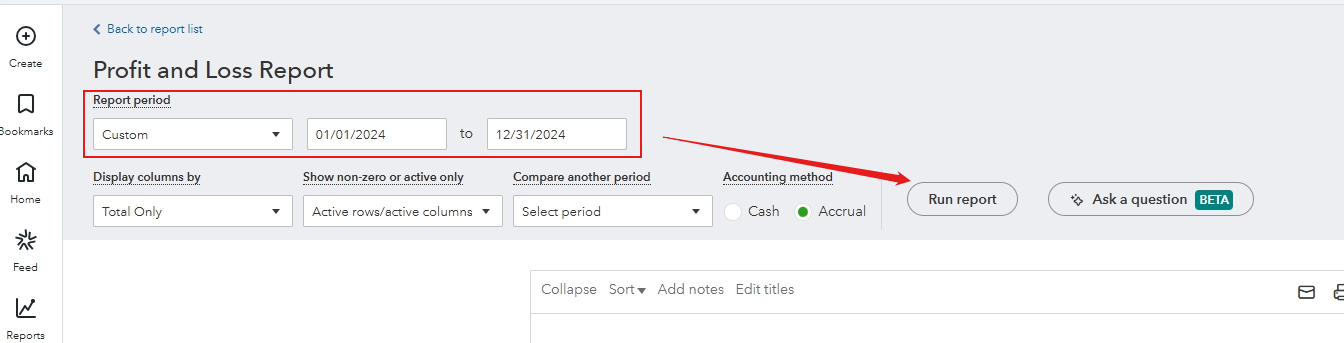
 

  1. Open the Profit and Loss report.
  2. In the Report period drop-down, choose Custom date.
  3. Enter the specific date range you want to review.
  4. Click Run report to refresh the results.


You can also use a private/incognito window when running the P&L report, as missing data can sometimes be caused by browser-related issue.


If transactions are still missing, you can review your Audit Log to confirm whether any 2024 transactions were deleted. If they were, you'll need to re-create them. You can contact your accountant to assist you with this process if needed.


We're here to help, so if you have any follow-up questions, just click the Reply button.

2 replies

RazzieE
RazzieEQuickBooks TeamAnswer
QuickBooks Team
Dec 7, 2025 1:51 AM UTC

Hi there, shery. Welcome to the Community.


When you run a Profit Loss (P&L) report and no transactions appear, it could possibly be that the filter used in the Report period is incorrect, causing no data to show. Let me show you how to filter it correctly.


Here's how:


  1. Open the Profit and Loss report.
  2. In the Report period drop-down, choose Custom date.
  3. Enter the specific date range you want to review.
  4. Click Run report to refresh the results.


You can also use a private/incognito window when running the P&L report, as missing data can sometimes be caused by browser-related issue.


If transactions are still missing, you can review your Audit Log to confirm whether any 2024 transactions were deleted. If they were, you'll need to re-create them. You can contact your accountant to assist you with this process if needed.


We're here to help, so if you have any follow-up questions, just click the Reply button.

Moderator
Dec 8, 2025 10:05 AM UTC

Hi, @sherylluitjens.


I just wanted to follow up to check if the resolution we provided helped resolve your issue.


Please let us know if everything is now working as expected or if you're still experiencing any problems.