
cancel
Showing results for 
Search instead for 
Did you mean: 
Announcements
Lea-o7
Level 1

COGS and Inventory Account Setup

hi there,


I am trying to setup quickbooks with my a2x integration but I'm finding it really confusing.


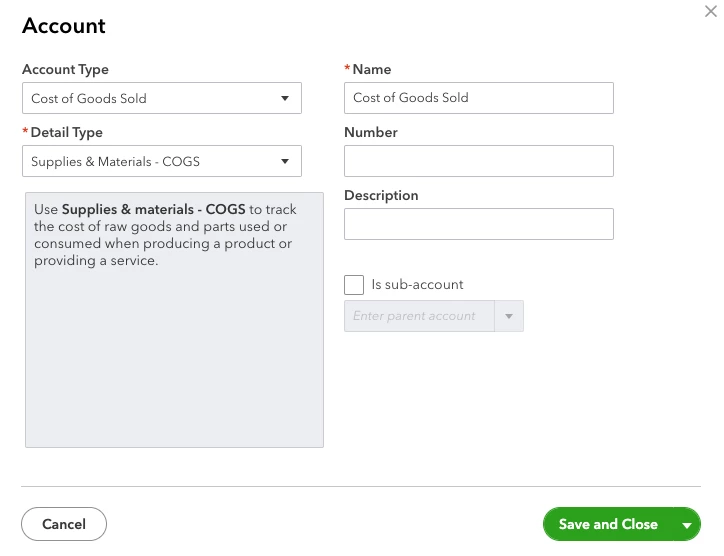
A2X have advised that I need to setup a 'cost of goods sold' account under chart of accounts, and also a credit account for inventory.


I have followed the screenshots here, but I'm not getting the same options:
 

image


I don't have that option, the closest option I have is Cost of sales... is this the same?


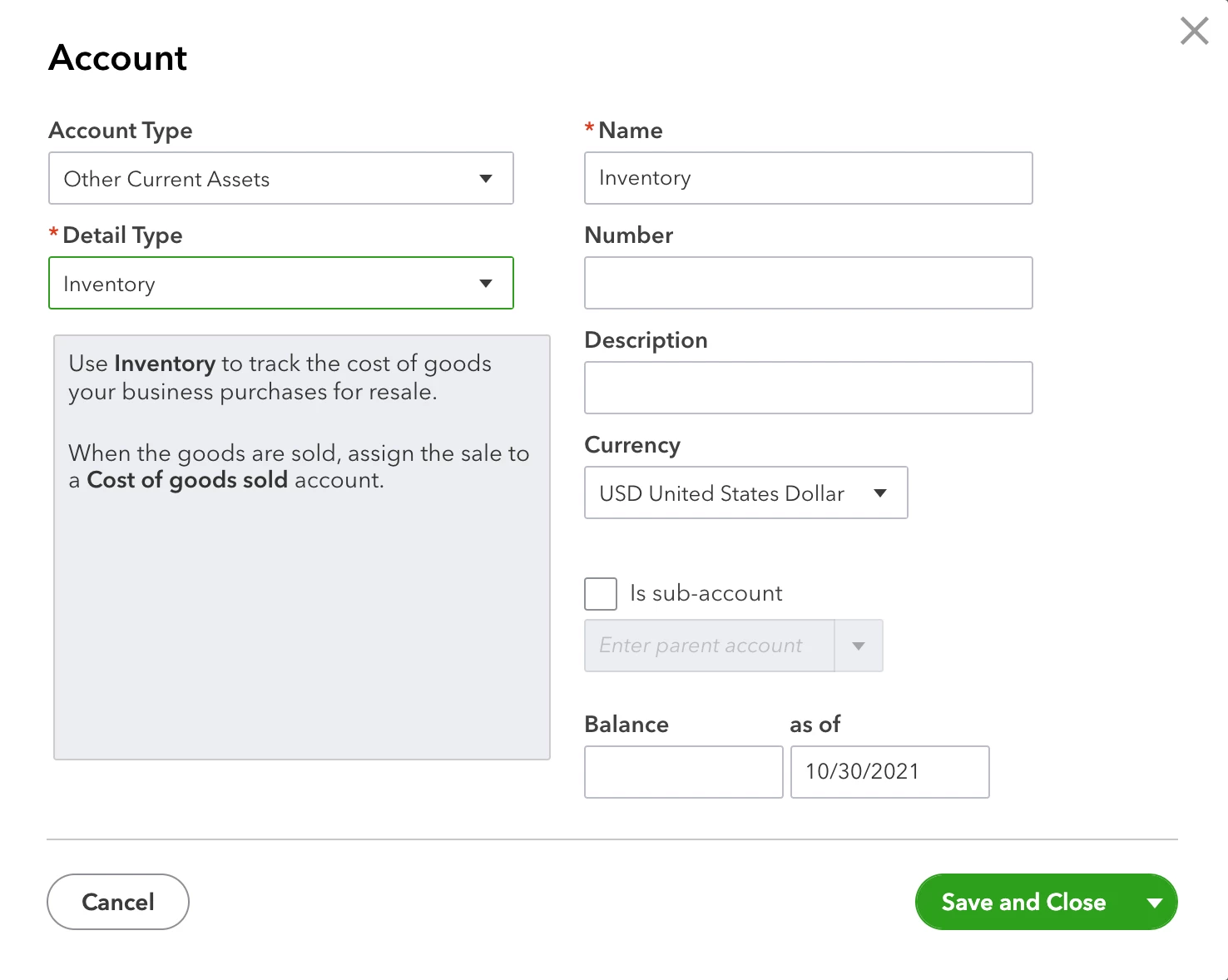
Also I have the same issue for 'inventory' - I don't have this option:
 

2021-10-30_11-58-28

I do have 'stock' however, under current assets > stock  would this be the same?


Thanks!

Leanne


6 REPLIES 6
katherinejoyceO
QuickBooks Team

COGS and Inventory Account Setup

Hello there, @Lea-o7


Thanks for following the steps to set up COGS and inventory in QuickBooks. 


As an insight, the inventory feature is only available on either the Plus or Advanced plan. You'll want to upgrade your QuickBooks Online subscription so you can enjoy this feature. 


After you upgrade, follow these steps below to turn on the inventory: 


  1. Go to the Gear icon.
  2. Select Account and settings.
  3. From the Sales tab, select the Products and services section.
  4. Turn on both Show Product/Service column on sales formsTrack quantity and price/rate, and Track inventory quantity on hand.
  5. Select Save and then Done.


I've included some informative resources that will guide you the detailed steps in setting up inventory:


Visit and post again if you have additional concerns. I'm always around here to guide you more. 


Lea-o7
Level 1

COGS and Inventory Account Setup

Hi there


Thanks so much for the reply! 

Lea-o7
Level 1

COGS and Inventory Account Setup

Hi there


Thanks for the advice - I have followed the steps up until step 4 and I get stuck (I have a plus account):


I don't have any options at all for step 4 on my dashboard - I wondered if this was because i need to create my products first, but when i do I have to select what account the product goes into and cost of goods sold is still not there... 


  1. Go to the Gear icon.
  2. Select Account and settings.
  3. From the Sales tab, select the Products and services section.
  4. Turn on both Show Product/Service column on sales formsTrack quantity and price/rate, and Track inventory quantity on hand.  


This is what i see under products and services:

Screenshot 2022-01-26 at 09.11.08.png

  1. Select Save and then Done.

Thanks

Ashleigh1
QuickBooks Team

COGS and Inventory Account Setup

Hello Lea-o7, thanks for coming back to us so step 4 is not in that section you send a screenshot off it is within the main cog wheel> account and settings> sales> product and service> turn on the settings save and done. 

Lea-o7
Level 1

COGS and Inventory Account Setup

Hi Ashleigh


Thanks for the response.  Those are all turned on... but I still can't see where I can add Cost of Goods Sold under chart of accounts... is cost of goods sold the same as cost of sales?


Screenshot 2022-01-26 at 12.35.37.png

I've seen on other forums that they are apparently not the same... all I want to do is track the COGS for my inventory 


Thanks!

Leanne


Ashleigh1
QuickBooks Team

COGS and Inventory Account Setup

Hi Leanne, that is great to yeah all the settings are turned on. In regards to the chart of account yes  cost of sales would be the one to choose for the cost of goods sold. As a cost of sales is a cost of goods sold account so that is the correct one to select. 

Need to get in touch?

Contact us