
Get 50% OFF QuickBooks for 3 months*

Buy now
Switch to QuickBooks and 70% off for 3 Months
July 20, 2020
Solved

Change Order

  • July 20, 2020
  • 3 replies
  • 49 views

I have looked at every “how to” and multiple threads on this website. What do I do if the “change order” box doesn’t populate when I make changes to an estimate? Pls help. sos

Best answer by Charies_M

You've made the right choice of coming here, JRH2.


When you make changes to your estimates, the Add Change Order box will pop up after the Recording Transaction window appears. I'll show you some screenshots below:


This the Recording Transaction pop-up. Just click Yes and the Add Change Order will automatically appear.

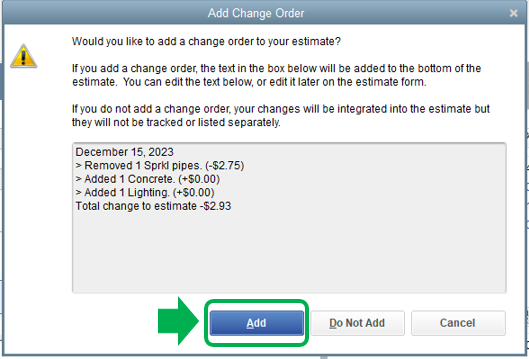
This is the Add Change Order box. Click Add to save the changes made.
 

You can have this article handy for more information about creating estimates in QuickBooks Desktop: Create an estimate.


If it still doesn't give you the change order box, I suggest running the Verify and Rebuild Utility Tool. This helps repair any data damage in the system. Below are the steps on how to do this:
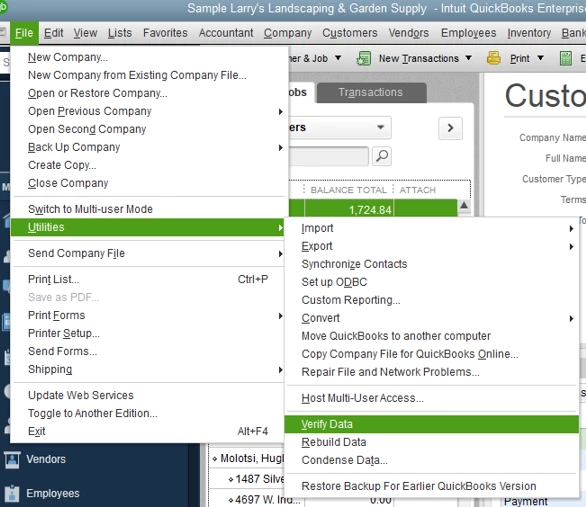
 

  1. From the File menu.
  2. Click on Utilities.
  3. Select Rebuild Data/ Verify Data.

I've got your back whenever you need help while working with QuickBooks. It will be a pleasure to assist you further. Enjoy the rest of the day!

3 replies

Charies_MAnswer
Level 9
July 20, 2020

You've made the right choice of coming here, JRH2.


When you make changes to your estimates, the Add Change Order box will pop up after the Recording Transaction window appears. I'll show you some screenshots below:


This the Recording Transaction pop-up. Just click Yes and the Add Change Order will automatically appear.

This is the Add Change Order box. Click Add to save the changes made.


You can have this article handy for more information about creating estimates in QuickBooks Desktop: Create an estimate.


If it still doesn't give you the change order box, I suggest running the Verify and Rebuild Utility Tool. This helps repair any data damage in the system. Below are the steps on how to do this:


  1. From the File menu.
  2. Click on Utilities.
  3. Select Rebuild Data/ Verify Data.

I've got your back whenever you need help while working with QuickBooks. It will be a pleasure to assist you further. Enjoy the rest of the day!

March 22, 2026

Thank you for these directions. I ran both utilities and the change order box did not pop up when I made a change to an estimate.  Any ideas on how I can fix this?  In advance, thank you for your help.

QuickBooks Team
March 22, 2026

Hi there, Sklglass24. Have you tried opening a sample company file to see if the problem persists? This helps us see if the issue is specific to your data, as the sample file mirrors all standard features.


To do this, select the Open a sample file dropdown on the QuickBooks startup page. You can see the photo attached below:


If the change order pops up in the sample file, your main company file likely has data integrity issues. I recommend using the QuickBooks Tool Hub to resolve this.


We have to close QuickBooks, then download and install the latest version (1.6.0.8) of the QuickBooks Tool Hub by running the QuickBooksToolHub.exe file and following the prompts to open it from your desktop.


If you can't find the icon, search in Windows for QuickBooks Tool Hub and select the program.


Next, run either Quick Fix My Program or the QuickBooks Install Diagnostic Tool. For steps, see Solutions 1 and 2 in this article: Repair your QuickBooks Desktop for Windows.


If the issue persists, I suggest reaching out with our Live Support team for them to take a closer look at your account. You can check our support hours here to find the best time to connect.


I’ll keep this thread open for any updates or anything else you’d like to share.

October 25, 2022

I'm sure this is out of date. With the current edition of QBO, how do we make change orders?

JenoP
QuickBooks Team
October 25, 2022

We're glad to see you here in the Community, Modern Dwellings.


Allow me to share details about changing orders to estimates.


First, you're following a thread for QuickBooks Desktop. Although the steps are not outdated, they will not be applicable to you since you're using a different platform. 


Second, the online version or QBO does not have a similar feature for changing orders. However, you can edit the estimate to include additional products or items to the transaction. Here's how:


  1. Go to the Sales menu and proceed to the All Sales tab.
  2. Look for the estimate and click on it to open the transaction.
  3. Add or edit any details in the Product/Service column.
  4. Click Save.


You would also need to edit the linked invoice so they would have the same information. Just click the 1 linked invoice link in the upper-right hand corner of the estimate. Then, make the same changes to make sure both the estimate and invoice have similar details. 


After that, click Save and send if you want to send another copy of the transaction to the customer. 


Let me know if you're able to save the changes to your estimates. I'd be glad to get back here if you need anything else. 

June 12, 2025

Once I enter a change order on an Estimate, can I get rid or delete it from the estimate?