
Get 50% OFF QuickBooks for 3 months*

Buy now
Switch to QuickBooks and 70% off for 3 Months
May 9, 2023
Question

Estimates not formatted correctly

  • May 9, 2023
  • 3 replies
  • 12 views

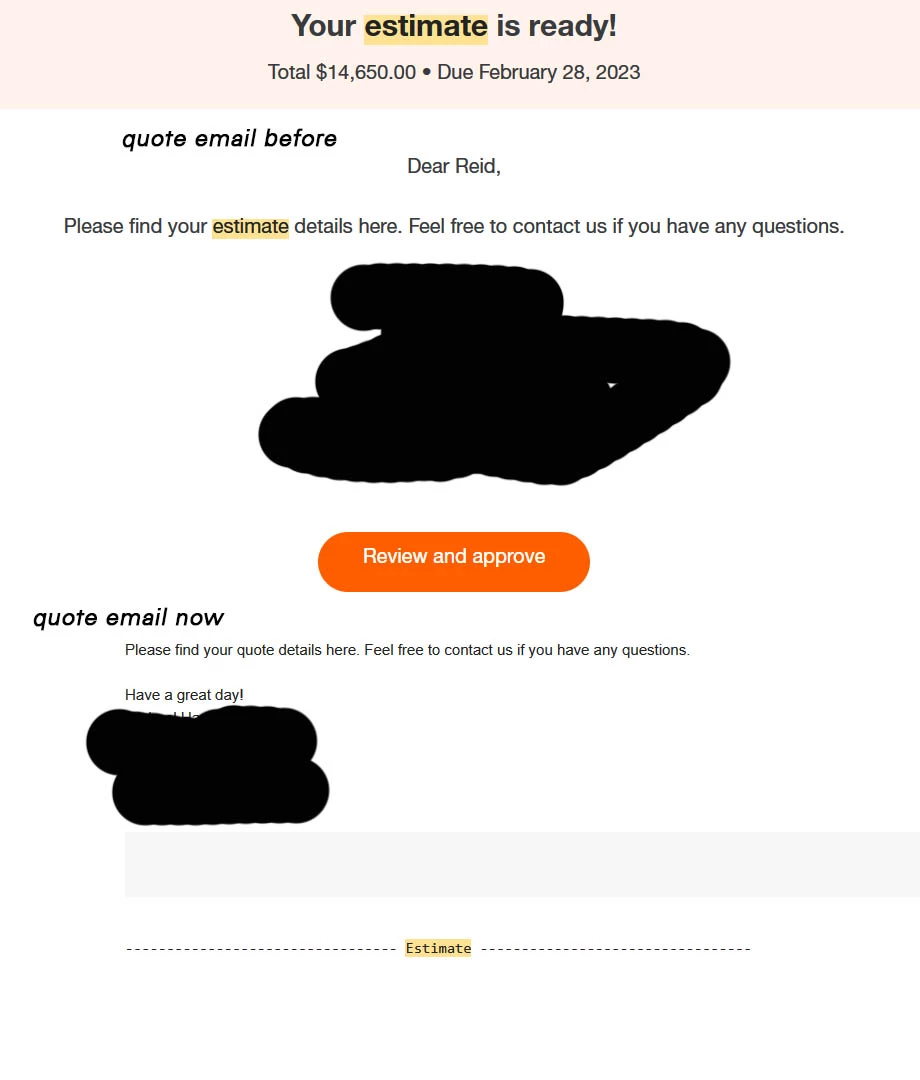
Anybody else notice that estimate emails no longer contain review and approve button/link? Reached out to support and was not offered a solution. 


3 replies

Angelyn_T
Moderator
May 9, 2023

Formatting your estimates correctly with the Review and approve link is my priority today, sales. You can run through some troubleshooting steps to get back the missing tab. I can guide you through the process.


Approving the estimates through the Review and Approve link is available on the new estimate interface. Please select the new layout when creating your transaction to get the option.


  1. Sign in to your QuickBooks Online (QBO) account.
  2. Go to the +New icon, then click on Estimate.
  3. Select Try the new invoices in the top right corner. 
  4. Fill in the details.
  5. Hit on Save and send.


These links will give you insights about switching to either the old or the new experience for estimates and invoices:


If the issue persists, I suggest creating your transactions through a private window to narrow down the result and protect your browser against cookie-based tracking. You can use either of these keyboard shortcuts to save you time:


  • Google Chrome: press Ctrl + Shift + N
  • Microsoft Edge: press Ctrl + Shift + N
  • Firefox: press Shift + CTRL + P


If it works, clear the cache of your original browser to start fresh. 


Once the estimate entry is approved, you can convert it into an invoice.


Please notify me in the comment section below if you have follow-up questions while working on your transactions. Just leave a comment below. Have a good one!

June 1, 2023

Hello i have the same issue and i had done what you suggest and the problem perssit

July 30, 2023

Hi salesperfromance,


I appreciate you for adding a screenshot. It helps me visualize your concern.


As of now, our engineers are still rolling out the new estimate layout wherein you can review and approve the said transaction.


For now, you may use the old layout and then email the estimate manually.


I've also added this article as your guide in converting an estimate to an invoice: Convert an estimate into an invoice in QuickBooks Online.


I'm always around whenever you have concerns in sending transactions.


I am a software developer and we both know that it can be fix in maybe 1 code line. I supose that the software deparment is busy in others task and they dont have time to come back and fix something that is no working and it should.
You shuold report this issue to the developer deparment and let them know this shuold be a priority task.
Many customers have the same problem and definitely send estiamates manualy is stilling my time. All your guides, official website page and tutorials videos are selling this feature and its no already deploy , i dont know but someone could present a legal claims cause we are paying for something that this beautifull system is not offering.

Task in develoment must be scheduled in time, please could you request the estimate date for get this new layout deploy for all customers?

I still having the same concern. When i will be avalaible to use the new layout ?

My actuals invoces, estimates are really awfull and i cant make them look nice. I am embarrassed to send this documents. This is my bussiness face and its is important.
These 2 imgs show what i have:

And these imgs show what i am paying for and I dont have.


Thank you for advance.


official video tutorial how  to create and estimate https://www.youtube.com/watch?v=TIdp1TqLerU

official video tutorial how to create and invoice https://www.youtube.com/watch?v=N1XHKZ1MGGA&t=37s 


May 9, 2023

nowhere to do that in mine


August 3, 2023

I noticed that the quantity is not longer printing. 

Level 9
August 3, 2023

Thank you for visiting the QuickBooks Community. I know how much time it can take when something isn’t working the way you need it, shandatuck. Let me share further details on how the new estimate interface works in QuickBooks. Also, provide troubleshooting steps so the quantity is included when printing the sales form, TP Floors.


The first phase of US QuickBooks Online customers was migrated from the old/classic invoice/estimate experiences to the new experiences which include new features and adjustments. However, this is not available to all users and the new experience is still being rolled out through FY23 (2023). There is no set date for when it will be accessible to all. 


Based on your statement, it seems you've been seeing the "Review and Approve" option on your previous transaction. With this, it could be your QuickBooks is on the old layout. If you still have the option to use the new interface on your Estimate page, I suggest modifying it so the Review and Approve link shows on your end.


Here's how:


  1. Sign in to your QuickBooks Online (QBO) account.
  2. Go to the +New icon, then click on Estimate.
  3. Select Try the new estimate in the top right corner. 
  4. Fill in the details.
  5. Hit on Save and send.


On the hand, you have to make sure that the Quantity box on your estimate template is being checked. This guarantees that the quantity gets printed. You can follow the steps below.


  1. Select Settings ⚙ and then Custom form styles.
  2. Find your custom or standard template.
  3. Select Edit in the Action column.
  4. Go to the Content tab and click the table section.
  5. Checkmark the Quantity box.
  6. Click Done.


You can open this article to see additional details and how a customizing template works in QuickBooks: Customize invoices, estimates, and sales receipts in QuickBooks Online.


Lastly, I'm adding these articles below that explain the new feature and how you can manage them to keep work moving and get paid faster:


Don't hesitate to reply to this post if you need additional assistance with managing your estimates. I'll be happy to lend a hand, shandatuck and TP Floors. Keep safe always!

August 3, 2023

Thanks for the response but that does not fix the problem. How are we supposed to send estimates without quantities? QB should be issuing service credits to those customers who have lost features especially since there is no time frame for fixing it.
