
SUMMER SAVINGS 90% OFF QuickBooks for 3 months* Ends 8/27

Buy now
Switch to QuickBooks and 70% off for 3 Months
March 3, 2021
Question

Intuits My Time App

  • March 3, 2021
  • 36 replies
  • 114 views

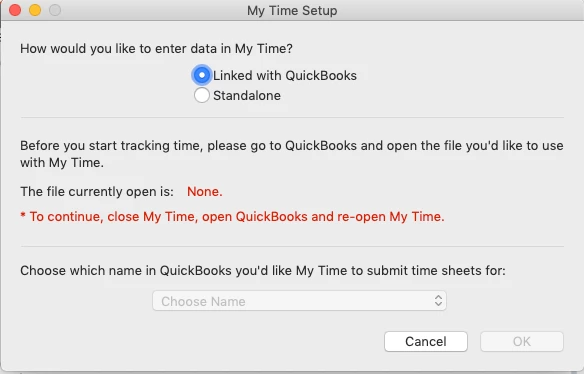
I am using QB for Mac 2016 and have been for several years without any issues.  I recently went into the Employees tab and went to the "Download My Time" button to see what that integration was all about.  I was able to download and install the program on my Mac running 10.14.6 (Mojave) and when it went to the setup screen it says It can not find the company file.
 

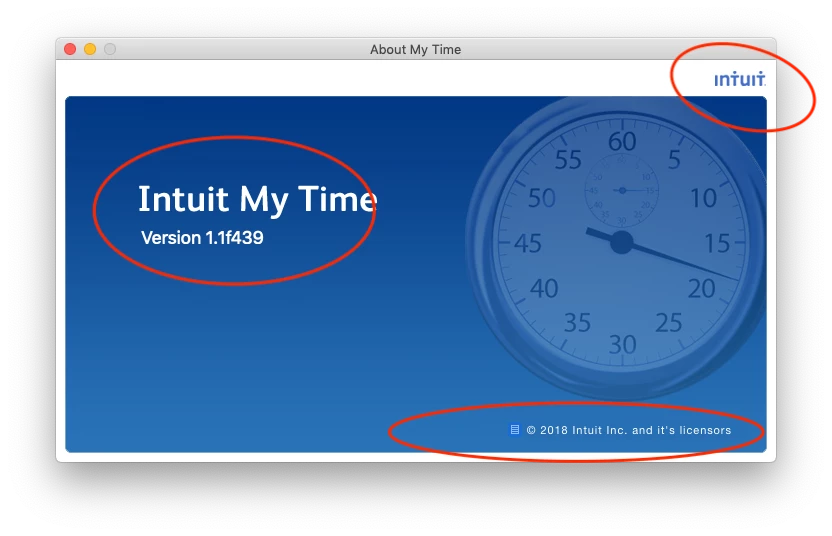
I reached out to support and they keep pointing me to mytime.com saying they need to help me and when I did mytime.com says they are a scheduling company not a time tracking company.  After reviwing the My Time App I see it is an Intuit product and apparently no one in support knows how to support it.
 

I am hoping someone here can shed some light on the situation.  I would like to get this working as I have been manually entering this in and would like to see how this program works.


FYI I have tried

  • rebooting the computer.
  • closing and opening my company file
  • closing my company file and opening a sample file (my Time doesn't see that file either)
  • verifying the company data file


Thanks for any help.

36 replies

Tori B
QuickBooks Team
March 3, 2021

Hey there, @Bgerber4


Thanks for reaching out to the Community for support. I'm happy to provide some insight into the My Time app.


Some users have found it helpful to uninstall the My time app version 1.1.f439. Once the My Time app has been uninstalled, you can download the new version of My Time which is 1.2.0.44. Grab the download of the new version here: Get your free My Time v1.2.x download. From there, you'll need to close QuickBooks and save a Backup. Once you've closed and saved a backup, Reopen QuickBooks and open My Time.


That should do it! Please let me know if you have further questions. I'm always around to lend a hand. You can reach out to the Community at any time. Take care! 


Bgerber4Author
March 3, 2021

thank you for the response.  I did try that before posting this and Unfortunately the V1.2 app is not supported on my version of mac os 10.14.6 (Mojave).

DivinaMercy_N
Moderator
October 17, 2022

I upgraded from 2020 to 2022 on July 28 because My Time was no longer syncing with QB. I discovered in August that there was a glitch in the programs that caused the time I submitted to appear on invoices with 2042 as the year, instead of 2022. QB has not resolved the issue.  I received an email on October 4, directing me to upgrade to 2023, which I did. My Time does not sync with 2023 so I spent an hour on the phone last week with support, deleting 2023 and going back to 2022.  However, during the call, we were unable to restore the connection between My Time and QB.  I can launch My Time from QB, but I cannot submit time from My Time to QB. I had to leave that chat for a meeting so tried to call again today.  I spoke to two people over a 20 minute period. The first said he would transfer me to a My Time expert.  The person he transferred me to had never heard of My Time, insisted it was not an Intuit product and said I would have to call My Time directly.


How can I get in touch with someone who can help?  


Hi there, @NBGlaw. I'm here to share some steps to help fix the connection issue between your My Time app and QuickBooks Desktop (QBDT).


I appreciate you sharing details of your concern. In addition to that, we can configure the setting of the integration to ensure the data from My Time will sync to QBDT. Here's how:


  1. In your QuickBooks Time account, click the QuickBooks drop-down.
  2. Next, choose Preferences and make any desired changes. Feel free to visit this link for detailed info: About QuickBooks Integration Preferences.
  3. Then, from the Employee Timesheets Should Show page, select the information you'd like your employees tracking time against: Customers/Jobs, Service Items, Billable yes/no, or Class.
  4. If you'd also like to import your Vendors as Employees in QuickBooks Time, simply click the Other Options, button. The data from QuickBooks are automatically imported.


For reference about the process, please check this article: Setup and use QuickBooks Desktop for Windows and QuickBooks Time integration. 


When finished, attempt to submit time again. If the issue persists, I recommend contacting the My Time support team again. If in case you're unable to be directly routed to the My Time representative, you can request the agent on the line to help transfer you. 


Please let me know how this goes. I'd love to know updates about this. Feel free to post here again if you have any other questions about the integration of My Time and QBDT. Have a great day ahead and take care.