
Get 50% OFF QuickBooks for 3 months*

Buy now
Switch to QuickBooks and 70% off for 3 Months
April 28, 2022
Solved

Credit Card Processing Fee

  • April 28, 2022
  • 5 replies
  • 41 views

Is there a way to automatically include the credit card processing fee to your invoices so that the customer gets charged? 

Best answer by Kurt_M

Hi there, @HBDesigns. I'll share some information about how you can add the credit card processing fee to your invoices in QuickBooks Online (QBO).


To add a credit card processing fee to your invoice, you can create a service item, then manually add it to your invoice. You can also consider a third-party app and integrate it with your QuickBooks. To begin, these are the steps:


  1. On the left navigational bar, go to Get paid and & pay tab.
  2. Choose Product & Service.
  3. Click on New then select Service.
  4. Enter the name of your service item. (Example CC Fee)
  5. Select the account you'd use to track the processing fees.
  6. Once done, click Save and Close.


Once done, add the credit card fee as an additional item on your invoice when you charge your customers with the processing fee.


In case you'd like to use a third-party app, here's where you can find one in QuickBooks Online:


  1. Sign in to your QuickBooks Online Company.
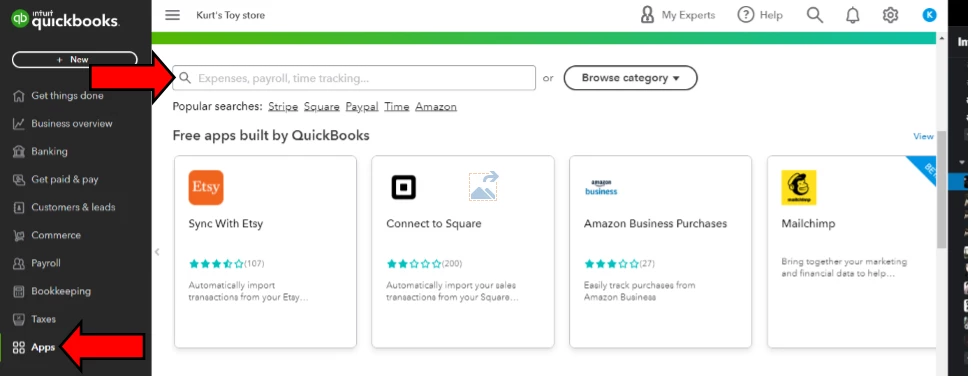
  2. Go to Apps tab.
  3. On the search bar, type the name of the that you'd like to integrate with your QBO account.
  4. Click the Search icon.


For visual reference, you can refer on the screenshot below.


Feel free to visit these handy articles for future reference:


Know that I'm just a click a way if you need further assistance with this. Have a nice day! 

5 replies

Fiat Lux - ASIA
Level 14
April 28, 2022

QB Payment doesn't have such feature at this time. You need a third-party connector to integrate with QB Payment and have the ability to add additional fees to eInvoicing and payment links. They claim that this feature is the only GAAP and VISA compliant solution on the market. The connector will perform a real-time BIN lookup to verify that the customer is paying via credit card and charge the applicable fee then reconcile invoice and fees accordingly.

Kurt_MQuickBooks TeamAnswer
QuickBooks Team
April 28, 2022

Hi there, @HBDesigns. I'll share some information about how you can add the credit card processing fee to your invoices in QuickBooks Online (QBO).


To add a credit card processing fee to your invoice, you can create a service item, then manually add it to your invoice. You can also consider a third-party app and integrate it with your QuickBooks. To begin, these are the steps:


  1. On the left navigational bar, go to Get paid and & pay tab.
  2. Choose Product & Service.
  3. Click on New then select Service.
  4. Enter the name of your service item. (Example CC Fee)
  5. Select the account you'd use to track the processing fees.
  6. Once done, click Save and Close.


Once done, add the credit card fee as an additional item on your invoice when you charge your customers with the processing fee.


In case you'd like to use a third-party app, here's where you can find one in QuickBooks Online:


  1. Sign in to your QuickBooks Online Company.
  2. Go to Apps tab.
  3. On the search bar, type the name of the that you'd like to integrate with your QBO account.
  4. Click the Search icon.


For visual reference, you can refer on the screenshot below.


Feel free to visit these handy articles for future reference:


Know that I'm just a click a way if you need further assistance with this. Have a nice day! 

July 30, 2022

What's the name of the app you referring to?

DivinaMercy_N
Moderator
September 12, 2022

@Koimarket  

Are you running a B2B or B2C company?


Thanks for posting here, @Koimarket. I'm here to provide information about the credit card processing fee in QuickBooks.


To clarify, are you referring to applying a credit card processing fee on your customer's invoices? If so, you have two ways to do this in QuickBooks. Follow along below to get this done right away.


The first option is to create a service item for the fee and include it on their invoices. For the detailed instructions, you can refer to the steps outlined by my colleague, KurtKyle_M. 


On the other hand, you can also look for a third-party connector app that can be integrated into the program to help add the processing fees. Please head to our QuickBooks Apps store to find one.


Then, to connect with our phone support team, you'll have to initiate a callback request or select the chat option. I also advised avoiding adding your contact information when posting here in the Community to prevent endangering your security and privacy. Below are the steps to reach out to them:


  1. Go to the Help menu and click the Search tab.
  2. Next, select the Contact us button.
  3. From there, enter a brief description of your concern (example: Charging a credit card fee in QuickBooks). Then, click Continue.
  4. Then, choose either Chat or Callback.


Once everything is fine, your next steps is to collect customer's payments and record it in QuickBooks. For guidance, feel free to check this article: Record invoice payments in QuickBooks Online.


Please get back here in this thread if you have any follow-ups about credit card fees. I'd also appreciate it if you can add updates on how the recommendation goes. I'm just around the corner and ready to help whenever needed. Have a good one and take care. 

Rainflurry
Level 11
April 28, 2022

@HBDesigns 


Many states outlaw that practice so confirm yours isn't one of them.  Charging your customer a credit card fee looks bad.  It's like a retail store charging a customer a "rent fee" because the customer chose to shop in-store instead of online. 

December 11, 2022

I don't care if it "looks bad", if we're getting charged 3% fees on these credit card invoices, I'm charging for the convenience. 3% on a $10,000 sale is $300. If they want to save money they can pay cash, if not, pony up.

February 16, 2024

Credit card fees and finance charges are tax deductible for businesses.

April 28, 2022

No Quickbooks does not offer this feature although there is a workaround.

July 30, 2022

What's the work around?

May 10, 2023

It is 2023. Is it available now, the automatic credit card fee?