Get 50% OFF QuickBooks for 3 months*

Buy now
Switch to QuickBooks and 70% off for 3 Months
MelissaC
November 4, 2022
Question

Beginning Balance Discrepancy

  • November 4, 2022
  • 2 replies
  • 0 views


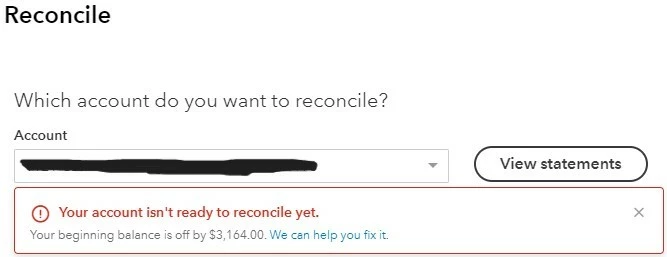
There have been some import and reconcile issues during the conversion from QB Desktop that I have been trying to fix as time permits, but I MUST have this account reconciled and Financial Reports created ASAP (I am running behind schedule due to a big event that took up much of my time but I need to have this turned in tonight), and the reconcile said my beginning balance was off. 

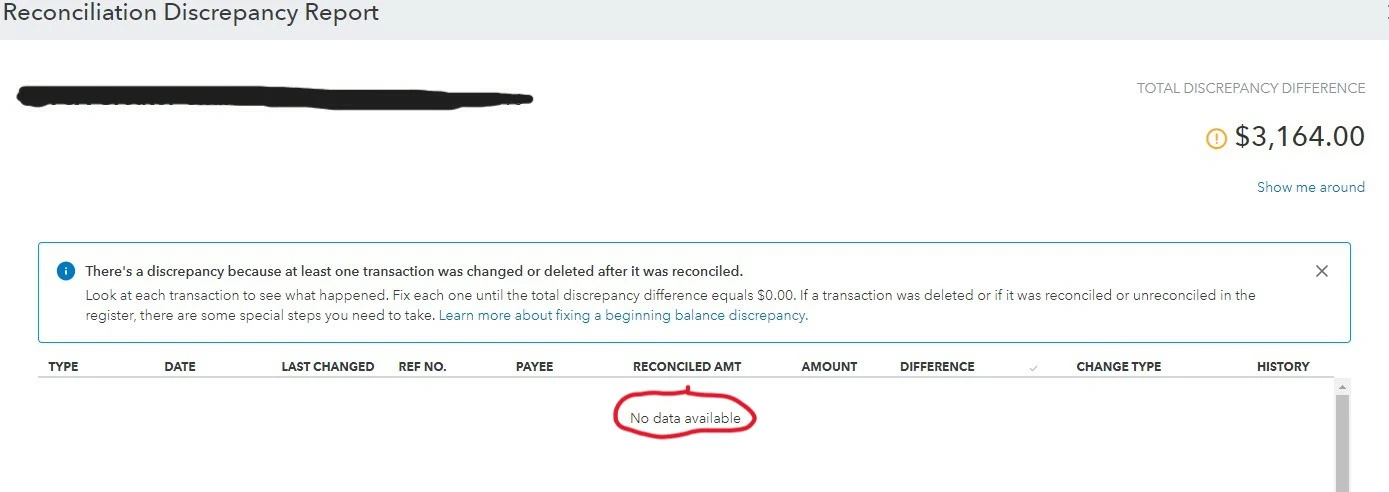
When I clicked "We can help you fix it" to view the discrepancy report it was due to some old transactions I reallocated to the proper accounts. These were not previously reconciled, so it threw off my beginning balance

I saw on a QBO YouTube tutorial to click on those transactions the discrepancy report showed and un-reconcile them, so I did. The -$1,672 discrepancy changed to +$3,164 discrepancy with no data showing in the discrepancy report.


How can I adjust the beginning balance without needing to re-reconcile numerous months or even years?

Thank you so much!


2 replies

Nicole_N
QuickBooks Team
November 4, 2022

Thank you for providing details about your concern, @MelissaC.

It's good to hear that you've done all the possible steps to fix your issue. Allow me to provide some clarifications and get you pointed in the right direction to help fix this opening balance concern. 

A cache-related issue can cause discrepancies. I recommend clearing your browser's cache and cookies. Your browser stores these files to speed up websites. However, it can cause some problems in QuickBooks Online (QBO) when they become outdated. You can rule this out by using an incognito window:
 

Here are the shortcut keys:


  • Google Chrome: Ctrl + Shift + N
  • Firefox: Ctrl + Shift + P
  • Safari (new versions): Command + Shift + N

If the issue persists, I'd recommend contacting our QuickBooks Online Support team. We can have a screen-sharing session with them to help you review and find out what transactions caused this issue. This way, they'll be able to provide you with the best resolution.
 

Here’s how you can reach out to them:
 

1. Click the Help (?) icon at the top.
2. Select Contact Us.
3. Enter your issue or question, then select Continue.
4. Review and Select from the following: Ask the community, Start a live chat, or Call us.
 

Please consider checking our available hours when contacting them to ensure we address your concern on time.

You can also learn more about editing an incorrect opening balance through this link.

Feel free to leave a comment down below by clicking the REPLY button if you have any other queries about the beginning balance discrepancy. I'd be around to help. Take care. 

MelissaC
MelissaCAuthor
November 9, 2022

Thank you for your response. I had already read this as a potential solution before posting my question and tried it without success.

I was finally able to resolve the issue through trial and error.


July 20, 2023

Fixing a beginning balance is a nightmare!  Spent time on phone with intuit to no avail!!!!!

July 20, 2023

Sat on phone with intuit rep although I learned a few things still have not been able to fix beginning balance so frustrating.  We too went from desk top to on line and it is a nightmare


QuickBooks Team
July 20, 2023

This is not the impression we want you to experience when fixing your beginning balance.


I appreciate you for contacting our support agent to better isolate the issue. I'd like to provide some clarifications and get you pointed in the right direction to help fix this beginning balance concern.


Don't worry if you're reconciling an account for the first time and the beginning balance is off. Most beginning balance issues are caused by an incorrect opening balance since this is the account's starting point you set when you first created it in the program. Correcting the opening balance should also fix your beginning balance issues.


Here's what to review so you can start reconciling your account for the first time. If the account was already reconciled, here’s a different list of things to review. Then, review the opening balance for the account you're reconciling. Sometimes, the opening balance doesn't include transactions that were still pending when you created the account. The opening balance is the balance of your bank account on the day you choose to start tracking transactions.


If you recently entered older transactions dated before your opening balance, here's how to reconcile them. Then continue with the instructions below:


  1. Go to Bookkeeping or Accounting, then select Chart of accounts.
  2. Find the account on the list.
  3. Click View register.
  4. Search for the opening balance entry. It should have "Opening Balance Equity" in the Account column.
  5. Take note of the date and balance.


If you forgot to enter an opening balance, here's how to manually enter an opening balance later. Then, follow the next steps in this article until the issue is resolved: Fix issues the first time you reconcile an account in QuickBooks Online. If the same thing happens and you've followed everything in our reconciliation guide but still have questions, I'd


For tips and other resources, I recommend visiting our website for future reference: QBO self-help articles.


Please post again or leave a comment in this thread if you have additional questions about opening balances or anything else. I'm always ready to lend a hand. Keep safe.

August 16, 2023

My question is how to I change the beginning bank statement balance on my reconciliation without changing the ledger balance.  The bank statement beginning balance does not match the bank statement ending balance from previous reconciliation.